Our Community is in read-only mode until April 8th, learn more here. You can still search existing threads or get help via Dropbox Support, the Dropbox Help Center, or Learn.
Forum Discussion

Omri1984
1 year agoExplorer | Level 4
Old dropbox and new dropbox API
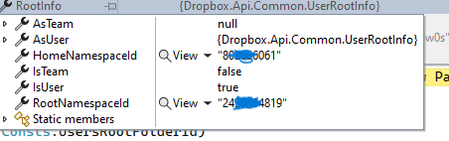
Hi , i know that dropbox made a lot of changes in the last few years. i want to understand something there where a time that i needed to check the account , and check if the account is team in o...
- 1 year ago
Omri1984 The combination of the two features allows an app to distinguish between all three team configurations. Please refer to this post for information on that. The recommendation is use these feature values to programmatically determine how to handle any particular team, as described throughout that post.


Здравко
1 year agoLegendary | Level 20
Omri1984 wrote:...
regrading the string of request body , it is a string that i am serializing it to an object
...
Yes, you definitely have no any idea what JSON means. You CANNOT serialize string to object!!! You may rather serialize object to string and that's the idea of JSON and that's what it's used for actually. Learn more about JSON - it comes from javascript, but it's the same in all languages.
An easy thing, you can do, is to remove the serialization you have already done by hands actually.

Omri1984
1 year agoExplorer | Level 4
Здравко What i meant is that i am serialize it to a json object
This is the response after i removed the serialization
"Error in call to API function \"users/features/get_values\": request body: could not decode input as JSON"
- Omri19841 year agoExplorer | Level 4
Здравко this is all i am doing
var client = new HttpClient()
{
BaseAddress = new Uri(" https://api.dropboxapi.com"),
DefaultRequestHeaders =
{}
};client.DefaultRequestHeaders.Authorization = new AuthenticationHeaderValue("Bearer", accessToken);
client.DefaultRequestHeaders.AcceptEncoding.Add(new StringWithQualityHeaderValue("UTF8"));
var requestBody = "{\"features\":[{\".tag\":\"\"other\"}]}";
var content = new StringContent(requestBody, Encoding.UTF8, "application/json");var res = await httpClient.PostAsync("/2/users/features/get_values",content);
- Здравко1 year agoLegendary | Level 20
Omri1984, I don't know what you have done, but the above is definitely NOT the code you have used; it wouldn't even compile. There are errors inside - visible on first look on!
You can do something else though. Try to send request to a test site where you can see what actually you're sending (just type "test post requests" or something like in Google and select a site you prefer; not to advertise some). Once you have everything configured properly, just set the Dropbox endpoint back. Don't ask for every syntax error or similar you made. If needed pass a refresh course.
About Dropbox API Support and Feedback

Get help with the Dropbox API from fellow developers and experts.
The Dropbox Community team is active from Monday to Friday. We try to respond to you as soon as we can, usually within 2 hours.
If you need more help you can view your support options (expected response time for an email or ticket is 24 hours), or contact us on X, Facebook or Instagram.
For more info on available support options for your Dropbox plan, see this article.
If you found the answer to your question in this Community thread, please 'like' the post to say thanks and to let us know it was useful!


