Your workflow is unique 👨💻 - tell us how you use Dropbox here.
Forum Discussion

Ivan_
3 years agoHelpful | Level 6
Resfresh Token using c# code for Oauth2.0
Hi,
I need assisstance in Oauth2.0 usage.
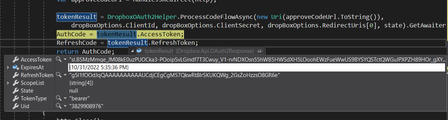
After I generated token I have following properties
The moment that I do not understand is how to refresh token. Here I got ExpiredAt property t...

Ivan_
3 years agoHelpful | Level 6
ЗдравкоI am sorry for being not clear in my questions as you said the following : "You are mixing different things! In previous discussion the topic was the code, not the token! (take care, in your code you are still mixing the names - might be that's why you got in confusion)"
currently I successfully get token and the code.
Now I need to clarify this moment about refreshing the token. As you told in first reply, DropBox does everything without me. So, for uploading files, how I need to constrct the client object in authentication flow without PKCE ?

Здравко
3 years agoLegendary | Level 20
Hmm... 🤔 I don't know what more to say.
Ok, let's take a look how the things happen on lower (API) level, when you need to do everything yourself. Take a look on this thread. Yes, the client object can do everything mentioned there for you, but it needs the same info (the one you would need)! What info is needed for performing refresh, as described in referred thread? 🙂 Take a look back in your code and keep in mind that the same algorithm is 'embedded' there.
Hope this sheds some light.
About Dropbox API Support and Feedback

Get help with the Dropbox API from fellow developers and experts.
The Dropbox Community team is active from Monday to Friday. We try to respond to you as soon as we can, usually within 2 hours.
If you need more help you can view your support options (expected response time for an email or ticket is 24 hours), or contact us on X, Facebook or Instagram.
For more info on available support options for your Dropbox plan, see this article.
If you found the answer to your question in this Community thread, please 'like' the post to say thanks and to let us know it was useful!


