Our Community is in read-only mode until April 8th, learn more here. You can still search existing threads or get help via Dropbox Support, the Dropbox Help Center, or Learn.
Forum Discussion

wen_hsiao
6 years agoExplorer | Level 4
The /upload behavior has been changed ?
Recently, we received many feedbacks from our product users that the filename (use /upload) has become garbled. We found the "path" decode behavior might be changed by dropbox server.
For Example:...
- 6 years ago
There was a change on our server stack that affected how we handled HTTP headers without proper encoding. That resulted in malformed file paths/names. We've reverted that change, so that should be working again, but please make sure your headers get encoded properly.
MReizinho
6 years agoExplorer | Level 4
Dear @Greg K. ,
Thank you very much for your prompt reply. I do believe that the code above is now working. But there are so many non-ASCII characters that perhaps some just fall into the loop. That would explain why the behaviour has changed from last week to ALL folders/files to just some.
Unfortunately, I'm not a developer like @wen_hsiao and don't know how to give you the code in API "language". What I can give you is a path and filename of some of my today errors. Perhaps you can run it and see if it works on your side:
\CONCURSOS PARTICULARES\2019\19.189 - Colombo Mobiliário\02 - ORCAMENTO\PROPOSTA ENVIADA\QUANTIDADES - COLOMBO (2019-07-16).xlsx
It was converted to:
\CONCURSOS PARTICULARES\2019\19.189 - Colombo Mobiliário\02 - ORCAMENTO\PROPOSTA ENVIADA\QUANTIDADES - COLOMBO (2019-07-16).xlsx
Another example:
\CONCURSOS PARTICULARES\2019\19.203 - Colombo Escritorios\06 - PROJECTOS\2_25-09-2019 - Pojeto segurança\
It was converted to:
\CONCURSOS PARTICULARES\2019\19.203 - Colombo Escritorios\06 - PROJECTOS\2_25-09-2019 - Pojeto segurança\
Hope it's useful. Please let me know if I can help in any way.
Thank you.

Greg-DB Dropbox Community Moderator
6 years agoDropbox Community ModeratorMReizinho Thanks for the sample! I just gave those two a try though and they both uploaded properly for me just now, even without applying the proper encoding:
curl -X POST https://content.dropboxapi.com/2/files/upload \
    --header "Authorization: Bearer <ACCESS_TOKEN>" \
    --header "Dropbox-API-Arg: {\"path\": \"/CONCURSOS PARTICULARES/2019/19.189 - Colombo Mobiliário/02 - ORCAMENTO/PROPOSTA ENVIADA/QUANTIDADES - COLOMBO (2019-07-16).xlsx\",\"mode\": \"add\",\"autorename\": false,\"mute\": false}" \
    --header "Content-Type: application/octet-stream" \
    --data-binary "some data"
That returns the following with the expected value:
{"name": "QUANTIDADES - COLOMBO (2019-07-16).xlsx", "path_lower": "/concursos particulares/2019/19.189 - colombo mobili\u00e1rio/02 - orcamento/proposta enviada/quantidades - colombo (2019-07-16).xlsx", "path_display": "/CONCURSOS PARTICULARES/2019/19.189 - Colombo Mobili\u00e1rio/02 - ORCAMENTO/PROPOSTA ENVIADA/QUANTIDADES - COLOMBO (2019-07-16).xlsx", "id": "id:25N5ksooX-sAAAAAAAOCZA", "client_modified": "2019-10-14T18:11:02Z", "server_modified": "2019-10-14T18:11:03Z", "rev": "594e2ca6a7afd021eccc7", "size": 9, "is_downloadable": true, "content_hash": "149078105941cd1edda0ec5a568fc1d178661b6441831c3647d88f41f7dfc886"}
And that prints out properly as:
{
  "name": "QUANTIDADES - COLOMBO (2019-07-16).xlsx",
  "path_lower": "/concursos particulares/2019/19.189 - colombo mobiliário/02 - orcamento/proposta enviada/quantidades - colombo (2019-07-16).xlsx",
  "path_display": "/CONCURSOS PARTICULARES/2019/19.189 - Colombo Mobiliário/02 - ORCAMENTO/PROPOSTA ENVIADA/QUANTIDADES - COLOMBO (2019-07-16).xlsx",
  "id": "id:25N5ksooX-sAAAAAAAOCZA",
  "client_modified": "2019-10-14T18:11:02Z",
  "server_modified": "2019-10-14T18:11:03Z",
  "rev": "594e2ca6a7afd021eccc7",
  "size": 9,
  "is_downloadable": true,
  "content_hash": "149078105941cd1edda0ec5a568fc1d178661b6441831c3647d88f41f7dfc886"
}
And here's a screenshot from the Dropbox website of the correct character:
The same worked for the second sample:
curl -X POST https://content.dropboxapi.com/2/files/upload \
    --header "Authorization: Bearer <ACCESS_TOKEN>" \
    --header "Dropbox-API-Arg: {\"path\": \"/CONCURSOS PARTICULARES/2019/19.203 - Colombo Escritorios/06 - PROJECTOS/2_25-09-2019 - Pojeto segurança\",\"mode\": \"add\",\"autorename\": false,\"mute\": false}" \
    --header "Content-Type: application/octet-stream" \
    --data-binary "some data"
That returns the following with the expected value:
{"name": "2_25-09-2019 - Pojeto seguran\u00e7a", "path_lower": "/concursos particulares/2019/19.203 - colombo escritorios/06 - projectos/2_25-09-2019 - pojeto seguran\u00e7a", "path_display": "/CONCURSOS PARTICULARES/2019/19.203 - Colombo Escritorios/06 - PROJECTOS/2_25-09-2019 - Pojeto seguran\u00e7a", "id": "id:25N5ksooX-sAAAAAAAOCag", "client_modified": "2019-10-14T18:12:24Z", "server_modified": "2019-10-14T18:12:24Z", "rev": "594e2cf477ccf021eccc7", "size": 9, "is_downloadable": true, "content_hash": "149078105941cd1edda0ec5a568fc1d178661b6441831c3647d88f41f7dfc886"}
And that prints out properly as:
{
  "name": "2_25-09-2019 - Pojeto segurança",
  "path_lower": "/concursos particulares/2019/19.203 - colombo escritorios/06 - projectos/2_25-09-2019 - pojeto segurança",
  "path_display": "/CONCURSOS PARTICULARES/2019/19.203 - Colombo Escritorios/06 - PROJECTOS/2_25-09-2019 - Pojeto segurança",
  "id": "id:25N5ksooX-sAAAAAAAOCag",
  "client_modified": "2019-10-14T18:12:24Z",
  "server_modified": "2019-10-14T18:12:24Z",
  "rev": "594e2cf477ccf021eccc7",
  "size": 9,
  "is_downloadable": true,
  "content_hash": "149078105941cd1edda0ec5a568fc1d178661b6441831c3647d88f41f7dfc886"
}
And here's a screenshot from the Dropbox website of the correct character:
Can you double check that you're still seeing the issue on new uploads being sent now? If so, please work with the developer of the app to reproduce the issue and share steps to reproduce it with us. Thanks!
- MReizinho6 years agoExplorer | Level 4
I can confirm that those two folders and more with similar names were not correctly cretaed/uploaded today at aproximately 18:00 GMT
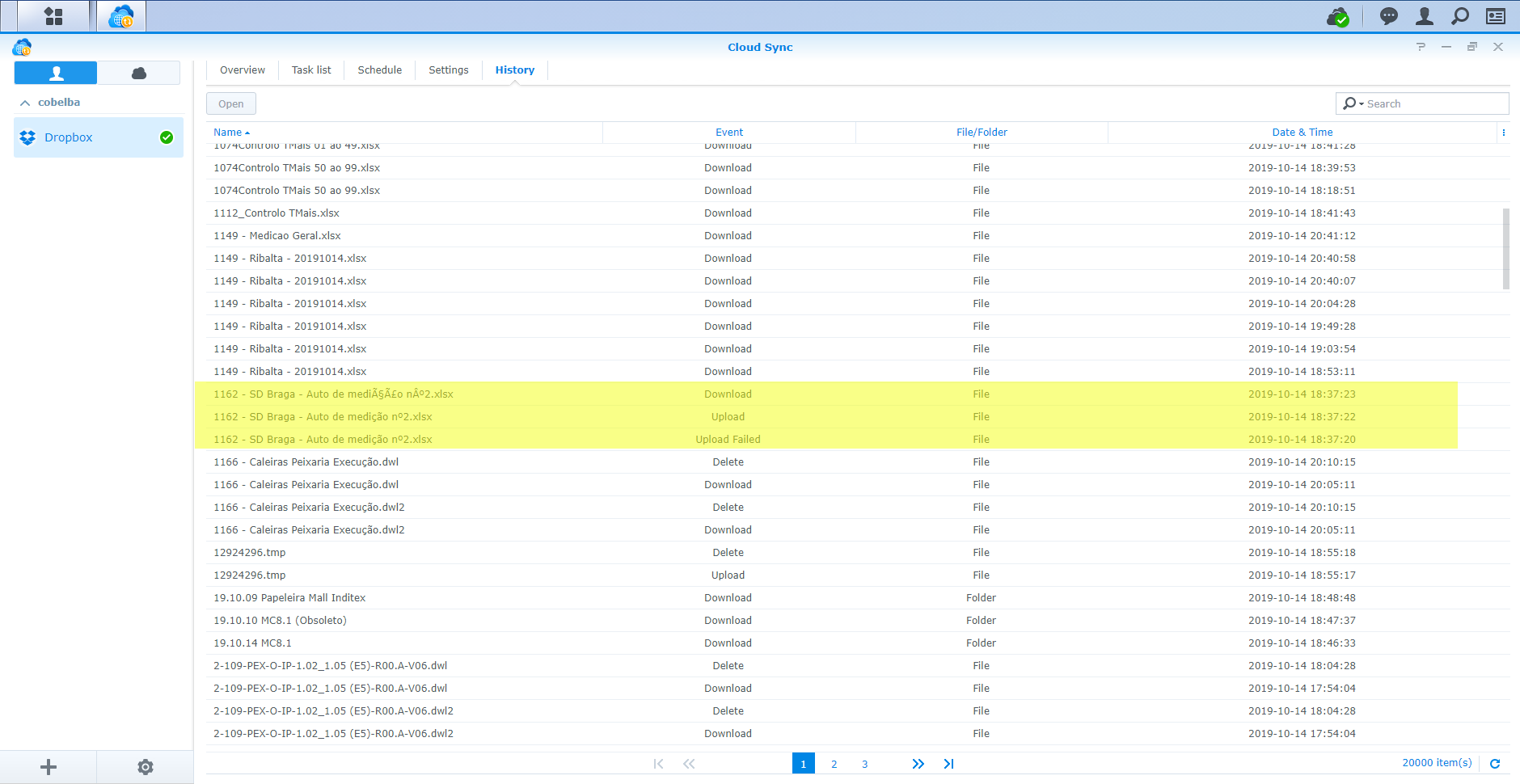
Here is a screenshot with the log:
The highlighted file, "1162 - SD Braga - Auto de medição nº2.xlsx" fails the upload to folder "/REDE/COBELBA/DEP OBRAS/OBRAS/1162 - SPORTS DIRECT BRAGA/08 - AUTOS DE MEDIÇÃO"
Instead new folder is created in the Dropbox cloud named "/REDE/COBELBA/DEP OBRAS/OBRAS/1162 - SPORTS DIRECT BRAGA/08 - AUTOS DE MEDIÇÃO" (not shown in the log)
The file is then uploaded to that folder. But since the file also has non-ASCII characters, the filename is also changed to "1162 - SD Braga - Auto de medição nº2.xlsx"
The client, noticing a new folder and file on the Dropbox cloud, then proceeds downloading both. Thence the tree highlighted log entries: upload failed, upload and download.
So, for what you found out, it seems that your API is processing the non-ASCII characters correctly again like it was past week. Not parsing it with the same code as it was, but right nevertheless.
The only explanation I can think of is how the client is sending out the information to be parsed. It worked before but it does not work anymore, after the changes and roll back. Like @wen_hsiao has pointed out, I've been having this system running since 2016 without a glitch. So something has certainly changed between the client and the processed response from the API callout
I'm only hopping that when @wen_hsiao sees these posts that he can follow up and come up with an updated client.
- wen_hsiao6 years agoExplorer | Level 4
Thanks for your help, it works good now.
The issue caused the Cloud Sync upload failed.
From your screenshot highlights, the second time file upload retry success, so I think the issue was solved.
But to be safety, you can contact Synology support to double confirm.
- MReizinho6 years agoExplorer | Level 4
Dear @wen_hsiao,
It's not working. Please read carefully my explanation on the previous post. The second time file upload is successful because it's uploading to the wrong named folder. That is also why you have the download after of the wrong file, because Cloud Sync detects a new folder and file on the Dropbox cloud.
I already opened the ticket in Synology support, it's ticket number #2380080 from October 7 if you want to check it out. But it has been poorly developped by the support staff.
About Dropbox API Support and Feedback

Get help with the Dropbox API from fellow developers and experts.
The Dropbox Community team is active from Monday to Friday. We try to respond to you as soon as we can, usually within 2 hours.
If you need more help you can view your support options (expected response time for an email or ticket is 24 hours), or contact us on X, Facebook or Instagram.
For more info on available support options for your Dropbox plan, see this article.
If you found the answer to your question in this Community thread, please 'like' the post to say thanks and to let us know it was useful!


