2025 sparked some incredible conversations across our community 👩💻. Discover the highlights and see what’s ahead in 2026.
Forum Discussion

apo1397
5 years agoExplorer | Level 4
Unable to get events for shared files
I have an application which uses the API files/list_folder/longpoll to fetch any changes to the account and then I use files/list_folder/continue with the cursor ( DbxClientV2.files().listFolderCont...

Greg-DB Dropbox Community Moderator
5 years agoDropbox Community ModeratorSo is there a way to get the cursor for "shared files" ?
No, unfortunately there isn't a way to get a cursor/longpoll for shared files from another account like that exactly, but I'll pass this along as a feature request. I can't promise if or when that might be implemented though. It's only possible to monitor changes actually in the connected account.
According to this article by Dropbox https://dropbox.tech/developers/manage-team-sharing-in-your-dropbox-app
It says to
1. Create a new app from your App console
2. Select ‘Dropbox Business API’
3. Select ‘Team member management’
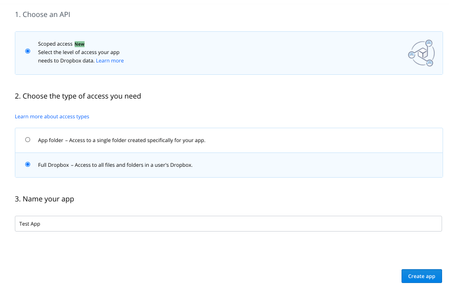
That post is old and out of date now. You no longer need to register a Dropbox Business API app with a specific Business permission, such as "Team member management" or "Team member file access" like that. You should instead just register a "scoped" app with the "Full Dropbox" access type, which can be used to access both user and team (Business) functionality, by enabling whichever scopes you need.
For example, to connect to a team and use the "Member file access" feature to access the files of any member of the team, you would enable the "team_data.member" scope.
A workaround would be force 'unhiding' of target option (Team member management).
Do not modify the Dropbox web site. Any result of doing so would not be officially supported. Please use the "scoped" app functionality as described above to enable access to whatever features you need.
About Dropbox API Support & Feedback

Find help with the Dropbox API from other developers.
The Dropbox Community team is active from Monday to Friday. We try to respond to you as soon as we can, usually within 2 hours.
If you need more help you can view your support options (expected response time for an email or ticket is 24 hours), or contact us on X, Facebook or Instagram.
For more info on available support options for your Dropbox plan, see this article.
If you found the answer to your question in this Community thread, please 'like' the post to say thanks and to let us know it was useful!


