Our Community is in read-only mode until April 8th, learn more here. You can still search existing threads or get help via Dropbox Support, the Dropbox Help Center, or Learn.
Forum Discussion

Oleks
3 years agoExplorer | Level 4
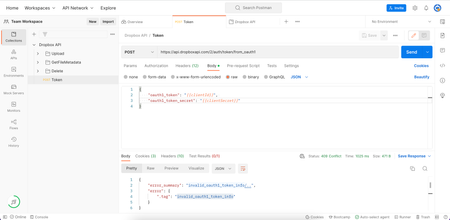
Unable to update access token in postman.
- 3 years ago
I have a post here showing the basic flow of getting and using a refresh token to retrieve new short-lived access tokens on demand which may be helpful.

Greg-DB Dropbox Community Moderator
3 years agoDropbox Community ModeratorI have a post here showing the basic flow of getting and using a refresh token to retrieve new short-lived access tokens on demand which may be helpful.

Oleks
3 years agoExplorer | Level 4
I did it, works perfectly fine. However, looking for a way not to use the terminal. I would love to automate that process. Here is my code:
const encodedToken = Buffer.from("<client_key>:<client_secret>").toString('base64');
pm.sendRequest({
method: 'POST',
header: {
'Content-Type': 'application/x-www-form-urlencoded',
'Authorization': `Basic ${encodedToken}`
},
}, function (err, res) {
console.log(res)
return pm.environment.set("OAuth_Token", res.json().access_token);
});
- Greg-DB3 years ago
The sample in my post happens to use curl on the command line, but exactly what network client you use is up to you, depending on your use case, environment, etc.
I can't offer help with the third party network clients themselves, but looking at that code, it seems you're missing the rest of the parameters for the /oauth2/token call, such 'grant_type', and 'refresh_token' or 'code', as applicable. You'll need to refer to the documentation and examples to translate that for your network client.
About Dropbox API Support and Feedback

Get help with the Dropbox API from fellow developers and experts.
The Dropbox Community team is active from Monday to Friday. We try to respond to you as soon as we can, usually within 2 hours.
If you need more help you can view your support options (expected response time for an email or ticket is 24 hours), or contact us on X, Facebook or Instagram.
For more info on available support options for your Dropbox plan, see this article.
If you found the answer to your question in this Community thread, please 'like' the post to say thanks and to let us know it was useful!


