Your workflow is unique 👨💻 - tell us how you use Dropbox here.
Forum Discussion

iosenqa
6 years agoExplorer | Level 4
Unable to upload the file via API
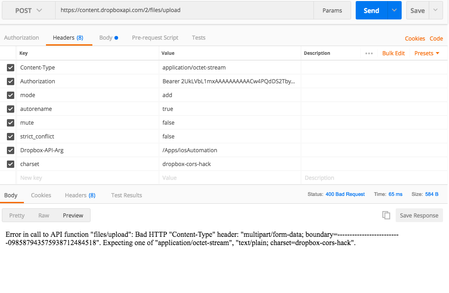
Unable to upload the files using API , see the Poster screenshot for paramaters and Body. Any help would be really appreciated. Seeing below error : Error in call to API function "files/upload": B...
- 6 years ago
The Dropbox API /upload endpoint does require that the HTTPS request use one of the Content-Type values listed in the error message you shared.
I see that you are attempting to set a valid Content-Type value, but the actual request is using a different value ("multipart..."). It seems that the HTTPS client you're using is overriding the value you're attempting to set.
You should refer to the documentation for the client you're using to determine how to disable that behavior. For instance, you likely will want to use the "binary" option seen in the screenshot of the "Body" tab you shared.
Also, note that some of your other headers look incorrect as well. The Dropbox API parameters should be sent as JSON in a single "Dropbox-API-Arg" header, not in separate "mode", "autorename", etc. headers like you have. You can find more information and an example in the documentation.

Greg-DB Dropbox Community Moderator
6 years agoDropbox Community ModeratorThe Dropbox API /upload endpoint does require that the HTTPS request use one of the Content-Type values listed in the error message you shared.
I see that you are attempting to set a valid Content-Type value, but the actual request is using a different value ("multipart..."). It seems that the HTTPS client you're using is overriding the value you're attempting to set.
You should refer to the documentation for the client you're using to determine how to disable that behavior. For instance, you likely will want to use the "binary" option seen in the screenshot of the "Body" tab you shared.
Also, note that some of your other headers look incorrect as well. The Dropbox API parameters should be sent as JSON in a single "Dropbox-API-Arg" header, not in separate "mode", "autorename", etc. headers like you have. You can find more information and an example in the documentation.
iosenqa
6 years agoExplorer | Level 4
after following the suggestions you mentioned, It works great. Now trying out retrieve features of the files.
About Dropbox API Support and Feedback

Get help with the Dropbox API from fellow developers and experts.
The Dropbox Community team is active from Monday to Friday. We try to respond to you as soon as we can, usually within 2 hours.
If you need more help you can view your support options (expected response time for an email or ticket is 24 hours), or contact us on X, Facebook or Instagram.
For more info on available support options for your Dropbox plan, see this article.
If you found the answer to your question in this Community thread, please 'like' the post to say thanks and to let us know it was useful!


