Your workflow is unique 👨💻 - tell us how you use Dropbox here.
Forum Discussion

GameOnCloud
4 years agoNew member | Level 2
Upload-session/finish-batch merges all the files appended in that upload session
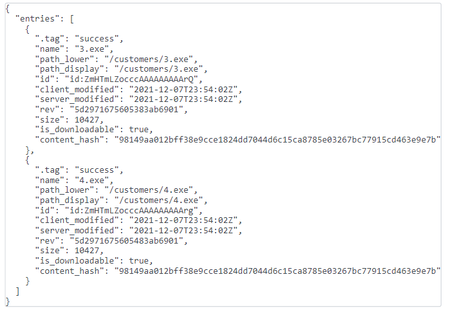
After creating a new upload session ID using upload-session/start (Sequential), I used upload-session/append to add 2 more files (5120 bytes each) in it and finally called upload-session/finish-batch...

Здравко
4 years agoLegendary | Level 20
Hi GameOnCloud,
🙂 Seems, you have misunderstood the meaning of upload session. Let's take a look on upload process at all.
The simplest upload can be performed using 2/files/upload. Main drawback here is limitation, set to any single HTTP transaction to the Dropbox server, be up to 150MB size. Which mean you can't upload file bigger than 150MB using the call mentioned (or it's not guaranteed at least). Since all files you have mentioned are much smaller, you can use this simplest call without issues.
To upload bigger files, you have to split files content to parts no bigger than 150MB and send the parts to the Dropbox server. You can achieve this using upload session for every one file. Using 2/files/upload_session/start, you can start such a session for single big file upload (according to described by you, you have tried use it for more than 1 file simultaneously 😯). The parts of file split before can be added using 2/files/upload_session/append_v2. Once all file parts upload finished, you can finish the session and put the content uploaded within Dropbox file system as a named file using 2/files/upload_session/finish. 😉 In such a way single file upload can get completed using multiple transactions.
The final upload step is time consuming (not only related to upload time) since Dropbox file system have to be locked for new file addition (or any other change). When you have many files, this last step can be optimized by grouping multiple upload sessions in batch and finish their addition to the Dropbox with a single locking using 2/files/upload_session/finish_batch_v2. Single file for every one session passed!
Hope this clarifies matter and you can select a way matching your needs and organize your code better.
About Dropbox API Support and Feedback

Get help with the Dropbox API from fellow developers and experts.
The Dropbox Community team is active from Monday to Friday. We try to respond to you as soon as we can, usually within 2 hours.
If you need more help you can view your support options (expected response time for an email or ticket is 24 hours), or contact us on X, Facebook or Instagram.
For more info on available support options for your Dropbox plan, see this article.
If you found the answer to your question in this Community thread, please 'like' the post to say thanks and to let us know it was useful!


