Your workflow is unique 👨💻 - tell us how you use Dropbox here.
Forum Discussion

GevorgMel
5 years agoHelpful | Level 5
Dropbox .NET SDK (Refresh Token)
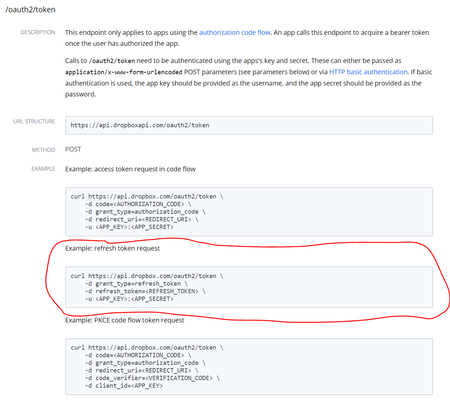
Hi, I found changes in OAuth2 for API, so the authorization could be done with offline access, ascuirung both Access and Refresh tokens. This part is OK, with ProcessCodeFlow method in SDK. But co...
- 5 years ago
GevorgMel This functionality should now be available on DropboxTeamClient as of release v5.1.0. Please update and give that a try and let us know if you run in to any issues. Thanks!

OFV
5 years agoExplorer | Level 3
Greg, I still can't get it to work for a duration longer than the access token's validity.
(this part works:)
I ask for user authentication (only once) using the DropboxOAuth2Helper.GetAuthorizeUri with OAuthResponseType.Code and TokenAccessType.Offline.
The resulting POST http request gives me a code and DropboxOAuth2Helper.ProcessCodeFlowAsync provides me an access token and refresh token based on that code. The tokens are persisted in the DB and to be used for longer periods (months) without the user needing to re-login
(this part fails:)
The DropboxClient is instantiated with the Access_token and refresh token retrieved in the first part.
Using the DropboxClient.Files.ListFolderAsync it works for a while (a few hours after initial usser auth), but the next day it fails with "Dropbox.Api.AuthException: expired_access_token/"
It concerns an MVC webapp, and the dropboxclient is newly instantiated on every use.
I thought the DropboxClient would do "it's thing" using the initial access and refresh tokens.
(I am using the Official Dropbox .Net v2 SDK v5.5.0 Nuget package)

Greg-DB Dropbox Community Moderator
5 years agoDropbox Community ModeratorOFV When your "DropboxClient is instantiated with the Access_token and refresh token", are you also supplying the app key and secret? Those are required to perform the refresh. Make sure you're doing so, like in the example here.
- OFV5 years agoExplorer | Level 3
Yes I am using the appid and appsecret. I'm using the constructor as in the example, with the addition of the access token expiry date:
CurrentClient = new DropboxClient(accessToken, refreshToken, expiryDate, appKey, appSecret, config);
The access token returned starts with sl. and is 139 bytes long. The refresh token starts with 1y_ and is 64 bytes long.
Fetching data from the api works up to the expiry date, which was set to 2020-12-09 17:37:48. After that fetching data takes a few minutes (!!) before throwing the exception.
- OFV5 years agoExplorer | Level 3
I found 2 possible culprits:
- My code wasn't properly "asynced", which I know I have to avoid: eg: ListFolderAsync(xxx).result(). I recursively converted all methods to async (which was a long way up), and got rid of the .result calls. (I know these calls result in timeouts when exceptions occur inside)
- In the Dropbox App console for our app, under OAuth section: The "access token expiration" was still set to "no expiration", which I now set to "short lived".
With these 2 updates, it now seems to run (with original accesss token still from yesterday).
 GevorgMel5 years agoHelpful | Level 5Try to use a constructor with refreshtoken, appkey, appSecret. It works for me
- OFV5 years agoExplorer | Level 3
Gevorg,
Thanks for the help, but it wroks for me now, even with the extra params in the constructor.
My issue was due to the 2 culprits I described in my previous post.
 abeyaz5 years agoExplorer | Level 4
I am saving only the refresh token to database and using dropboxClient with refresh token, appkey, appsecret constructor. Do I need to save the access token also and use accessToken, refreshToken, appKey, appSecret, config constructor instead. What is the difference between them?
- GevorgMel5 years agoHelpful | Level 5No, there is no need to save access token, if you’re using appId, appSecret and refresh token it is enough. Provided access token will be ignored anyway.
- Greg-DB5 years ago
abeyaz GevorgMel is correct, you do not need to supply the access token as well. That is optional, since only the refresh token, app key, and app secret are actually needed to perform the refresh to get a new short-lived access token.
- abeyaz5 years agoExplorer | Level 4
Thank you. Documentation says refresh tokens are long-lived. How long exactly? Say it is 6 months, does it mean we need to involve client again to get a new authentication code and then a new refresh token ?
About Discuss Dropbox Developer and API

Explore Dropbox Developer & API discussions with developers like you.
The Dropbox Community team is active from Monday to Friday. We try to respond to you as soon as we can, usually within 2 hours.
If you need more help you can view your support options (expected response time for an email or ticket is 24 hours), or contact us on X, Facebook or Instagram.
For more info on available support options for your Dropbox plan, see this article.
If you found the answer to your question in this Community thread, please 'like' the post to say thanks and to let us know it was useful!


