Your workflow is unique 👨💻 - tell us how you use Dropbox here.
Forum Discussion

pankajetal
2 years agoExplorer | Level 3
Submit button greyed out in developers
I'm not able to submit after making the changes in permission, to test API, as submit seems to be greyed out.
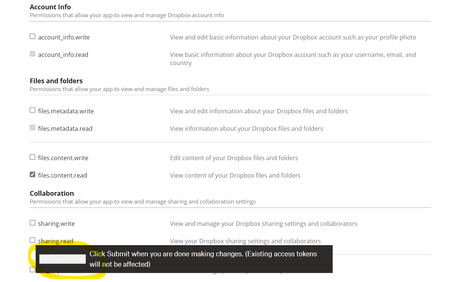
- 2 years ago
Thanks. Can you let me know which web browser you're using, and the version number of that web browser?
I just tried this myself and I was able to apply changes by clicking the button while it's greyed out, so we'll need to try to reproduce the particular issue you're seeing.

Greg-DB Dropbox Community Moderator
2 years agoDropbox Community ModeratorThanks. Can you let me know which web browser you're using, and the version number of that web browser?
I just tried this myself and I was able to apply changes by clicking the button while it's greyed out, so we'll need to try to reproduce the particular issue you're seeing.

ozbcoz
2 years agoExplorer | Level 3
I have now tried Firefox, Chrome and Edge - all updated as updates come out.
As I said in my earlier reply on this thread the Permissions are not being saved when I click on Update (shown by this error message I get when accessing the API : Error in call to API function "files/upload": Your app is not permitted to access this endpoint because it does not have the required scope 'files.content.write'. The owner of the app can enable the scope for the app using the Permissions tab on the App Console.
400 - and the fact that the checkboxes on permissions go clear again)
At the moment I am simply not able to use the API
Jim
About Discuss Dropbox Developer and API

Explore Dropbox Developer & API discussions with developers like you.
The Dropbox Community team is active from Monday to Friday. We try to respond to you as soon as we can, usually within 2 hours.
If you need more help you can view your support options (expected response time for an email or ticket is 24 hours), or contact us on X, Facebook or Instagram.
For more info on available support options for your Dropbox plan, see this article.
If you found the answer to your question in this Community thread, please 'like' the post to say thanks and to let us know it was useful!


