Your workflow is unique 👨💻 - tell us how you use Dropbox here.
Forum Discussion

pankajetal
2 years agoExplorer | Level 3
Submit button greyed out in developers
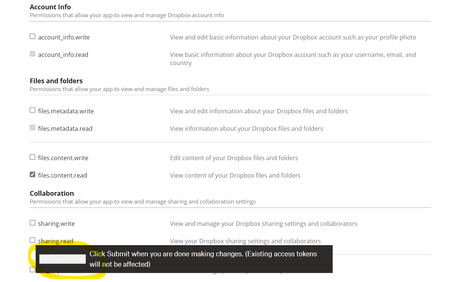
I'm not able to submit after making the changes in permission, to test API, as submit seems to be greyed out.
- 2 years ago
Thanks. Can you let me know which web browser you're using, and the version number of that web browser?
I just tried this myself and I was able to apply changes by clicking the button while it's greyed out, so we'll need to try to reproduce the particular issue you're seeing.

ozbcoz
2 years agoExplorer | Level 3
Hope this works
https://www.dropbox.com/s/viwkdau4utp7a0y/Dropboxapp%202023-05-01%20164925.mp4?dl=0
cheers
Jim

Greg-DB Dropbox Community Moderator
2 years agoDropbox Community Moderatorozbcoz Thanks, that's helpful. When updating the scopes for your app, instead of then switching to another tab such as "Branding" and clicking "Save changes" there, please stay on the "Permissions" tab and click on the "Submit" button in the bar at the bottom of that page. There's currently an issue that makes that "Submit" button appear white/greyed out and hard to see when making scope changes, but that button is still there and should be functional.
- ozbcoz2 years agoExplorer | Level 3
Thanks - my first success with the api !!!!!!!
very good of you to help me
cheers
Jim
About Discuss Dropbox Developer and API

Explore Dropbox Developer & API discussions with developers like you.
The Dropbox Community team is active from Monday to Friday. We try to respond to you as soon as we can, usually within 2 hours.
If you need more help you can view your support options (expected response time for an email or ticket is 24 hours), or contact us on X, Facebook or Instagram.
For more info on available support options for your Dropbox plan, see this article.
If you found the answer to your question in this Community thread, please 'like' the post to say thanks and to let us know it was useful!


