Our Community is in read-only mode until April 8th, learn more here. You can still search existing threads or get help via Dropbox Support, the Dropbox Help Center, or Learn.
Forum Discussion

amei
7 months agoExplorer | Level 3
Using javascript to download file from dropbox
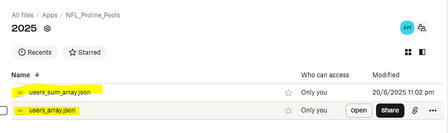
I am creating a javascript routine that requires me to download and upload updated files in my dropbox app file folders which contains updated football picks. I am able to upload files to my app but ...

amei
6 months agoExplorer | Level 3
the LoadFromDropbox returns the following :
The LoadFromDropbox2 returns essentially the same
iNeil Dropbox Community Moderator
6 months agoDropbox Community ModeratorHi amei,
I have reviewed the information you provided. From my understanding, you are experiencing difficulties downloading a file using the Dropbox JavaScript SDK and parsing a JSON file.
Based on the code snippet you shared, it appears that the JSON file is being parsed incorrectly. Would you be able to test the following code snippet example to check whether it resolves the issue you are encountering?
import { Dropbox } from "dropbox";
import fs from "fs/promises";

const dbx = new Dropbox({ accessToken: "YOUR_ACCESS_TOKEN" });

async function downloadJsonFile() {
  try {
    // Request file from Dropbox
    const { result } = await dbx.filesDownload({ path: "/users_array.json" });

    // Convert response into a buffer
    let buffer;
    if (result.fileBinary) {
      buffer = Buffer.from(result.fileBinary);
    } else if (result.fileBlob) {
      const ab = await result.fileBlob.arrayBuffer();
      buffer = Buffer.from(ab);
    } else {
      throw new Error("Unexpected response: no fileBinary/fileBlob present.");
    }

    // Download the file to a specified location on your local machine.
    await fs.writeFile("/YOUR_FILE_PATH_TO/users_array.json", buffer);
    console.log("File downloaded successfully");

    // Parsing JSON file after downloading the file
    const parsed = JSON.parse(buffer.toString("utf8"));
    console.log("Parsed JSON object:", parsed);

  } catch (error) {
    console.error(" Error downloading file:", error);
  }
}

downloadJsonFile();
- amei6 months agoExplorer | Level 3
Thanks for pointing me in the right direction. I finally figured out that I was working with a string(text) representation of an array uploaded to dropbox as a json file. Once I realized that this is what I did to properly download the jason file and etablish the users_array containing football picks :
Array Listing : (note I only picked one line)
When I tried to call up a particular value in the array to make sure it's working :
So the array has been downloaded and formatted properly, Thanks for pointing me in the right direction.
The only issue I have now is that I have been working with a temporary access code (starts with sl and lasts only 4 hours). Is there an option to make the code last for a week or more ?
- iNeil6 months ago
Hi amei, I'm happy to hear that you are able to resolve the issue with downloading the JSON file with the Dropbox API!
In relation to the access token, it's not possible to extend the access token's expiry time. Please bear in mind that Dropbox is no longer offering the option for creating new long-lived access tokens. Dropbox is now issuing short-lived access tokens (and optional refresh tokens) instead of long-lived access tokens. You can find more information on this migration here.
Apps can still get long-term access by requesting "offline" access though, in which case the app receives a "refresh token" that can be used to retrieve new short-lived access tokens as needed, without further manual user intervention. Refresh tokens do not expire automatically and can be used repeatedly. You can find more information in the OAuth Guide and authorization documentation. There's a basic outline of processing this flow in this blog post which may serve as a useful example.- amei6 months agoExplorer | Level 3
Hi INeil. As I mentioned previously I was able to download the dropbox jason file and parse it into and array inside the async function shown below. However when I try to use it outside the async function it is either returned as undefined or a promise. Below are more detials.
Load file from dropbox and parse the array. Works fine within this async function.
Results : within function (listed as local) the array works fine, outside function (listed as global), a promise is returned and the array is undefined. Any assistance with using this array outside of the async function would be greatly appreciated.
About Discuss Dropbox Developer and API

Explore Dropbox Developer & API discussions with developers like you.
The Dropbox Community team is active from Monday to Friday. We try to respond to you as soon as we can, usually within 2 hours.
If you need more help you can view your support options (expected response time for an email or ticket is 24 hours), or contact us on X, Facebook or Instagram.
For more info on available support options for your Dropbox plan, see this article.
If you found the answer to your question in this Community thread, please 'like' the post to say thanks and to let us know it was useful!


