Our Community is in read-only mode until April 8th, learn more here. You can still search existing threads or get help via Dropbox Support, the Dropbox Help Center, or Learn.
Forum Discussion

Yousri
9 months agoExplorer | Level 4
How to stop "This shared file already synced" pop-up when opening synced files from a shared link
Hey! This is a very recent issue for me, it was fine before
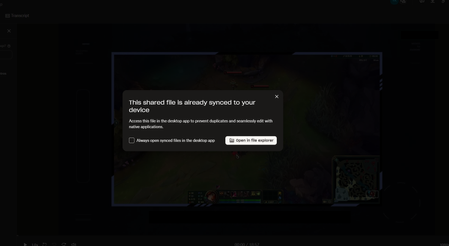
Every time I open a Dropbox link to a file that's already synced on my computer, I get this annoying popup saying the file is already syn...


Yousri
9 months agoExplorer | Level 4
I can see that you already added a checkbox to disable it!!!
This is fantastic! You guys are amazing for doing this so fast!
Only issue is that i'm still getting the old popup instead of it going away haha 😅
Here is a video showing it in action:
link removed by moderator to avoid traffic to it
I think the new popup with the checkbox and the old one are serperate?

Walter Dropbox Community Moderator
9 months agoDropbox Community ModeratorDoes this persist after rebooting your computer and quitting and restarting the app Yousri?
- Yousri9 months agoExplorer | Level 4
Hey! Sorry just saw this
but yea, restarting the app and rebooting my pc didn't fix it- Megan9 months ago
Hey Yousri!
Do you notice the same behavior with all of your shared links?
- Yousri9 months agoExplorer | Level 4
Hey Megan
Yep, this message shows up for me with any shared link to a file that I already have synced on my PC. I recorded a quick video to show it in action:
https://dl.dropboxusercontent.com/scl/fi/mx83kmem4dloqsiu533uy/chrome_sPumtY1c6o.mp4?rlkey=2ht0lj7gsyqvif1ejdkbc5jry&dl=0
And yeah, since I mostly get links from the department I work in, I’m basically seeing this popup constantly now haha

About Create, Upload, and Share
Find help to solve issues with creating, uploading, and sharing files and folders with Dropbox.
The Dropbox Community team is active from Monday to Friday. We try to respond to you as soon as we can, usually within 2 hours.
If you need more help you can view your support options (expected response time for an email or ticket is 24 hours), or contact us on X, Facebook or Instagram.
For more info on available support options for your Dropbox plan, see this article.
If you found the answer to your question in this Community thread, please 'like' the post to say thanks and to let us know it was useful!


