We’re Still Here to Help (Even Over the Holidays!) - find out more here.
Forum Discussion

robynphd
7 years agoExplorer | Level 4
Syncing is stuck on a Mac. What could be the culprit here?
I have a Mac Air (photo attached includes system data). I have noticed for the last two days that the DropBox desktop icon is constantly syncing three files. I have no "blue icons" in my Dropbox fold...
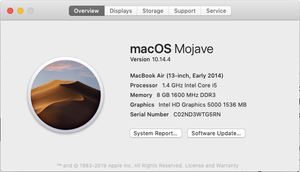
- 7 years agoHey WolfgangHaak, I’ve moved your post here, as the two descriptions are very similar & I’d like to see if the troubleshooting posted here fixes this issue for you. Could you have a quick look on our suggestions above?There’s also a new Stable Build that was released just yesterday → (Stable Build 84.4.170). Could you give it a go if it’s not too much trouble & see if this gets the syncing issue sorted?Thanks again & please let us know of the outcome here!

Jane Dropbox Staff
7 years agoDropbox StaffHey robynphd, thanks for taking the time to work on that & letting us know of the outcome here!
If I were in your shoes, I'd unlink & relink my account once, since it recreates the local database. Can you clarify if you’ve already tried following these steps if it’s not too much trouble for you?
Zdravko’s suggestion could also be helpful. If you’re not very confident with the terminal, you could also check out the steps below. Please note that it is very important to follow these steps specifically as failure to do so may result in other issues:
#1. Make sure the Dropbox desktop application is running & click on the Dropbox icon in your menu bar. → Then click next to your profile picture in the Notifications panel.
#2. Select 'Preferences' & then navigate on the 'Account' tab.
#3. Hold down the 'Option/Alt' key.
#4. Click on the 'Fix Permissions' button (make sure you're still holding down the 'Option/Alt' key).
#5. You may be prompted for your a username and password, this is your computer login credentials, not your Dropbox account ones.
Once you get a chance to have a look at our pointers, please keep us updated on the results!
About Create, upload, and share
Find help to solve issues with creating, uploading, and sharing files and folders in Dropbox. Get support and advice from the Dropbox Community.
The Dropbox Community team is active from Monday to Friday. We try to respond to you as soon as we can, usually within 2 hours.
If you need more help you can view your support options (expected response time for an email or ticket is 24 hours), or contact us on X, Facebook or Instagram.
For more info on available support options for your Dropbox plan, see this article.
If you found the answer to your question in this Community thread, please 'like' the post to say thanks and to let us know it was useful!


