We’re Still Here to Help (Even Over the Holidays!) - find out more here.
Forum Discussion

robynphd
7 years agoExplorer | Level 4
Syncing is stuck on a Mac. What could be the culprit here?
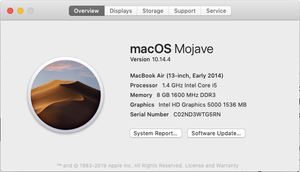
I have a Mac Air (photo attached includes system data). I have noticed for the last two days that the DropBox desktop icon is constantly syncing three files. I have no "blue icons" in my Dropbox fold...
- 7 years agoHey WolfgangHaak, I’ve moved your post here, as the two descriptions are very similar & I’d like to see if the troubleshooting posted here fixes this issue for you. Could you have a quick look on our suggestions above?There’s also a new Stable Build that was released just yesterday → (Stable Build 84.4.170). Could you give it a go if it’s not too much trouble & see if this gets the syncing issue sorted?Thanks again & please let us know of the outcome here!


macgarvin
7 years agoExplorer | Level 4
Jane wrote:Perfect WolfgangHaak, have a wonderful weekend ahead! 😊
I've had the same issues with the same setup, and appear to have solved it for me on two MacOS 10.16.6 machines following the path (partly) suggested by Jane of repairing permissions, ensuring that v84.4.170 was installed, and then delinking and relinking the accounts. HOWEVER when a coworker, Jennfer, logs into her account on either machine Dropbox won't start for her, indicates that there is a permissions issue, and to contact support with the error message below in italics.
Anyone have any quick thoughts on how to solve this before I try contacting support?
Cheers, Malcolm
bn.BUILD_KEY: Dropbox
bn.VERSION: 84.4.170
bn.DROPBOXEXT_VERSION: failed
bn.is_frozen: True
machine_id: 23843ba5-7737-5d6d-9bc1-b984f6d0fb7d
pid: 8030
ppid: 1
uid: 502
user_info: pwd.struct_passwd(pw_name='jennifer', pw_passwd='********', pw_uid=502, pw_gid=20, pw_gecos='Jennifer ******', pw_dir='/Users/jennifer', pw_shell='/bin/bash')
effective_user_info: pwd.struct_passwd(pw_name='jennifer', pw_passwd='********', pw_uid=502, pw_gid=20, pw_gecos='Jennifer *****', pw_dir='/Users/jennifer', pw_shell='/bin/bash')
euid: 502
gid: 20
egid: 20
group_info: grp.struct_group(gr_name='staff', gr_passwd='*', gr_gid=20, gr_mem=['root', 'jennifer', '_serialnumberd'])
effective_group_info: grp.struct_group(gr_name='staff', gr_passwd='*', gr_gid=20, gr_mem=['root', 'jennifer', '_serialnumberd'])
DYLD_LIBRARY_PATH: None
cwd: '/'
real_path='/'
mode=0o40755 uid=0 gid=0
parent mode=0o40755 uid=0 gid=0
HOME: '/Users/jennifer'
appdata: '/Users/jennifer/.dropbox'
real_path='/Users/jennifer/.dropbox'
mode=0o40700 uid=502 gid=20
parent mode=0o40755 uid=502 gid=20
dropbox_path: None
not found
parent not found
sys_executable: '/Applications/Dropbox.app/Contents/MacOS/Dropbox'
real_path='/Applications/Dropbox.app/Contents/MacOS/Dropbox'
mode=0o100755 uid=501 gid=20
parent mode=0o40755 uid=501 gid=20
trace.__file__: '/Applications/Dropbox.app/Contents/Resources/python-resources/python-packages-37.zip/dropbox/client/ui/common/boot_error.pyc'
real_path='/Applications/Dropbox.app/Contents/Resources/python-resources/python-packages-37.zip/dropbox/client/ui/common/boot_error.pyc'
not found
parent not found
tempdir: '/var/folders/wn/dsl2g5x90zj3b3yfcksv097m0000gp/T'
real_path='/private/var/folders/wn/dsl2g5x90zj3b3yfcksv097m0000gp/T'
mode=0o40700 uid=502 gid=20
parent mode=0o40755 uid=502 gid=20
Traceback (most recent call last):
File "dropbox/sqlite3_helpers.pyc", line 647, in conn
AttributeError: '_thread._local' object has no attribute 'conn'
During handling of the above exception, another exception occurred:
Traceback (most recent call last):
File "dropbox/sqlite3_helpers.pyc", line 943, in __init__
File "dropbox/sqlite3_helpers.pyc", line 956, in _load_db
File "dropbox/sqlite3_helpers.pyc", line 962, in _do_migrations
File "contextlib.pyc", line 112, in __enter__
File "dropbox/sqlite3_helpers.pyc", line 661, in cursor
File "dropbox/sqlite3_helpers.pyc", line 649, in conn
File "dropbox/sqlite3_helpers.pyc", line 629, in _create_conn
File "dropbox/sqlite3_helpers.pyc", line 550, in connect
File "dropbox/sqlite3_helpers.pyc", line 541, in load_sqlite_ext
sqlite3.OperationalError: dlopen(/Applications/Dropbox.app/Contents/Frameworks/libdropbox_sqlite_ext.dylib.dylib, 10): image not found
During handling of the above exception, another exception occurred:
Traceback (most recent call last):
File "dropbox/sqlite3_helpers.pyc", line 647, in conn
AttributeError: '_thread._local' object has no attribute 'conn'
During handling of the above exception, another exception occurred:
Traceback (most recent call last):
File "dropbox/client/main.pyc", line 7725, in main_startup
File "dropbox/client/main.pyc", line 3191, in run
File "dropbox/client/main.pyc", line 1631, in startup_low
File "dropbox/client/multiaccount/instance_database.pyc", line 759, in __init__
File "dropbox/client/multiaccount/instance_database.pyc", line 153, in __init__
File "dropbox/sqlite3_helpers.pyc", line 949, in __init__
File "dropbox/sqlite3_helpers.pyc", line 910, in rebuild
File "dropbox/sqlite3_helpers.pyc", line 649, in conn
File "dropbox/sqlite3_helpers.pyc", line 629, in _create_conn
File "dropbox/sqlite3_helpers.pyc", line 550, in connect
File "dropbox/sqlite3_helpers.pyc", line 541, in load_sqlite_ext
sqlite3.OperationalError: dlopen(/Applications/Dropbox.app/Contents/Frameworks/libdropbox_sqlite_ext.dylib.dylib, 10): image not found

Здравко
7 years agoLegendary | Level 20
Hi macgarvin,
Can you check the result from:
ls -l /Applications/Dropbox.app/Contents/Frameworks/libdropbox_sqlite_ext.dylib
If possible, post result coming from execution in context of 'jennifer' account & of your own account.
Did you ensure the local user application cache is cleared? (as WolfgangHaak has done)
- macgarvin7 years agoExplorer | Level 4
Здравко wrote:Hi macgarvin,
Can you check the result from:
ls -l /Applications/Dropbox.app/Contents/Frameworks/libdropbox_sqlite_ext.dylib
If possible, post result coming from execution in context of 'jennifer' account & of your own account.
Did you ensure the local user application cache is cleared? (as WolfgangHaak has done)
Thanks @Здравко for your help!The result for the ls -l command for users 'macgarvin' and 'jennifer' are respectively:
Grey-Malkin:~ macgarvin$ ls -l /Applications/Dropbox.app/Contents/Frameworks/libdropbox_sqlite_ext.dylib
-rw------- 1 macgarvin staff 52368 30 Oct 18:55 /Applications/Dropbox.app/Contents/Frameworks/libdropbox_sqlite_ext.dylib
Grey-Malkin:~ macgarvin$
and
Grey-Malkin:~ jennifer$ ls -l /Applications/Dropbox.app/Contents/Frameworks/libdropbox_sqlite_ext.dylib-rw------- 1 macgarvin staff 52368 30 Oct 18:55 /Applications/Dropbox.app/Contents/Frameworks/libdropbox_sqlite_ext.dylibGrey-Malkin:~ jennifer$I didn't get as far as clearing the local user application cache for account 'macgarvin' because Dropbox was working with the previous steps. I'll have a go at clearing the catche for a/c Jennifer when I have satellite access to my ISP in a couple of hours time and can see the result.
Malcolm
- Здравко7 years agoLegendary | Level 20
Wow... macgarvin,
I don't pretend for high knowledge in MAC, but seems very strange that work in any way, even for you. Anyway... try following:
chmod a+rx /Applications/Dropbox.app/Contents/Frameworks/*.dylib
Execute above in 'macgarvin's context.
Check, after that, if something changed when launch Dropbox in 'jennifer's context. If there is some other error, post it.
- macgarvin7 years agoExplorer | Level 4
Здравко wrote:... try following:
chmod a+rx /Applications/Dropbox.app/Contents/Frameworks/*.dylib
Execute above in 'macgarvin's context.
Check, after that, if something changed when launch Dropbox in 'jennifer's context. If there is some other error, post it.
Many thanks Здравко, that worked - Dropbox launched on user Jennifer's side and relinked and succesfully synced.
The 'ls' terminal command now results in:
Grey-Malkin:~ macgarvin$ chmod a+rx /Applications/Dropbox.app/Contents/Frameworks/*.dylibGrey-Malkin:~ macgarvin$ ls -l /Applications/Dropbox.app/Contents/Frameworks/libdropbox_sqlite_ext.dylib-rwxr-xr-x 1 macgarvin staff 52368 30 Oct 18:55 /Applications/Dropbox.app/Contents/Frameworks/libdropbox_sqlite_ext.dylibandGrey-Malkin:~ jennifer$ ls -l /Applications/Dropbox.app/Contents/Frameworks/libdropbox_sqlite_ext.dylib-rwxr-xr-x 1 macgarvin staff 52368 30 Oct 18:55 /Applications/Dropbox.app/Contents/Frameworks/libdropbox_sqlite_ext.dylibIncidentally, I was surprised to see 'macgarvin' referred to in both accounts, so I looked on another mac that had continued to work without problems, same OS version and same (automatically updated) Dropbox version. For these the 'ls' terminal command returned a slightly different string, but 'macgarvin' was referred to on both sides, so I assume that wasn't part of the problem:Pink-Kitten:~ macgarvin$ ls -l /Applications/Dropbox.app/Contents/Frameworks/libdropbox_sqlite_ext.dylib-rw-r--r--@ 1 macgarvin staff 52368 30 Oct 18:55 /Applications/Dropbox.app/Contents/Frameworks/libdropbox_sqlite_ext.dylibandPink-Kitten:~ Jennifer$ ls -l /Applications/Dropbox.app/Contents/Frameworks/libdropbox_sqlite_ext.dylib-rw-r--r--@ 1 macgarvin staff 52368 30 Oct 18:55 /Applications/Dropbox.app/Contents/Frameworks/libdropbox_sqlite_ext.dylib - Здравко7 years agoLegendary | Level 20Don't worry. This string denotes the user who has installed Dropbox application. 😉
- macgarvin7 years agoExplorer | Level 4
Unfortunately the problem appears to have re-emerged on one of the machines - in the current manifestation stuck on perpetual sync on my user account.
- macgarvin7 years agoExplorer | Level 4
Thanks Jane
Would it be okay if I reached out to you on the email address connected to your Community profile, in order to further advise based on the info I have on file on my tools?Yes that's welcolm - though currently the issue has disappeared without action on my part; I'm on v85.4.155
- Jane7 years ago
Dropbox Staff
Thanks for keeping me in the loop here & for your confirmation macgarvin!I’ve now sent you a brief message through our system to make sure that this has been fixed, since you’ve been working with us for some time. Please have a look at your inbox when you have some spare time.Thanks again!
About Create, upload, and share
Find help to solve issues with creating, uploading, and sharing files and folders in Dropbox. Get support and advice from the Dropbox Community.
The Dropbox Community team is active from Monday to Friday. We try to respond to you as soon as we can, usually within 2 hours.
If you need more help you can view your support options (expected response time for an email or ticket is 24 hours), or contact us on X, Facebook or Instagram.
For more info on available support options for your Dropbox plan, see this article.
If you found the answer to your question in this Community thread, please 'like' the post to say thanks and to let us know it was useful!


