We’re Still Here to Help (Even Over the Holidays!) - find out more here.
Forum Discussion

robynphd
7 years agoExplorer | Level 4
Syncing is stuck on a Mac. What could be the culprit here?
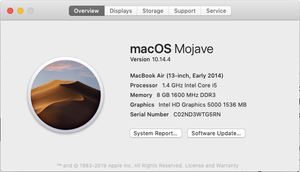
I have a Mac Air (photo attached includes system data). I have noticed for the last two days that the DropBox desktop icon is constantly syncing three files. I have no "blue icons" in my Dropbox fold...
- 7 years agoHey WolfgangHaak, I’ve moved your post here, as the two descriptions are very similar & I’d like to see if the troubleshooting posted here fixes this issue for you. Could you have a quick look on our suggestions above?There’s also a new Stable Build that was released just yesterday → (Stable Build 84.4.170). Could you give it a go if it’s not too much trouble & see if this gets the syncing issue sorted?Thanks again & please let us know of the outcome here!

Jane Dropbox Staff
7 years agoDropbox StaffI’ve now located your support ticket on our system, I’ve notified my colleague of your comments & I’ve increased your priority internally to help expedite matters on my side. You should expect a message back from them, however could you try Fixing Permissions in the meantime to see if this does the trick?
Please let us know how you get on with this & we’ll go from there. Thanks again!
HipstarSounds
7 years agoNew member | Level 2
Hi Jane,
Thank you for your reply! I am currently in correspondence with Janet from Dropbox Support also regarding this issue. I have now completed the instructions from both of you but the problem still persists.
Thank you for the help so far and I look forward to hearing back regarding the next step.
- Jane7 years agoThanks for trying our suggestions HipstarSounds!Can I have you unlink & relink your account on this device once as the best next step to re-create the local database?If this doesn’t give us the expected results, could you include a screenshot (omitting personal info) in your next message for me showing me what’s your current sync status?Give me a nudge when you’re ready to continue looking into that!
About Create, upload, and share
Find help to solve issues with creating, uploading, and sharing files and folders in Dropbox. Get support and advice from the Dropbox Community.
The Dropbox Community team is active from Monday to Friday. We try to respond to you as soon as we can, usually within 2 hours.
If you need more help you can view your support options (expected response time for an email or ticket is 24 hours), or contact us on X, Facebook or Instagram.
For more info on available support options for your Dropbox plan, see this article.
If you found the answer to your question in this Community thread, please 'like' the post to say thanks and to let us know it was useful!


