Our Community is in read-only mode until April 8th, learn more here. You can still search existing threads or get help via Dropbox Support, the Dropbox Help Center, or Learn.
Forum Discussion

mattmireles
7 years agoExplorer | Level 3
Attaching Dropbox files to Emails on iPhone X Suddenly Stopped Working
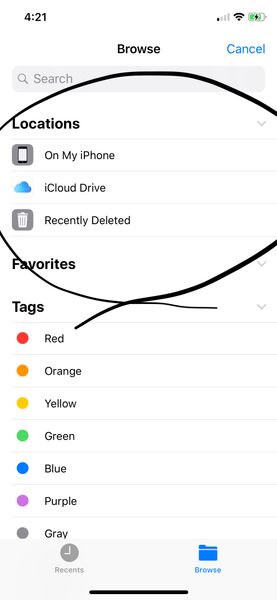
Up until recently, I was able to attach files from Dropbox to my emails on my iPhone X. I use Polymail and Apple Mail. However, recently, the attachment dialogue stopped showing Dropbox as an option ...
 7 years ago
Hi there,
Apologies for the trouble with the Dropbox and Files.app integration. Could you try opening the Files app directly, going into the “Edit” menu in the upper right, then re-enabling the Dropbox integration?
We have heard reports that when people uninstall and re-install the Dropbox app, or when they do an iCloud restore, this integration needs to be re-enabled manually.
Let us know if that works!
Norah Dropbox Staff
7 years agoDropbox StaffIs there a pass-code on the Dropbox app? Can you confirm the version of it by going to the Settings of the app?
Thanks in advance for your reply!
mattmireles
7 years agoExplorer | Level 3
Pass code is turned off
App version 92.32
- Norah7 years agoCurrently, this is not possible, however, I will make sure your comments are passed along to our development team, thanks for your feedback.Have a great week ahead!
 revvaloon7 years agoNew member | Level 2Hi, has this feature been implemented yet? I used to be able to attach dropbox files using the iOS mail app but ever since upgrading to the iPhone X, I can't seem to do it anymore.
I don't think this is a new feature since it seemed to be working with previous iOS versions? I tried reinstalling the Dropbox app but that did not help.
Thanks! Scoobz1017 years agoNew member | Level 2
I agree with @Revvaloon. This is not a new ask as I have an iPhone X and have always been able to attach dropbox files to apple mail until very recently. It wasn't after an update (that I can recall) it just happened. I've had the iPhone X since last year and up till a few weeks ago it stopped working
About Apps and Installations
Have a question about a Dropbox app or installation? Reach out to the Dropbox Community and get solutions, help, and advice from members.
The Dropbox Community team is active from Monday to Friday. We try to respond to you as soon as we can, usually within 2 hours.
If you need more help you can view your support options (expected response time for an email or ticket is 24 hours), or contact us on X, Facebook or Instagram.
For more info on available support options for your Dropbox plan, see this article.
If you found the answer to your question in this Community thread, please 'like' the post to say thanks and to let us know it was useful!


