Our Community is in read-only mode until April 8th, learn more here. You can still search existing threads or get help via Dropbox Support, the Dropbox Help Center, or Learn.
Third Party Integrations
60 Topics
Dropbox/Boxifier Integration - New Question
This is a technical question based on research I've been doing related to the recent issue with Boxifier no longer working with the latest version of Dropbox, and an inability to get a response from Boxifier support. In my research I've come across information that Dropbox has, with version 243.4.6956, moved from a proprietary sync platform to Microsoft-based API that leverages their OneDrive sync engine. So my first question is whether that is true. If it is true, my experience with OneDrive is that it is not possible to sync content from a NAS, or in my case WD MyCloudHome, using a mapped network drive. OneDrive will only sync content that is stored directly on the hard drive of the laptop itself, and does not support mapped drives (IE Z:/MyCloudHome/MyPictures). Previous to purchasing Dropbox and Boxifier, I had "tricked" OneDrive into syncing files from my drive mapped to MyCloudHome by using MKLink symbolic links to directories on the MyCloudHome. However, I discovered that after those directories grew to over about 100GB those symbolic links began to fail sporadically, so I had no idea which files were synced to OneDrive cloud, and which were not. After doing research on potential solutions I reached out to Dropbox and was told that the combination of Dropbox and Boxifier would meet my requirements. After testing and confirming that did work, I purchased Dropbox and a "lifetime" Boxifier license about 6 months ago. Unfortunately, "lifetime" appears to be about 6 months for Boxifier and I fear I may have thrown $350 out the window as it is probably not possible for Boxifier to continue to operate with Dropbox if indeed Dropbox is now running on the OneDrive sync engine. So, my questions are whether Dropbox is now on the OneDrive platform, and based on that answer what my options are to continue to sync my content from MyCloudHome to Dropbox going forward. I appreciate official Dropbox guidance on this matter, as well as any advice other users in similar situations might have. Thank you, Dave169Views3likes7Comments
Boxifier not working with latest Dropbox update
Good morning , Is anyone able to assist with getting hold of @Boxifier team member ? They are completely unresponsive and email or post on their website not being allowed showing as pending. Original issue i had was as below (copy of the message to @Boxifier below)Does Boxifier still exist? I’ve been using your software for several years and have been very happy with it. However, over the past couple of months I’ve been experiencing persistent issues. I frequently receive the message “core not running,” and all of my previously synced folders are being removed from the Boxifier folder. When I try to re-add the folders, it creates further problems — Dropbox begins deleting and re-uploading large amounts of data, causing several hours of disruption. Additionally, folders from my shared drives are being copied and converted into random files, while the originals remain untouched in their original locations. Attempting to re-link the folders doesn’t work either; I get an error message saying that a folder with that name already exists in Boxifier. In Dropbox’s Selective Sync settings, I can see that the folder is listed and selected to sync, but nothing happens. The only workaround I’ve found is to completely delete the folder from Dropbox online and then re-link it on my PC — which again results in hours of syncing chaos. I’ve tried reinstalling the latest versions of both Boxifier and Dropbox each time this occurs, but the problem persists. Could you please assist me in resolving this issue? It’s been quite disruptive, and I’d really appreciate your help in getting things back to normal. Last night its stopped completely following and Dropbox update to 243.4.6956, whatever i do no cant get it to work again and workflow is seriously impacted . Can anyone help please , thanks Szymon754Views1like36Comments
Dropbox Pocketbook isn't supported won't let me sign in.
Application Affected (Dropbox Pocketbook.) Device PocketBook 628 Question or Issue Recently had issue with my network, was told from Pocketbook support, to do factory reset. Afterall I realized that I can't log-in with my account, cause the interface of login page was update. How should I bypass that piece of a problem, cause that was one way how I was syncink the files with my deviceSolved139Views0likes6Comments
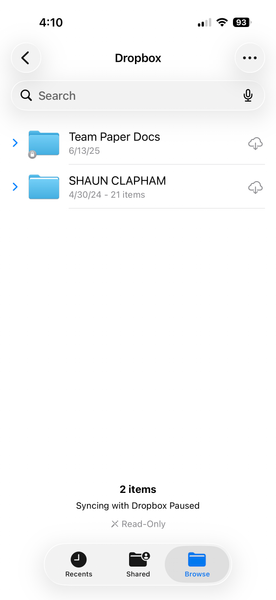
I'm trying to add Dropbox as a location in Files app, but it says syncing is paused.
I cannot use dropbox as a location to select files from on iphone ios 26.2.1 I have restarted, installed everything over and over. Removed preview app, and nothing. Application Affected dropbox on iphone Device iphone 17 pro ios 26.2.1 Operating System/Browser (if using the web) files iphone app Dropbox App Version (if using the app) 460.2.2 Question or Issue Need a solution144Views0likes2Comments
Cannot access Dropbox on Kindle Fire Max 11
Application affected, Dropbox, Kindle Fire Max 11 Device: Kindle Fire Max 11 Operating System: Fire OS 8.3.3.8 Dropbox App version: Latest For the last few years I have used Dropbox almost daily, importing files into Songbook Pro. At the end of December I retired my Fire Max 11 and bought a new one. It has been working fine, but about a week ago I can no access Dropbox on my Fire Max 11 (I have plenty of room in Dropbox). The problem first started when I would log into my Mac's Kindle Dropbox, import a file to it, but nothing new would appear on my Dropbox Kindle, just older items. The last one I imported worked fine, but then it could not be deleted from Dropbox when I was through with it. Now when I would try to sign into Dropbox (on the Kindle) I get a message, "Can't connect to Dropbox. Make sure you're online, or try again later." I can still access Dropbox on my desktop Mac, no problem. I have twice deleted and reinstalled Dropbox on the Kindle, and numerous times restarted the Kindle. I have no problems with any other app. One month ago I retired my Fire Max 11 and bought a new one. I still have it, I suppose I could reregister it and see if it would work?345Views1like7Comments
Dropbox library problem "unable to find valid certification path"
We started experiencing certificate issues with dropbox jar file libraries a week ago, for 2 days then resolved. Today we are experiencing t6he same. Our Apps cannot access the files. The error message log is as below: com.dropbox.core.NetworkIOException: sun.security.validator.ValidatorException: PKIX path building failed: sun.security.provider.certpath.SunCertPathBuilderException: unable to find valid certification path to requested target at com.dropbox.core.DbxRequestUtil.startPostRaw(DbxRequestUtil.java:284) at com.dropbox.core.v2.DbxRawClientV2$1.execute(DbxRawClientV2.java:146) at com.dropbox.core.v2.DbxRawClientV2.executeRetriable(DbxRawClientV2.java:330) Caused by: sun.security.provider.certpath.SunCertPathBuilderException: unable to find valid certification path to requested target at sun.security.provider.certpath.SunCertPathBuilder.build(SunCertPathBuilder.java:148) at sun.security.provider.certpath.SunCertPathBuilder.engineBuild(SunCertPathBuilder.java:129) at java.security.cert.CertPathBuilder.build(CertPathBuilder.java:280) at sun.security.validator.PKIXValidator.doBuild(PKIXValidator.java:434)Solved498Views0likes6Comments
Authentication required on iPad Files app
Hello, when trying to import from the files app on an iPad, it keeps asking for authentication in the Dropbox app, I did logged myself in the app but Files keeps asking and don’t give me access to the dB files. thanx a lot for your help.Solved11KViews0likes24CommentsSyncing Dropbox files to Android SD card - third party apps?
Hi everyone, As you may know, Dropbox doesn't sync files on Android any more as of last year or so (see this, for example). They used to be in sdcard>Android>data>com.dropbox.android>files, but the new "available offline" option stores them in the cache of the Db app, which other apps cannot access (you wouldn't be able to locate them with Files, for example), to ensure their safety, I would guess. The only way to use these files on your device apart from through the Db app is to "export" them after they were made "available offline" (so basically to properly download them locally), and it is thus impossible to do what Dropbox is meant to do in the first place : read and write synced files. I personally would like to edit note files on my computer and my phone and to get them synced by Db, but there seems to be no way to reach and edit locally stored (note) files with my note-taking app. The only workaround I found to this problem is using third party app that syncs files with your Dropbox repository, such as Dropsync or FolderSync, which were explicitly meant for that : "New files in your cloud account are automatically downloaded onto your device. [...] This is how Dropbox works on computers but not on Android. Two-way automatic synchronization should be an essential function of the official app. For whatever reason, it is not the case. Dropsync is here to fill the gap." [Dropsync app description] But then I am not too keen on adding more complexity to my workflow, increase the likeliness of some incompatibility or other "technical issues" to emerge in the future and, moreover, to potentially put my professional and personal data into more covetous digital hands than they already are in (free apps that manipulate my data? I sense what the product might be)... So my questions are : has anyone in here ever tried these solutions and did it work as planned? Any (unusual) worries to have regarding privacy with these solutions? And above all (@support people?), is there any way to circumvent the issue without these? Cheers16KViews8likes8Comments
"Sprig Electron View" holds up shutting down on Windows 10.
Ever since I upgraded to Windows 10, and apparently dropbox changed from program to "app" (hate them vs. full programs), every time I shut down my computer, it sits and waits for a half minute or more for something called Sprig Electron View, and finally shuts down. Apparently this has something to do with dropbox. If I manually quit dropbox before shutting down, then shutdown works almost instantly. I want that instantly. So, what is this program, can I remove it and still use dropbox, if so, how. Or how do I get it to stop holding up the shutdown command? Thanks.Solved20KViews4likes9Comments