Our Community is in read-only mode until April 8th, learn more here. You can still search existing threads or get help via Dropbox Support, the Dropbox Help Center, or Learn.
Forum Discussion

aneshoda
2 years agoExplorer | Level 3
Dropbox folders look grayed out after transferring from Business to personal account
I've recently left my job and I am in the midst of transferring some of my creative work from my employers business dropbox to my personal dropbox. I read in the community that I should create a shar...
- 2 years ago
Hi aneshoda, thanks for reaching out to us!
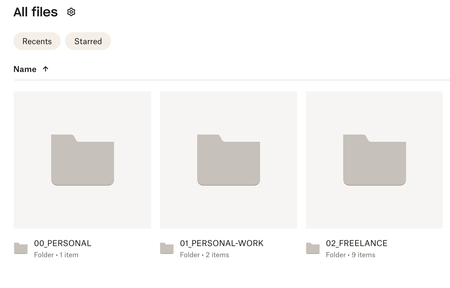
We looked into this and we were able to get confirmation from our design team: what you're seeing is an upcoming interface update, where we're trying a few versions with small sets of customers for quality testing and feedback.
The gray folders don't indicate anything wrong with the items of the account itself - just a different look/color scheme for the Dropbox web interface.
If you've got any thoughts on this, feel free to share, and I'll make sure our development team at Dropbox hears them!

aneshoda
2 years agoExplorer | Level 3
Yep the grey folders have data in them! I can also access the grey folders files from my desktop/mac and download them/make them available offline.. it is only on web that they are grey.
I'm not sure if its specifically linked to me copying the files across - as when I make a completely new folder on my own (in my personal acc on the web) - it also pops up grey too. (See images below).. unless my personal is somehow linked to the business and its blocking everything? I'm not sure.. very confused.
But yes - correct, the original business folders were team folders.

Hannah Dropbox Community Moderator
2 years agoDropbox Community ModeratorHi aneshoda, thanks for reaching out to us!
We looked into this and we were able to get confirmation from our design team: what you're seeing is an upcoming interface update, where we're trying a few versions with small sets of customers for quality testing and feedback.
The gray folders don't indicate anything wrong with the items of the account itself - just a different look/color scheme for the Dropbox web interface.
If you've got any thoughts on this, feel free to share, and I'll make sure our development team at Dropbox hears them!
About Apps and Installations
Have a question about a Dropbox app or installation? Reach out to the Dropbox Community and get solutions, help, and advice from members.
The Dropbox Community team is active from Monday to Friday. We try to respond to you as soon as we can, usually within 2 hours.
If you need more help you can view your support options (expected response time for an email or ticket is 24 hours), or contact us on X, Facebook or Instagram.
For more info on available support options for your Dropbox plan, see this article.
If you found the answer to your question in this Community thread, please 'like' the post to say thanks and to let us know it was useful!


