Our Community is in read-only mode until April 8th, learn more here. You can still search existing threads or get help via Dropbox Support, the Dropbox Help Center, or Learn.
Forum Discussion

Blain B.
7 years agoHelpful | Level 5
Dropbox won't open but says it's open so I can't uninstall
Setup a new user in Mac High Sierra. All works fine except Dropbox. I open it but no window appears. I try to delete it so I can set it up again but it won't move to the Trash because it says it's op...

Walter Dropbox Community Moderator
7 years agoDropbox Community ModeratorAre you getting any errors mariamineo? Could you share a screenshot?
Have you by any chance tried our offline installer from the following page directly?
https://www.dropboxforum.com/t5/Desktop-client-builds/Stable-Build-64-4-141/m-p/322084#M5164

ScottTexProp
6 years agoNew member | Level 2
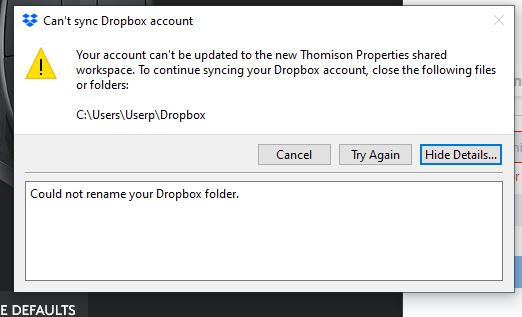
- Здравко6 years agoLegendary | Level 20
Hi ScottTexProp,
Make difference between application window and disk folder. :wink:
Open the file explorer see what you can find out there. Also, while trying the action again, close any other open application (after save current work).
Hope this gives some direction.
- ScottTexProp6 years agoNew member | Level 2I’ve already did that and uninstall and reinstall 3 times. Luckily I saved all my files on external HD.
- Здравко6 years agoLegendary | Level 20
Ok ScottTexProp, You have a backup so may be the easiest way is to remove the Dropbox directory completely. Open Windows file explorer and using Ctrl+L key combination focus changes to address line. Clear the line and paste there "C:\Users\Userp" (without quotes, of course) and push Enter. After that, locate the Dropbox folder below and remove it permanently (mark the folder after that press Shift+Del and finally confirm the removal). An alternative could be in a terminal window just type "rmdir /s /q Dropbox" (again - without quotes and without change the current working directory, which have to be: C:\Users\Userp). After that try install and see what error message appear, if any. :wink:

About Apps and Installations
Have a question about a Dropbox app or installation? Reach out to the Dropbox Community and get solutions, help, and advice from members.
The Dropbox Community team is active from Monday to Friday. We try to respond to you as soon as we can, usually within 2 hours.
If you need more help you can view your support options (expected response time for an email or ticket is 24 hours), or contact us on X, Facebook or Instagram.
For more info on available support options for your Dropbox plan, see this article.
If you found the answer to your question in this Community thread, please 'like' the post to say thanks and to let us know it was useful!


