We're making some changes to the Dropbox Community 👩💻 - Find out more here.
Forum Discussion

JGersh
3 years agoHelpful | Level 5
New message notifications will not go away
I have several “unread” messages from Dropbox which when opened or marked as read the “2” displayed above the icon will not go away. The marked as read button does nothing and there appears to be no...
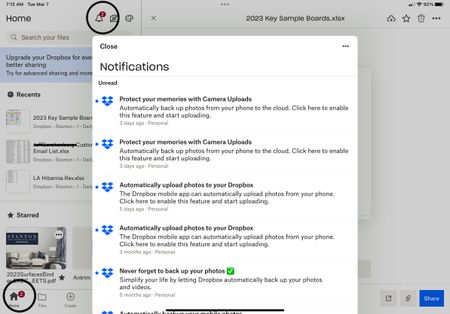
 3 years agoI ended up removing App from iPhone and reloaded it. Bit of a faff but worked

Hannah Dropbox Community Moderator
3 years agoDropbox Community ModeratorHey amcoffice, thanks for bringing this to our attention.
Can you open the Dropbox app, tap on "account", then on the gear icon, then on "clear cache", to see if that helps?
Keep me posted.

amcoffice
3 years agoExperienced | Level 11
Stuck notification red circle cleared after I uninstalled and reinstalled the iPhone app - hopefully that's not a recurring issue.
Thank you.


About Apps and Installations
Have a question about a Dropbox app or installation? Reach out to the Dropbox Community and get solutions, help, and advice from members.
The Dropbox Community team is active from Monday to Friday. We try to respond to you as soon as we can, usually within 2 hours.
If you need more help you can view your support options (expected response time for an email or ticket is 24 hours), or contact us on X, Facebook or Instagram.
For more info on available support options for your Dropbox plan, see this article.
If you found the answer to your question in this Community thread, please 'like' the post to say thanks and to let us know it was useful!


