Our Community is in read-only mode until April 8th, learn more here. You can still search existing threads or get help via Dropbox Support, the Dropbox Help Center, or Learn.
Notifications
23 Topics
Constant notifications to update desktop app on Windows.
I am getting frequent notifications to update my Windows desktop Dropbox app, requesting permission to make changes to my system. It doesn't matter whether I respond yes or no, nothing happens after that. It just keeps happening over and over again.Solved18KViews5likes10Comments
I keep seeing an unwanted desktop app notification about being over-quota. How can I make it stop?
Application Affected Dropbox for Windows Device Desktop Operating System/Browser (if using the web) Win11 Dropbox App Version (if using the app)Latest Question or Issue Every single day, the Dropbox app has started popping up a notification that my Dropbox is full and wants me to upgrade. I am well aware that my Dropbox is full, and I have no intention of ever upgrading. Please make this popup stop.261Views0likes6Comments
I'm being asked to update my desktop app to the latest version, but the update fails.
Application Affected (Dropbox Desktop for Windows) Device (ASUS core i9 13900K with 32GB RAM) Operating System/Browser (if using the web) (Windows 11 24H2 build 26100.6584) Dropbox App Version (if using the app) (Uninstalled and trying to install latest app) Question or Issue I had been getting an update to latest version prompt. When I click on install, it downloads DropboxInstaller.exe. I double click to install and it gets to a screen that shows "On your marks..." It then hangs at that point and does nothing. I waited a couple of hours and then restarted the computer. Ran the app again and still nothing. I uninstalled the desktop app, restarted the computer and tried running the installer again. No luck. I rebooted, went back to download the software and ran it again. Stil nothing.406Views0likes10Comments
Dropbox folder bounces in the dock on Mac when syncing.
NOTE: a thread already exists for this issue but was closed without a solution. I'm writing this here to reopen it. The Dropbox folder in my dock (Mac OS Sequoia) bounces every time a file is updated by dropbox Sync. When syncing hundreds of files, it will bounce constantly. When opening a cloud document (online-only document that is opened via the desktop file explorer and temporarily loaded onto the computer), it also bounces. This means that if I even use quick-look to preview a batch of images, my dropbox folder icon will bounce incessantly as it loads higher-resolution preview thumbnails. People have tried disabling this in terminal and it hasn't worked. I haven't personally tried the terminal method due to these reports, but I would prefer to manage this in the notifications preferences of Dropbox instead. Even with everything turned off on my notification preferences, it still bounces.Solved2.6KViews0likes13Comments
I keep being asked for my Mac password every time I rename/move files on Dropbox
I know there has been a couple of other incidents like this. But I dont want to reinstall Dropbox to be honest. So just like the subject say: Mac Finder asks for password each time I rename a file or move in Dropbox. And now comes the weird thing. This all is hapening on my iMac Pro (Sonoma v14.5). While when on my Macbook Pro (Sonoma v14.5) it just works fine. So its really only happening on the iMac. Got the same other programs installed on both machines. Yes, also Onedrive. But I closed it to test if that is the problem, but it isnt. Checked online if I can edit the file name there; and yes, I can. Installed in the right way and it always worked. It just stopped working like a week ago. I also checked the sharing & permissions, gave everyone read & write and also applied to enclosed items. Really lost atm.Solved6.5KViews0likes11Comments
I'm not receiving the notification to verify my Passwords account on my iPhone
I have Dropbox Plus with 2 TB of storage. I've been using Dropbox Passwords on one PC with Google Chrome browser and on my iPhone (14) with no real issues. That PC had a coffee incident and is in for repairs. I took the opportunity to buy a new (additional) PC. I'm trying to instal the Chrome extension for passwords on the new PC. It says it's sending a notification to my iPhone and the original PC for me to acknowledge. As far as I can tell that notification never makes it to my iPhone (I don't have the other PC at present to check. Then I try using Recovery Words - I can access them from the settings in the Dropbox Passwords app on my phone. I enter all 12 words very carefully and get told "Something went wrong, please try again". No amount of trying solves the issue.Solved1.4KViews0likes3Comments
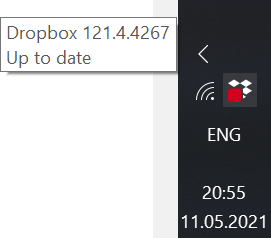
Red box on the Dropbox tray icon
Hello everyone! Why is the red box on my dropbox Windows taskbar icon? I've read in another thread that it's not a big deal and it's about some notification problem. But I have all notifications on. When I delete a file from one of dropbox folders the icon doesn't show syncing (which it does properly), just stays with red box. When I restart the program, the icon shows syncing, but then shows the same red box. It really freaks me out TBO.Solved5.1KViews0likes19CommentsNew message notifications will not go away
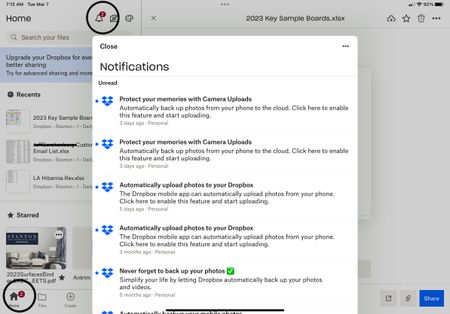
I have several “unread” messages from Dropbox which when opened or marked as read the “2” displayed above the icon will not go away. The marked as read button does nothing and there appears to be no way to delete the messages ? Using app on new iPad Pro.Solved15KViews9likes64Comments
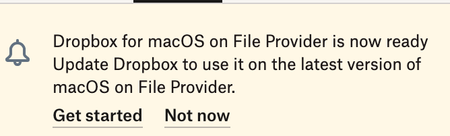
Dropbox keeps asking me to install the MacOS for File Provider update, but it's already installed
This thing just runs in a cycle! I get a notice that it's available, so I start - it seems like it does a partial reinstall - asks me the re-log in - re-verify folders I am syncing - it says it is moving Dropbox to a new secure location (which seems to be CloudStorage under Library - but it's already there!) - adds Dropbox to the left pane of Finder - and it's already there. It seems to want to add the Finder extensions, but they don't show up - even though Dropbox has Full Disk Access permissions under Files and Folders (Settings/Privacy & Security). When it's done, it still shows this exact same status with a badge on my menu bar: Some days I have done this 3 or 4 times - same cycle. I end up just clicking "Not Now" to get rid of this. Is this broken? Something wrong on my end? It's very annoying! I am on Dropbox Essentials - MacBook Pro M3 Max - Sonoma 14.3.1 - Dropbox v 193.4.5594Solved5.5KViews0likes17Comments
What is the red-circled number "1" on my menu's Dropbox logo supposed to mean?
I'm not sure what category this question belongs in, but I'm flummoxed by this little red number "1" that appears on the Dropbox icon in my menu bar. Normally that means "1 message waiting", but I can't figure out where to look for such a message. What does it mean? And if it's "message waiting", where?Solved1.3KViews0likes2Comments