Our Community is in read-only mode until April 8th, learn more here. You can still search existing threads or get help via Dropbox Support, the Dropbox Help Center, or Learn.
Forum Discussion

JGersh
3 years agoHelpful | Level 5
New message notifications will not go away
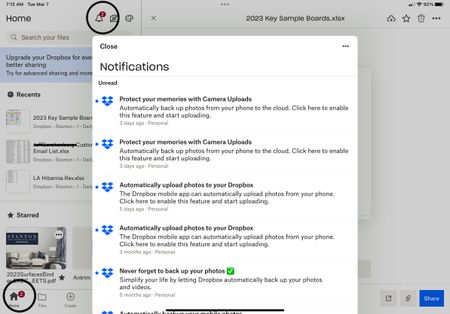
I have several “unread” messages from Dropbox which when opened or marked as read the “2” displayed above the icon will not go away. The marked as read button does nothing and there appears to be no...
 3 years agoI ended up removing App from iPhone and reloaded it. Bit of a faff but worked

Phcalc
3 years agoHelpful | Level 6
Version 3.18.2.2
Trying to see how to attach or add screenshots
Trying to see how to attach or add screenshots

Nancy Dropbox Community Moderator
3 years agoDropbox Community ModeratorAre you seeing this if you hover over the Dropbox icon in your system tray/menu bar? The app version you should be seeing should be similar to this one.
You can also add a screenshot to this thread by clicking on the small camera icon that should be located above your message box, right before you post your reply here.
- Phcalc3 years agoHelpful | Level 6Sorry I just don’t see anything like what you describe.
- Walter3 years ago
Hey Phcalc, sorry to jump in here, but could you clarify your device's exact OS and version?
A screenshot of the alerts you mentioned would also help!
- Phcalc3 years agoHelpful | Level 6The version of Dropbox is 218.2.2 on an iPhone 12.
I cannot seem to be able to upload a screenshot of the alerts that remain “unread” after I read them. Sorry

About Apps and Installations
Have a question about a Dropbox app or installation? Reach out to the Dropbox Community and get solutions, help, and advice from members.
The Dropbox Community team is active from Monday to Friday. We try to respond to you as soon as we can, usually within 2 hours.
If you need more help you can view your support options (expected response time for an email or ticket is 24 hours), or contact us on X, Facebook or Instagram.
For more info on available support options for your Dropbox plan, see this article.
If you found the answer to your question in this Community thread, please 'like' the post to say thanks and to let us know it was useful!


