Our Community is in read-only mode until April 8th, learn more here. You can still search existing threads or get help via Dropbox Support, the Dropbox Help Center, or Learn.
Forum Discussion

JGersh
3 years agoHelpful | Level 5
New message notifications will not go away
I have several “unread” messages from Dropbox which when opened or marked as read the “2” displayed above the icon will not go away. The marked as read button does nothing and there appears to be no...
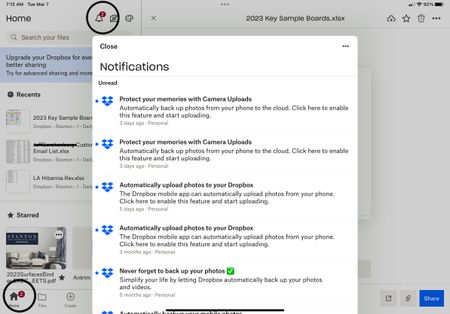
 3 years agoI ended up removing App from iPhone and reloaded it. Bit of a faff but worked

clira
3 years agoCollaborator | Level 9
Thanks Phcalc , that did it for me on both devices. I agree that it should be fixed though.
clira
3 years agoCollaborator | Level 9
Just discovered something VERY nasty- signing out and then back in again resets the need for a passcode. If you signed out and back in again as a fix for the notifications, you may want to check your app settings and see if a password is still required. Or just click the Dropbox icon and see if you get the passcode prompt.
- clira3 years agoCollaborator | Level 9
I was part of this recent thread
where in order to fix a notification problem we were advised to sign and out back in to the Dropbox app on our iPads. The next time I went to save from Numbers to Dropbox, I did not get a passcode prompt. It seems that when you sign and out and back in, your must AGAIN set the passcode requirement on the device. That seems like a big hole. Repro:
1. Log into Dropbox on your iPad using your passcode.
2. Go to Account and click "Sign out from this Dropbox".
3. Exit, then go back in again, entering your user ID and password.
4. Exit, then go back into Dropbox again.
Expected: You should be prompted for your passcode.
Actual: the app opens without any passcode prompt.
Granted, people probably don't sign in and out of their Dropbox app that often, but it was a bit disconcerting to know that my Dropbox was unprotected for the past few days(other than iPad level TouchID). Is this the way it is supposed to be, or is there an authentication hole?
Dropbox app version: 320.3.2
iOS version: 16.3.1
- Rich3 years ago
Super User II
clira wrote:
It seems that when you sign and out and back in, your must AGAIN set the passcode requirement on the device.
That's the intended behavior, and it's how you reset the passcode if you ever forget it. The same happens if you uninstall/reinstall the app.
- clira3 years agoCollaborator | Level 9
Hmmm…if you forget the passcode, how can you even get into the app to sign out(and thus turn off the passcode requirement)?
- Rich3 years ago
clira wrote:
... signing out and then back in again resets the need for a passcode.
That is the intended behavior. You still need to sign back in, so the app and your account are not accessible once you sign out.
- clira3 years agoCollaborator | Level 9
Right, but after you sign back in, you may not realize that the passcode has been turned off, and that you need to turn it back on again. I thought that the passcode requirement was linked to my profile or account settings, but it’s not.

About Apps and Installations
Have a question about a Dropbox app or installation? Reach out to the Dropbox Community and get solutions, help, and advice from members.
The Dropbox Community team is active from Monday to Friday. We try to respond to you as soon as we can, usually within 2 hours.
If you need more help you can view your support options (expected response time for an email or ticket is 24 hours), or contact us on X, Facebook or Instagram.
For more info on available support options for your Dropbox plan, see this article.
If you found the answer to your question in this Community thread, please 'like' the post to say thanks and to let us know it was useful!


