Our Community is in read-only mode until April 8th, learn more here. You can still search existing threads or get help via Dropbox Support, the Dropbox Help Center, or Learn.
Forum Discussion

JGersh
3 years agoHelpful | Level 5
New message notifications will not go away
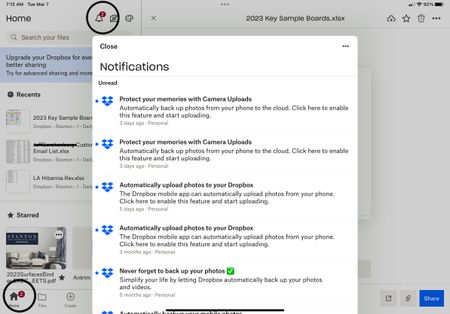
I have several “unread” messages from Dropbox which when opened or marked as read the “2” displayed above the icon will not go away. The marked as read button does nothing and there appears to be no...
 3 years agoI ended up removing App from iPhone and reloaded it. Bit of a faff but worked

Megan Dropbox Community Moderator
3 years agoDropbox Community ModeratorHi Rick17, have you tried uninstalling the app and then re-installing it, like Jay suggested above?
Also dmarie26, could you send me a screenshot, of your notification area on your desktop, where you notice this issue?

dmarie26
3 years agoExplorer | Level 4
 Phcalc3 years agoHelpful | Level 6Well. I reported we can get rid of alerts (unread messages which have been read) by signing off and signing in. Yes it works until next alert. Now I have it back.
Signing off and on is not a fix.
DropBox get the glitch fixed.- dmarie262 years agoExplorer | Level 4
On 3/24/23, I posed this issue (notification flag won't go away). Now, a year later, I revisited the forum for the same issue. Why can't Dropbox fix the problem, glitches, or what ever it's called. I am beyond frustration.

About Apps and Installations
Have a question about a Dropbox app or installation? Reach out to the Dropbox Community and get solutions, help, and advice from members.
The Dropbox Community team is active from Monday to Friday. We try to respond to you as soon as we can, usually within 2 hours.
If you need more help you can view your support options (expected response time for an email or ticket is 24 hours), or contact us on X, Facebook or Instagram.
For more info on available support options for your Dropbox plan, see this article.
If you found the answer to your question in this Community thread, please 'like' the post to say thanks and to let us know it was useful!


