Our Community is in read-only mode until April 8th, learn more here. You can still search existing threads or get help via Dropbox Support, the Dropbox Help Center, or Learn.
Forum Discussion

Martin T.1
7 years agoNew member | Level 2
Stuck on "upgrading dropbox"
As of today Dropbox is permanently stuck on "upgrading Dropbox". I'm running Dropbox in Linux. I've found references to such error messages a good while back by Googling, but no simple fix.
- 7 years agoHey there Martin T.1!So as to have a better understanding of what you’re seeing, could you please send me a screenshot of this message (omitting any personal info)? Please keep in mind that if your Dropbox desktop app is trying to update, the latest stable version should be at 53.4.66 - could you hover over your Dropbox icon and let me know what version you see outlined?Thanks in advance! :grin:

Lusil Dropbox Staff
7 years agoDropbox StaffNo worries, ngtr. Let me know of any updates and I’ll make sure to get back to you as soon as possible. :upside_down:

ngtr
6 years agoHelpful | Level 6
So I figured this out: Dropbox seems to check for a new version and if one is available, then fails to upgrade to it.
From then on, it keeps saying "upgrading Dropbox" constantly. This never gets better, unless I upgrade it by hand. Is there way to fix this or prevent it from trying to upgrade?
It is very annoying, as it constantly makes it look like Dropbox is still syncing. I also don't see any files that are being synced, as the "dropbox upgrading message overlays any other messages.
This has been true for any Dropbox version going back about 1 year from the date of this post. It would be more professional of you if you could make Dropbox log error messages, this makes a problem like this solvable.
This is on Debian Stable (Stretch) Linux.
- ngtr6 years agoHelpful | Level 6
Your instructions for headless upgrade says this:
cd ~ && wget -O - "https://www.dropbox.com/download?plat=lnx.x86_64" | tar xzf -
~/.dropbox-dist/dropboxdThis works, EXCEPT that the second command does not work, because it says that another instance of dropbox is still running. So doing:
cd ~ && wget -O - "https://www.dropbox.com/download?plat=lnx.x86_64" | tar xzf -
dropbox stop
~/.dropbox-dist/dropboxd &
works.
Maybe you want to update your instructions accordingly.
- Lusil6 years agoThanks for keeping me in the loop, and awesome work on the troubleshooting, ngtr!I've passed your feedback along to our dev team so if you have any further comments regarding this, please don't hesitate to let me know. Cheers!
- DBOnLinux6 years agoHelpful | Level 5
As someone else in this thread noted, a request for further information is labelled - wrongly, obviously - as a solution.
Now, user ngtr was good enough to actually provide a solution, but (1) it is manual whereas the application should do this for the user, (2) it is not permanent. To expand on drawback 2: every time Dropbox tries to upgrade itself, I must reapply the fix. Moreover, when Dropbox is going through its regular and doomed struggle to upgrade itself, it uses some resources and indeed in such a way as to slow down my system, especially Firefox. All of this is pretty disastrous. So, Lusil, please ask the developers for an actual fix. Thank you.
- DBOnLinux6 years agoHelpful | Level 5
Thank you for this solution. I appreciate it. However, it is only partial - as my post further down explains.
 davewiner5 years agoExplorer | Level 3
I'm having this problem now. And none of the solutions I've tried, including the ones outlined here, have worked.
All my Linux servers that run Dropbox are now trying to upgrade themselves and apparently failing. Nothing is syncing.
I'm getting a jumble of errors -- I have no idea what they mean -- and I don't want to know. Here's what it looks like.
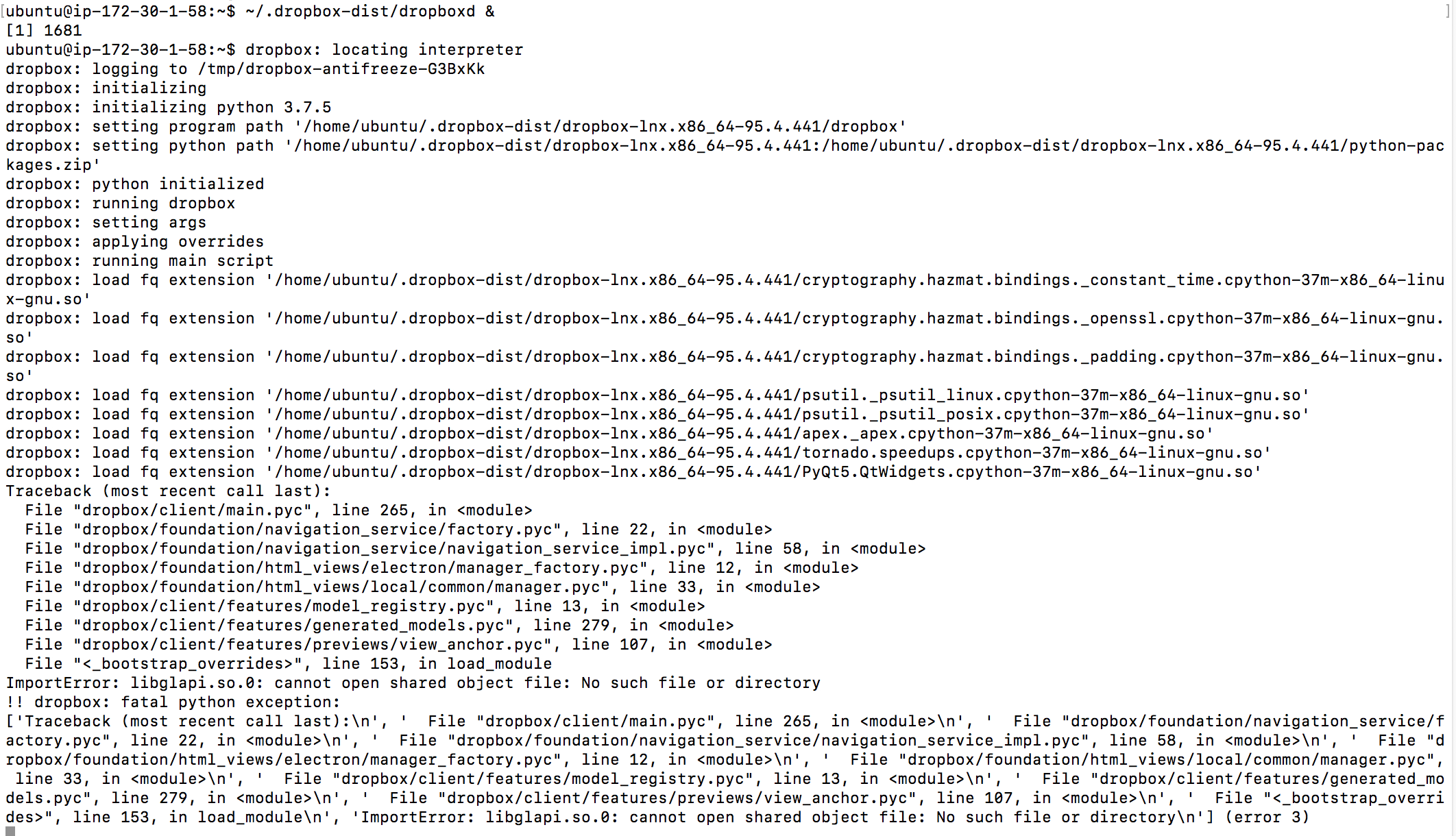
- Dinsdale5 years agoHelpful | Level 5I'm finding it difficult to read those log lines, but it looks as though you are missing "libglapi.so.0" and on my - OpenSuse Leap 15.1 - system that is being provided by the package "Mesa-libglapi0". There is a 32-bit and a 64-bit version, I only have the 64-bit version installed.
- danielbradley5 years agoNew member | Level 2
Davewiner: what Ubuntu version are you using? Also is it server (with UI) or desktop?
Daniel.
About Apps and Installations
Have a question about a Dropbox app or installation? Reach out to the Dropbox Community and get solutions, help, and advice from members.
The Dropbox Community team is active from Monday to Friday. We try to respond to you as soon as we can, usually within 2 hours.
If you need more help you can view your support options (expected response time for an email or ticket is 24 hours), or contact us on X, Facebook or Instagram.
For more info on available support options for your Dropbox plan, see this article.
If you found the answer to your question in this Community thread, please 'like' the post to say thanks and to let us know it was useful!


