Our Community is in read-only mode until April 8th, learn more here. You can still search existing threads or get help via Dropbox Support, the Dropbox Help Center, or Learn.
Forum Discussion

Flame Soulis
1 year agoHelpful | Level 6
Where's the Linux preferences GUI? The CLI doesn't work.
The title says it all. While setting up a fresh laptop with EndeavourOS, I was able to load the UI from an older installation for a moment until it closed itself. This usually happens when the app is...

Flame Soulis
1 year agoHelpful | Level 6
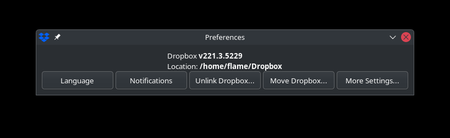
And just in case, I decided to force the system to prevent loading any updates, and this is the older UI that shows up from v214.
So, what's the big deal with the removal of this window?
- Megan1 year ago
Dropbox Community Moderator
Hey Flame Soulis, thanks for posting here today!
I'm wondering if the behavior you noticed earlier was because you used our beta version (221.3) instead of our stable one.
Just to make sure we're aligned here. It looks like that second window is what you were looking for, right? You don't seem to have any issues with that. Feel free to correct me, if I'm wrong.
Let me know more, and we'll take it from there.
- Flame Soulis1 year agoHelpful | Level 6
Good evening, Megan!
I've reviewed my installation and the version I installed was 214. The dropbox system itself appears to be automatically updating the system to 221.3, which I confirmed with another machine (an Ubuntu 24.04 laptop that previously had v220).
The only way to prevent this is to lock the .dropbox-dist folder, but this prevents the system from synchronizing correctly.
Additionally, on the page that loads up when you click on More Settings, it states the following:
Note: Selective sync, proxy, and bandwidth settings are now only available through the Command Line Interface (CLI).
This was updated on March 21st of this year.
Also, I could not link the page without receiving the following error:

About Apps and Installations
Have a question about a Dropbox app or installation? Reach out to the Dropbox Community and get solutions, help, and advice from members.
The Dropbox Community team is active from Monday to Friday. We try to respond to you as soon as we can, usually within 2 hours.
If you need more help you can view your support options (expected response time for an email or ticket is 24 hours), or contact us on X, Facebook or Instagram.
For more info on available support options for your Dropbox plan, see this article.
If you found the answer to your question in this Community thread, please 'like' the post to say thanks and to let us know it was useful!


