Our Community is in read-only mode until April 8th, learn more here. You can still search existing threads or get help via Dropbox Support, the Dropbox Help Center, or Learn.
Forum Discussion

Flame Soulis
1 year agoHelpful | Level 6
Where's the Linux preferences GUI? The CLI doesn't work.
The title says it all. While setting up a fresh laptop with EndeavourOS, I was able to load the UI from an older installation for a moment until it closed itself. This usually happens when the app is...
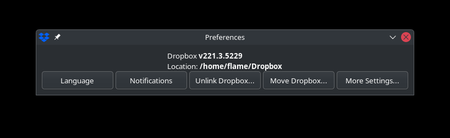

Flame Soulis
1 year agoHelpful | Level 6
Good evening, Ryan!
The issue is that I didn't download or install the beta build on the Ubuntu laptop, so if this was for beta only, it appears to have somehow become part of the release.
Either way, here is the output of /usr/bin/dropbox help
Granted, this is on the EndeavourOS laptop I use, and not the Ubuntu laptop. The Arch setup bases the installation from the .dropbox-dist tarball archive for the releases, and copies it to /opt/dropbox. The dropbox binary is then linked to /usr/bin/dropbox.
The AUR noted it was based on 214. I manually updated it to 220.4.4126 with the same process, which produced the results above. The .dropbox-dist folder had writing permissions removed to prevent the automatic update to 221.3. If you feel this will hurt testing, let me know and I can let it perform the automatic updates.
Because I understand that Arch is not one of the supported distributions, I will be reviewing the Ubuntu 24.04 laptop once I get home and repeat for the sake of brevity, as that was set up from the DEB packages from the website. Despite that, it also updated itself to 221.3.

RyanFromDropbox Dropbox Product Manager
1 year agoDropbox Product ManagerHi Flame Soulis -- Thanks for providing this context!
Based on your response and screenshots, it looks like you're using a non-standard setup for Dropbox on Linux.
You're missing the wrapper (dropbox) that actually implements the command line interface. This is a separate package named nautilus-dropbox that you can get here: https://github.com/dropbox/nautilus-dropbox
As we roll out the simplified preferences experience on Linux, you'll need this to ensure the Dropbox CLI works as expected!
Hope this helps! Let me know if you have any questions.
Cheers,
Ryan
About Apps and Installations
Have a question about a Dropbox app or installation? Reach out to the Dropbox Community and get solutions, help, and advice from members.
The Dropbox Community team is active from Monday to Friday. We try to respond to you as soon as we can, usually within 2 hours.
If you need more help you can view your support options (expected response time for an email or ticket is 24 hours), or contact us on X, Facebook or Instagram.
For more info on available support options for your Dropbox plan, see this article.
If you found the answer to your question in this Community thread, please 'like' the post to say thanks and to let us know it was useful!


