Our Community is in read-only mode until April 8th, learn more here. You can still search existing threads or get help via Dropbox Support, the Dropbox Help Center, or Learn.
Forum Discussion

Flame Soulis
1 year agoHelpful | Level 6
Where's the Linux preferences GUI? The CLI doesn't work.
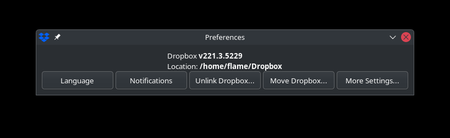
The title says it all. While setting up a fresh laptop with EndeavourOS, I was able to load the UI from an older installation for a moment until it closed itself. This usually happens when the app is...

Nerdgasm
11 months agoHelpful | Level 5
I'm an Arch-based distro user as well and the change to having the CLI caught me off guard and absolutely ruined not only my day, but my next few months. I have an open escalated support ticket with support right now and all they really told me to do was go to the older version. I have responded by telling them that it is not a solution, just a temporary workaround that only pushes our anger to a slightly later date. I haven't paid thousands of dollars to Dropbox just to have core functionality ripped away from me. My organization manages currently about 70ish TBs of data in Dropbox with many thousands of files and folders that Selective Sync is used to manage. I told them that we are Dropbox users, not scripters, and this sort of change is trying to force us to be scripters. The amount of time lost by having to manage Selective Sync with CLI is immense. I expressed that it is literally cheaper for us to build the server infrastructure within our organization than it is to spend the person-hours using the CLI to manage Selective Sync. If they don't announce a re-adding of the GUI then we are implementing a short timeline that we have drafted to build the infrastructure and end our usage of Dropbox.
About Apps and Installations
Have a question about a Dropbox app or installation? Reach out to the Dropbox Community and get solutions, help, and advice from members.
The Dropbox Community team is active from Monday to Friday. We try to respond to you as soon as we can, usually within 2 hours.
If you need more help you can view your support options (expected response time for an email or ticket is 24 hours), or contact us on X, Facebook or Instagram.
For more info on available support options for your Dropbox plan, see this article.
If you found the answer to your question in this Community thread, please 'like' the post to say thanks and to let us know it was useful!


