Our Community is in read-only mode until April 8th, learn more here. You can still search existing threads or get help via Dropbox Support, the Dropbox Help Center, or Learn.
Forum Discussion

Flame Soulis
1 year agoHelpful | Level 6
Where's the Linux preferences GUI? The CLI doesn't work.
The title says it all. While setting up a fresh laptop with EndeavourOS, I was able to load the UI from an older installation for a moment until it closed itself. This usually happens when the app is...
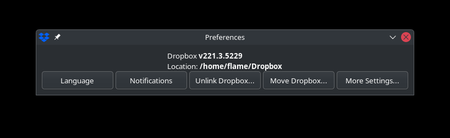

Nerdgasm
11 months agoHelpful | Level 5
They aren't going to add it back. This is what I was told after my support representative said they contacted the engineering team.
"They've confirmed that they don't plan to roll back the UI changes. At this stage, I'm unable to provide a specific date for when they will be rolled out to users on the stable release. "
MrShifty
11 months agoHelpful | Level 6
Well they need to reconsider that. This like a car company just deciding to remove steering wheels from their cars. It's not okay.
My plan renews in October. That gives them six months to fix this problem or they'll lose me as a customer, and I will make sure all the others I've recommended Dropbox to leave as well. This includes businesses. This is one of the most anti-usability moves I've seen a company do.
- Nerdgasm11 months agoHelpful | Level 5
Well you better prepare for that because there aren't enough Linux users for them to care about us. They aren't going to change their minds on this.
About Apps and Installations
Have a question about a Dropbox app or installation? Reach out to the Dropbox Community and get solutions, help, and advice from members.
The Dropbox Community team is active from Monday to Friday. We try to respond to you as soon as we can, usually within 2 hours.
If you need more help you can view your support options (expected response time for an email or ticket is 24 hours), or contact us on X, Facebook or Instagram.
For more info on available support options for your Dropbox plan, see this article.
If you found the answer to your question in this Community thread, please 'like' the post to say thanks and to let us know it was useful!


