2025 sparked some incredible conversations across our community 👩💻. Discover the highlights and see what’s ahead in 2026.
Forum Discussion

RS2020
2 years agoHelpful | Level 6
Dropbox Sign link expires after 7 days ?
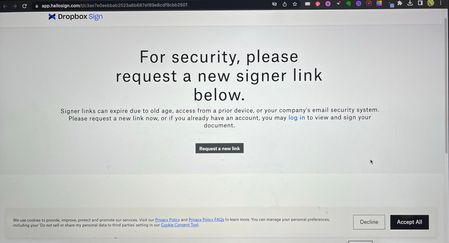
I have sent hundreds signatures requests via Dropbox Sign. 60%+ already signed without any problem but since Yesterday people started complaining the link is not valid any more. Multiple people infor...

Rich Super User II
2 years agoSuper User II
RS2020 wrote:
I don't understand how Gmail can send the Hello sign message and make the link expire?
She's not saying that Gmail (in this case) is sending the message seen in the screenshot. She's saying that if the mail client/system on the recipient's end is scanning the links in the email, then that scan could be tripping the one-time validity of those links, which would cause them to expire and result in Dropbox Sign displaying the message you see in the screenshot.
You send a sign request to someone. The email they receive has a link to click on. That link is only valid once and then it expires. The mail client scans the link in the message to see if it's safe. It does this, basically, by opening the link and seeing where it leads and what's on the page. That link is now expired because it was already used; not by the recipient, but by the scanning process.

RS2020
2 years agoHelpful | Level 6
Ok thanks for the clarification.
I Think I am starting to understand what is going on:
- I send the first sing request in bulk. (possibly this is alarming the mail clients for a possible problem)
- After 3 days Dropbox sign is sending a reminder. (I think it disables renders the first sing request mail link)
- Some users forward the sing request e-mail (one of the two) to another person who is capable of signing.
- Some users sing request links are expired (maybe because they click on the first mail in stead of the reminder mail OR because Dropbox sign is limiting the amounts of openings/forwards)
- People who have to click on the 'Request new link' button will receive the new sing request in spam because all the previous actions and maybe because Dropbox Sign is sending e-mails with the Hello sign mailserver (mail.hellosign.com). This is alerting many mail clients. It could be phishing.
Is there anything I can do to solve this?
Thx!


About Dropbox Sign

Ask your Dropbox Sign questions here.
The Dropbox Community team is active from Monday to Friday. We try to respond to you as soon as we can, usually within 2 hours.
If you need more help you can view your support options (expected response time for an email or ticket is 24 hours), or contact us on X, Facebook or Instagram.
For more info on available support options for your Dropbox plan, see this article.
If you found the answer to your question in this Community thread, please 'like' the post to say thanks and to let us know it was useful!


