Our Community is in read-only mode until April 8th, learn more here. You can still search existing threads or get help via Dropbox Support, the Dropbox Help Center, or Learn.
Forum Discussion

Ed Dropbox Staff
8 years agoDropbox StaffThings you can do with Dropbox Paper
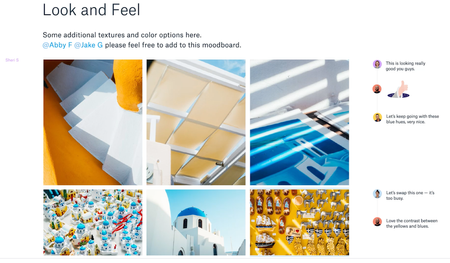
1. Holding brainstorms
You’ve likely participated in your fair share of brainstorms, but what happens when your team is scattered across three offices and three time zones? Paper is designed to h...

FionaDropbox Staff
6 years agoDropbox StaffHey anyam!
Thanks for bringing this to our attention!
Here is our Dropbox Paper guide: https://www.dropbox.com/paper/guide
You can also visit this Help center article for Paper step by step instructions: https://help.dropbox.com/files-folders/paper
You can now do more than 5 things with Paper! :grinning:
- Brainstorm.
- Meeting notes.
- Connect Paper with your Calendar
- Create a to Do's list and assign the tasks.
- Add media and attach files.
- Export a Paper doc as a word doc, pdf. and .md
- Presentation mode.
Discover all the ways you can make your work easier with Paper and get back to us with all your feedback. :grin:
Thanks!

- Fiona6 years ago
Pleasure presenting my fav Dropbox feature! :heart: :grin:
Enjoy Dropbox Paper anyam!
 buffywan6 years agoHelpful | Level 6
Is there somewhere I can read or a video I can watch to help understand this feature better?
"When the meeting’s over, you can group the most important items in a table for quick reference"
- Fiona6 years ago
Hello buffywan!
You can create a table to group up the meeting informatio as suggested just by clicking the table icon.
Here is also a video presenting Dropbox Paper functionalities: https://www.youtube.com/watch?v=TiJzU4-feJg
Hope this helps. :penguin: Cheers!

About Dropbox Tips and Tricks
Find helpful advice and smart ways to get more out of Dropbox.473 PostsLatest Activity: 2 years ago
The Dropbox Community team is active from Monday to Friday. We try to respond to you as soon as we can, usually within 2 hours.
If you need more help you can view your support options (expected response time for an email or ticket is 24 hours), or contact us on X, Facebook or Instagram.
For more info on available support options for your Dropbox plan, see this article.
If you found the answer to your question in this Community thread, please 'like' the post to say thanks and to let us know it was useful!


