Our Community is in read-only mode until April 8th, learn more here. You can still search existing threads or get help via Dropbox Support, the Dropbox Help Center, or Learn.
Forum Discussion

Lulo
1 year agoNew member | Level 2
Dateien nicht offline trotz Konfiguration
Hallo Dropbox-Community Ich hoffe auf eure Hilfe, vielleicht hatte jemand von euch schon das gleiche Problem. Vorweg: Ich nutze Dropbox schon viele Jahre und hatte dieses Problem bis vor wenigen M...
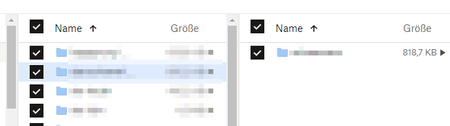
- 10 months ago
Hallo,
Vielen Dank für Ihren Beitrag in unserem Forum!
Die selektive Synchronisierung, welche Sie beschreiben ist eine andere Funktion als die Dateien oder Ordner nur online oder offline verfügbar zu machen.
Wenn Sie Ordner oder Dateien nur online verfügbar gespeichert haben, dann muss diese Einstellung für jede Datei bzw. jeden Ordner manuell geändert werden und zwar indem Sie per rechts-Klick auf die Daten klicken und ''offline verfügbar machen'' auswählen.
Die Anleitung dazu ist auch hier zu finden: https://help.dropbox.com/de-de/sync/access-files-offline
Hoffentlich helfen Ihnen diese Informationen weiter.
Viele Grüße,
Adrian


Lulo
1 year agoNew member | Level 2
Vielen Dank, Sarah, für Ihre Antwort. Ich arbeite inzwischen mit jemandem aus dem Supportteam an dem Problem, das nicht so einfach zu lösen ist, wie man denken könnte. Ich weiß, wie die selektive Synchronisation funktioniert und ich weiß auch, was man einstellen muss, um Dateien offline verfügbar zu haben. Das funktioniert aber nicht mehr, es ist ein größeres Problem. Ausserdem bezieht es sich nicht auf einzelne Ordner und Dateien, sondern auf sehr viele.

About Eine Frage stellen

Sie haben Fragen? Richten Sie sie an die Dropbox Community!
The Dropbox Community team is active from Monday to Friday. We try to respond to you as soon as we can, usually within 2 hours.
If you need more help you can view your support options (expected response time for an email or ticket is 24 hours), or contact us on X, Facebook or Instagram.
For more info on available support options for your Dropbox plan, see this article.
If you found the answer to your question in this Community thread, please 'like' the post to say thanks and to let us know it was useful!


