Your workflow is unique 👨💻 - tell us how you use Dropbox here.
Forum Discussion

manbo
5 years agoExplorer | Level 4
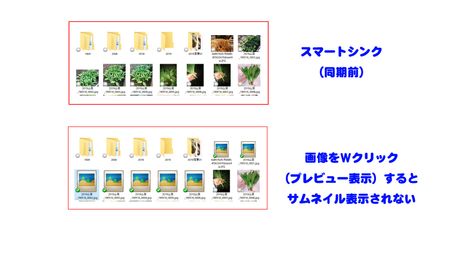
画像のサムネイルが表示されない
PCを新規購入して初めて「スマートシンク」でDropboxを使用しています。 OSはwindows10 Proです。 Dropboxのフォルダを開くと最初は画像はサムネイル表示されますが、そのファイルをクリックしてプレビューする(ローカルに保存される)と画像ファイルのサムネイルが見れなくなります。 リロードしても「ディスクのクリーンアップ」で「縮小表示」のキャッシュファイルを削除しても同じ...

Kaname Dropbox Staff
5 years agoDropbox Staffmanbo さん、こんにちは!
Dropbox が正常に動作していることを確認するため、お使いのコンピュータと Dropbox アカウントのリンクを解除してから再リンクさせ、設定し直すことをおすすめします。この操作により、ファイルに影響を与えたりファイルを削除せずに、変更した設定を復元することができます。
ご利用のパソコンとのリンクを解除してから再リンクするには、次の手順に従ってください。
1) システム トレイまたはメニュー バーの時計の横にある Dropbox アイコンを右クリックします。
2)検索バーの右側にあるプロフィール写真またはイニシャルをクリックし、[基本設定]を選択します。
3) [アカウント] タブを選択します。
4)[アカウント]タブで[リンクを解除]をクリックします。
5) アカウント情報の再入力を求めるメッセージが表示されます。
通常のアクティビティに戻る前に、アカウントのインデックスの再登録や保留中の変更同期を行います。このプロセスには数分かかります。
問題が継続する場合はDropboxサポートへお問い合わせください:envelope:
About 質問する

他のユーザーのディスカッションで回答が見つかる場合があります。回答が見つからない場合は、新しく質問してください。
The Dropbox Community team is active from Monday to Friday. We try to respond to you as soon as we can, usually within 2 hours.
If you need more help you can view your support options (expected response time for an email or ticket is 24 hours), or contact us on X, Facebook or Instagram.
For more info on available support options for your Dropbox plan, see this article.
If you found the answer to your question in this Community thread, please 'like' the post to say thanks and to let us know it was useful!


