Our Community is in read-only mode until April 8th, learn more here. You can still search existing threads or get help via Dropbox Support, the Dropbox Help Center, or Learn.
Forum Discussion

Trudy Tran
2 years agoExplorer | Level 3
How to replace signers in pending signature requests? Or Cancel a pending signature requests?
I am a Dropbox Sign Standard trail plan. I have 2 questions: 1. In your document, We can replace signers in pending signature requests on Dropbox Sign Standard plan. But I don't see this feature ht...

Hannah Dropbox Community Moderator
2 years agoDropbox Community ModeratorHi again, Trudy Tran!
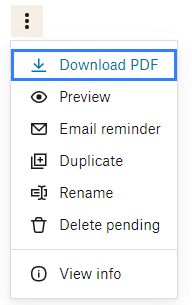
Regarding cancelling the signature request, the option you need to click is the "delete pending".
You can see all the steps here.
As for replacing a signer, you can only edit the signers if no one has signed the request yet; is it possible that someone already signed?
Let me know and we'll go from there.
 Trudy Tran2 years agoExplorer | Level 3
As for replacing a signer, you can only edit the signers if no one has signed the request yet; is it possible that someone already signed?
For no one has signed the request yet.
- Hannah2 years ago
Are you seeing the same behavior when logging in through a different browser or a private browsing window as well, Trudy?
About Dropbox Sign

Ask questions and get help with Dropbox Sign here.
The Dropbox Community team is active from Monday to Friday. We try to respond to you as soon as we can, usually within 2 hours.
If you need more help you can view your support options (expected response time for an email or ticket is 24 hours), or contact us on X, Facebook or Instagram.
For more info on available support options for your Dropbox plan, see this article.
If you found the answer to your question in this Community thread, please 'like' the post to say thanks and to let us know it was useful!


