We’re Still Here to Help (Even Over the Holidays!) - find out more here.

Photographers
Group Content

Camera uploads from my phone and some photos of my cats
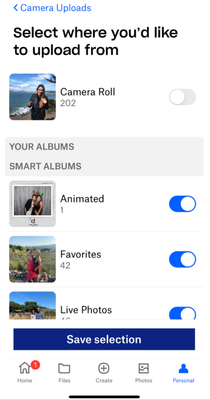
Now, I’m no professional photographer, but I do really enjoy taking photos and thanks to my smartphone 🤳. I can do this pretty easily, many, many times a day! If there’s one thing that you're almost guaranteed to see me taking photos of, it’s probably my cats. Like, seriously, it’s not even funny how many photos I have of them but I just can’t help myself. While my phone is a pretty awesome piece of technology, it doesn’t have an unlimited memory and with my propensity to snap away throughout the day, the memory that it has can fill up pretty quickly. Thankfully, camera uploads allows me to take as many photos as I like, without having to worry about filling my phone up. Turn on camera uploads If you haven’t already got your camera uploads turned on, I highly recommend you do it now. It’s really simple to do and only takes a couple of minutes, but it will save you a lot of time and space in the long run. If like me you're using an Android device, all you need to do is open the mobile app, tap on the menu button and select Settings, then under Features tap on Camera uploads, then tap on Backup photos and when prompted tap Allow If you’re on an iOS device, it’s a little bit different but equally as simple. Just go to the person icon and tap on Camera uploads. Then, tap OK and select what you would like to upload and if you would like to use cell data, then tap Turn on camera uploads. Organize your photos I often found myself looking for photos on my phone for ages, only to find I’d scrolled past the tiny image 2 or 3 times before I spotted it. Since I enabled camera uploads, I no longer have this problem because all of the photos I take are automatically added to a folder called Camera uploads in my Dropbox account. From here, I can move them into different folders, add tags, and do a few other things to help organize my photos, like changing the naming convention and adding various automations. Then I can simply search for the photo I want in the search bar, although I will admit, in my case, searching simply for “cat” doesn’t really make it any easier to find what I’m looking for 👀. Tell us what you think I’d love to hear about how you use camera uploads so please leave a comment below. I’d also equally love to see some photos of your pets, bonus points for cats!8.5KViews11likes6CommentsWhat’s the one tip you’d give yourself starting out as a photographer?
There’s nothing quite like the power of hindsight, especially when it comes to some of those golden life tips you pick up along the way that would made your everyday a lot easier if you had known them when you were younger. While we don’t have the ability to travel back in time and give ourselves the helping hand that could have made all the difference, we do have the power to pass on these little nuggets of brilliance to people who are following a similar path to yours. So, here’s your chance to help and give some advice that could benefit someone who is just starting out as a photographer and allow them to take the next steps in their journey. Now, as I’ve said before, I am not in any way, shape, or form a professional photographer, but I have taken a lot of photographs over the years and made my fair share of mistakes along the way. When I first started to take photographs, I was using an analogue camera, with actual film in it, and I can’t tell you the amount of times I took a photo that didn’t turn out anything like I thought it would. So for me, the one tip that I would give myself now, would be to take more than one photo. This is, of course, a lot easier to do now than it was back then. Digital cameras and smart phones are awesome and being able to instantly see your photo and not being restricted to the amount of shots you can take because you’re running out of film is a huge plus for making sure you get awesome shots. I say, get totally snap happy, and when you think you’ve got enough photos, take some more, even if you think you’ve already got the ultimate shot, because you’ll never know if the next one will turn out better, unless you take it. I also pretty much exclusively use my phone for taking photos, and thanks to Camera uploads I can keep my phone memory relatively clear and make sure I never accidentally delete the best photo of the bunch. So, now over to you, if there was one tip you would give yourself when you were starting out as a photographer, what would if be?12KViews9likes8CommentsHere's how our Community Manager Emmet uses Dropbox to manage photographs
We really want to hear all about how you use Dropbox as photographers, so I guess it's only fair that before you tell us your stories, we tell you one of ours. Our very own Emmet has been part of the Community team here at Dropbox for the best part of the last 2 years but in a past life, he was a photographer and had a serious process for organizing his photos and files to make sure he saved those memories for everyone else too. Check his story out below. For about 5 years, I worked as photographer for University College Cork, providing photos and other creative content for the student societies in the college. There were over 100 individual societies in the college, and I would photography over a dozen events each week. During my 5+ years working in UCC, I uploaded over 250GB of photos, videos and graphics, for students, and the college, to use and share as part of their activities. Organising that many photos, videos and more could have been a bit of a nightmare, but thankfully Dropbox was there to help keep everything organised. I created individual folders to house the content for each society and created sub-folders inside these for each event. I would share these folders with the society/societies involved, and they would use this content for promotion, and sharing on their social media channels. This allowed me to keep everything organised and easy to find. At the end of each year, I would create a new folder to contain all the events that year, and ensure I could easily find them in the next year. Dropbox proved an invaluable tool over my years as a photographer, and allowed me to quickly access all of the photos based on the host of the event, time of the event etc. At the end of each year, I would create a compilation video, celebrating the hard work of all the student societies. When I was creating this, I found the Photo tab on Dropbox invaluable, as I would be able to see the thousands of photos I took every year, and quickly pick out my favourites for the video. It was an amazing tool for organizing my files then - and still is today, so it’s great to be able to use it at work everyday now. In fact, Emmet’s filing system was so good that he managed to dig out a 10 year old photo he took of fellow Community team member Amy on her first day of college - not knowing their paths had crossed before, Dropbox is really amazing sometimes! So, that's how Emmet uses Dropbox to sort his photographs, now we'd love to hear your number one tip for using Dropbox as a photographer.2.9KViews8likes1CommentFall Photography Tips & Tricks
Fall, or autumn as we call it here in Ireland, is arguably the most photogenic season. Missing out on capturing its beauty would be a shame. Here’s how you can make the most of this vibrant time of year with some simple photography tips. Play with Colour in Your Composition The fall colour palette is so recognisable and it is with no doubt one of the main things that sets your Autumnal photos apart from the rest of the year. With nature slowly turning to beautiful gold, orange, red and brown, it is no wonder the rich autumn colours are so iconic and play to the senses to give a warm feeling to a photo. To emphasize these, you can easily link Photoshop to Dropbox, allowing you to boost the already present colours in post-editing, enhancing the natural vibrancy of the scene. Capture the Magic During Golden Hour To truly make the most of fall’s spectacular display, shoot your landscapes during the golden hour (the hour after sunrise and the hour before sunset). This warm, soft light enhances the already vivid fall colors, casting a romantic glow over your photos. It’s the perfect time to capture the essence of a crisp autumn walk through a forest or along a quiet country road. Want to share a photo of a glorious autumn sunset on your social media? Easily add watermarks to your photos - Nature may be beautiful but, you deserve some credit too! 😉 Explore Fall in the City Fall isn’t just for those in rural areas, cities offer their own unique autumnal charm. Capture the season’s essence with shots of fall fashion, urban wildlife, or maybe you could get really artsy with puddle reflections. The contrast of vibrant leaves against urban landscape can create real visual impact. It can be exciting in the city - we easily get inspired and may take waaay too many photos ( speaking for myself, especially with my weakness for fall fashion). We want to share what we see with family and friends, and Dropbox makes it so easy to share large, high-resolution photographs with sharable links. Stay Safe When you’re out chasing that perfect autumnal shot, safety should always be a priority. Be cautious of slippery surfaces, especially near bodies of water or on hiking trails with fallen leaves and damp ground, wear sturdy shoes with good grip, carry a fully charged phone, and respect wildlife by giving animals their space. Tips from a Photographer One of our talented Community managers, who also happens to be an incredible photographer, shared some valuable fall photography tips with us: “I love capturing leaves falling and love using reflections in my photos, especially during autumn. There is such a panoply of colours that you can capture. I often recommend using trees, windows, etc. to help frame your photos. It helps capture the moment and really draw yourself into the experience” Here are a few examples of Emmet’s amazing photography. As you can see he really can capture that natural mystical radiance found in Ireland during the Autumn months. So what are your top photography tips for fall? Share your thoughts and join the conversation below! Let’s capture the beauty of this incredible season together.1.1KViews7likes2CommentsWelcome to Groups: Photographers
OK, I guess the name is probably a bit of a giveaway but I thought I’d take this opportunity to welcome you all to our brand new Community group for photographers and share a little bit of an insight to what you can expect here. We know that a lot of you use Dropbox for some really creative work, like photography. Whether it’s a serious hobby, your profession or just something you like to do when you’ve got some spare time, we’ve created this space for you. We thought it would be great if we could connect you with others who shared your passion and give you a place where you could hang out, socialise and share some tips on how to get the most out of using your Dropbox account. Who can join? Absolutely anyone! There is no barrier for entry, so whether you’re a seasoned-pro or just thinking about getting started, this is a great place for you to come and share how you use Dropbox as a photographer. What can I post? Anything photography related is welcome. If you want to find photographers in your area, collaborate, showcase your work, discuss the latest equipment, or talk about the best way to categorise the photos in your Dropbox account, this is the perfect place to start a discussion. This group is a social place, so while we want you to talk about Dropbox and help each other, it’s not intended to be your first stop for customer support. So, if you are looking for help from one of our Community Moderators, the best place to find it is still over on our Ask the community board. Tell us what you think This group won’t work without all of you getting involved so we’d love to hear your thoughts about how we can make it better, so if you’ve got any feedback, or just want to say hi, please leave a comment below.2.7KViews7likes3CommentsBoost your Photography Game with Dropbox in 2025
Creating a photography dream board is like crafting your own roadmap to creative success! 🗺️📷 It’s a visual way to collect your ideas, inspirations, and big ambitions - all in one place. With it, you can dream big, set clear goals, and envision the amazing artist and photographer you’re destined to become. At Dropbox, we’ve got your back every step of the way. 🚀 To help you get started, here are some thought-provoking questions to spark your creativity, plus a few expert tips from us to really get the ball rolling. We hope this resource reignites your passion for photography and fuels your creative fire 🔥. Who knows where your camera lens will take you next? And hey, we’d love to hear from you 💬✨. What tips and strategies have helped you grow your photography business online? 📸 How do you use social media platforms to sell your photos or share your passion for photography. Let us know, and let’s continue to inspire one another! 🚀🙌193Views2likes0CommentsHow do you organize your photos?
Hey photographers, it’s hard to believe we’re already well into the summer. With brighter and longer days, I’ll probably be getting out and taking photos a little more regularly, which got me wondering about the best way to organize my photos. I’m not gonna lie, my current system is far from ideal. I have Camera uploads turned on and my photos make their way to Dropbox and then they just stay where they are, which isn’t really helpful if I want to find a photo. This is something that I want to improve. I’ve already been inspired by how one of my team mates, Emmet, organizes his photos, but I wanted to hear how some of you experts are doing it, too. Are you organizing by shoot, by client, by subject, or by something completely different? Are you using automations, changing naming conventions or doing anything else to help make the way you organize your photos easier, or do you go through everything at the end of the day and find a home for it in your Dropbox account? Whatever you’re doing to keep your photos organized, I’d love to hear about it and you could potentially help inspire me and some of our other group members to get our photos a little more organized.1.9KViews2likes1CommentAutomated watermarks and file renaming
Hey everyone, I hope you're all doing well and feeling creative. I just wanted to let you all know about some awesome new updates to the folder automation features that I thought would be really cool for photographers. You'll now be able to configure multiple automations on selected folders and subfolders to automatically rename files, add watermarks, and more. You can find out more about these automations and how to get started with them by reading this post. Do you think these automations will improve your workflow and save you time? Let us know what you think by leaving a comment below.4.8KViews2likes3Comments
Share pictures with loved ones automatically?
My wife keeps the pictures of our two year old daughter synced with dropbox. We want to share pictures of her with our large extended family, but we also don't want to post the pictures to social media. I created an app that takes dropbox folder and creates a secured online photo gallery for your friends and family. https://www.producthunt.com/posts/myphotos-by-gembani6.1KViews2likes3CommentsClass Reunion Photo Page Set-up
In the past I have used Dropbox to post photos for my high school reunion. I was able to set-up a display page available by invitation, post the photos, and make them available for free download. I set it up for no edit or uploads from participants other than myself. More than a decade has passed, I have become less active on Dropbox, and I don't really don't recall what to do to set it up again. Does anyone have, or is anyone aware of a template that can be used to make a similar set-up? I am currently trying to help a friend to do this (he has 3 TB available, so memory is not an issue). Any assistance would be greatly appreciated.Solved5.8KViews2likes6Comments





About Photographers

This is a space for Photographers of all levels to connect and share tips about using Dropbox. Join today to network, collaborate, and exhibit your work.Latest Activity: 3 days ago
Open Group
The Dropbox Community team is active Monday to Friday. We try to respond to you as quickly as we can, at least within a business day.
If your request is urgent, please be sure to Contact Support so our Customer Experience team can get started on your request.
This community group is for networking and collaboration, not contract discussions. Reach out to your account team for questions you need answered about your specific account and contract.