We’re Still Here to Help (Even Over the Holidays!) - find out more here.

how do I get rid of this frustrating pop up when sharing a link with a client? We're a paid dropbox business member and I get a tonne of clients telling me they cant access the files because of this ...

jaycub
7 months agoHelpful | Level 5
I'm curious why the original thread was closed here, but yes, this is still an issue, and I am still having to talk clients around it, and it still makes all of us look bad.
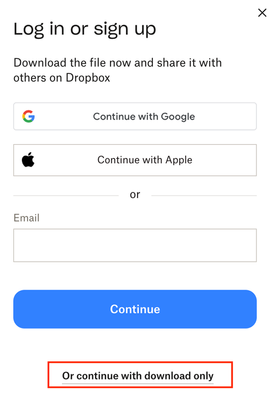
Jay if you send a link using the "Copy Dropbox link" the recipient is able to view the file on the Dropbox site. If the recipient clicks "download" (wherever it is now, this UI seems to change daily), that recipient will be greeted with the above modal prompting them to "Log In or Sign Up", leaving "or continue to download only" in a much smaller font at the bottom (oddly, this darkUI feature hasn't changed in YEARS).
So, please do not ask for "more details about how users don't have permissions" or "what browser are you experiencing the issue". It is a KNOWN ISSUE, the Dropbox team is aware of it, it is intentional, and paying customers are frustrated by it. It is a VERY simple UI fix. Echoing Remy_vE above, let's get this fixed, or get a reasoning on how using paid accounts as vehicles to dupe file recipients into signing up for accounts is more important than satisfaction of paying customers. I am happy to recommend well-intentioned and beneficial products to my clients and have done a lot of Dropbox evangelising in the past, but it is issues like this and the staff responses that are indicative of a downward slide
Related Content
- 3 years ago