Your workflow is unique 👨💻 - tell us how you use Dropbox here.
Forum Discussion

sam93
6 years agoExplorer | Level 3
How to create a folder outside the App Folder or User's Dropbox through the Business Endpoint?
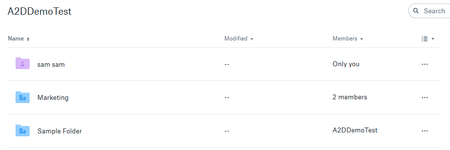
Hi Experts, We want to create a folder outside the User's Dropbox root folder using the Business Endpoint. Here is an example, I want to create a folder say Sales outside the Sam Sam (which is the ...
- 6 years ago
It looks like your team is using the "team space" configuration and you want to use the Dropbox API to operate inside that team space.
Dropbox API calls default to the member folder, but you can set them to work in the team space if you want. For information on how to do so, please refer to the Namespace Guide:
https://www.dropbox.com/developers/reference/namespace-guide
Note that you'll need to use a "full Dropbox" Dropbox API app (or "team member file access" Dropbox Business API app) to do so. Apps with the "app folder" permission can't access the team space.
sam93
6 years agoExplorer | Level 3
Hi Greg,
Thanks a lot for the information.
In either of the case, whether the team is configured as "Team Space" or not, we can continue using create_folder_v2, correct? Even the same would work if it is an individual Dropbox, right?
Thanks,
Sam

Greg-DB Dropbox Community Moderator
6 years agoDropbox Community ModeratorNo problem, I'm happy to help.
Yes, whether the account is an individual account, or on a team either using the team space or not, a full Dropbox app can use create_folder_v2 to create folders anywwhere in the account. (Likewise, a Dropbox Business API app with the team member file access permission can use create_folder_v2 to create folders regardless of whether or not the team is using the team space configuration.)
The only limitation is that create_folder_v2 can't be used to create the special "team folders" used by teams that aren't using the team space configuration. That would require the use of /2/team/team_folder/create. (Indeed, this complication is one of the things the migration to the team space configuration is meant to address.)
About Discuss Dropbox Developer and API

Explore Dropbox Developer & API discussions with developers like you.
The Dropbox Community team is active from Monday to Friday. We try to respond to you as soon as we can, usually within 2 hours.
If you need more help you can view your support options (expected response time for an email or ticket is 24 hours), or contact us on X, Facebook or Instagram.
For more info on available support options for your Dropbox plan, see this article.
If you found the answer to your question in this Community thread, please 'like' the post to say thanks and to let us know it was useful!


