2025 sparked some incredible conversations across our community 👩💻. Discover the highlights and see what’s ahead in 2026.
Shared Links
988 Topics
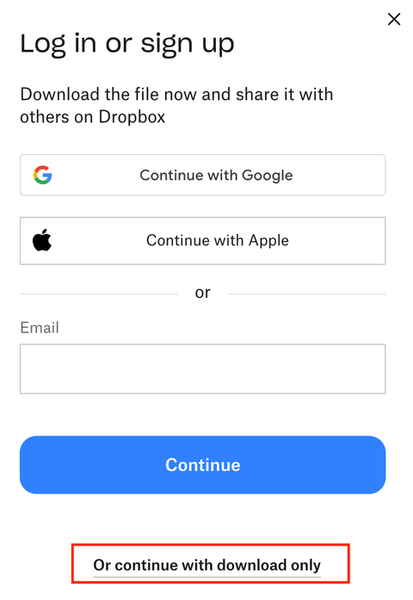
Recipients confused by the login prompt when downloading files from Transfer or shared link
When sharing files via Dropbox Transfer or a "view-only" link, the "Continue with download only" button is hidden at the bottom. This often confuses recipients because they think they must log in to download. I wish recipients weren't prompted to log in at all when they just want to download the files. Thank you for considering this improvement!Solved63Views1like3Comments
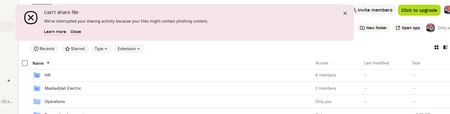
Error that my sharing activity has been interrupted because files might contain phishing content.
Device Dell Zbook Operating System/Browser (if using the web) Windows 11 Dropbox App Version (if using the app) 238.4.6305 Syncing Status Up to date" Question or Issue I was unable to copy sharing link to one of my colleague, of the folder which is already shared and being used in multiple of my devices and shared persons' devices. This is happening no matter what folder or file i select.36Views0likes2CommentsRemove login or sign-up popup when sharing a link.
how do I get rid of this frustrating pop up when sharing a link with a client? We're a paid dropbox business member and I get a tonne of clients telling me they cant access the files because of this popup. Needs to able to be switch this off. I pay to have ability to share files externally so either make it free and keep the pop up, or let me turn it off. Thanks, so this thread, but not locked - https://www.dropboxforum.com/discussions/101001014/remove-loginsignup-dialog-box-from-shared-link-download/757059#M82871455Views8likes9Comments
I don't want to login/signup/copy to or copy link.
I'm using a personal setup with a Plus account, not planning to upgrade further. So within the Plus Account... I set this up to let a group of people view pdf's, photos, mp4s. NOT to link to them; they can share my link to the folders. I'm giving out a VIEW link and it allows downloads which is exactly what I want. I do not want them to join my folder. JUST to view them online or download them. From what I've seen every screen shows the line So&So shared this folder... (which is fine with me but the next part is not) I do not want the to Log in or Sign up. & I do not want 2 or the 3 button/boxes below that: Copy to Dropbox & Copy Link — because I don't want them to share the content. Does anyone know of any tip or trick to either hide these or nullify them? (Without an upgrade because the fees jump too drastically for this project.) I should mention that there are many friends that will View this content and Share it via my own link so giving each person a link would take major time. It's a privacy/respect-the-people thing. Hoping...36Views0likes1Comment