Our Community is in read-only mode until April 8th, learn more here. You can still search existing threads or get help via Dropbox Support, the Dropbox Help Center, or Learn.
Camera uploads
157 Topics
Changing the location of Camera upload folder
While uploading the pictures to Dropbox by default is uploading to Camera upload folder. How can I change the default location as I have 2 Iphone and would like to synchronize the pictures to Dropbox by enabling the camera upload option. If the pictures are going to be uploaded default in camera upload folder how can I differentiate the pictures from both Iphone. really appreciate if I can get some on this topic.Solved51KViews29likes31Comments
Photo backup on iPhone isn’t working - alternating between files
I am on the latest iOS and Dropbox for my iPhone 13. Dropbox 324.2 and iOS 16.4.1 I noticed that it was going forth between 5 and 4 photos left. There is plenty of room in dropbox. Nothing has been uploaded. I followed the instructions mentioned here https://www.dropboxforum.com/t5/Storage-Space/Photo-backup-on-iPhone-isn-t-working/td-p/515471 for clearing the cache and rebooting. Still have the same issue and it won't give it up. Problem also exists backing up via cellular. Problem also persists after full delete and reinstallation of Dropbox on iPhone.Solved28KViews10likes42Comments
Stop renaming my files! (on auto phone upload)
Video files ( possibly photos too ) get renamed on automatic upload from the phone to Dropbox. There must be a really good reason for Dropbox to rename files and I'd like to hear it. It's very annoying because the file names are perfectly fine the way they are and so I can keep track easier for missing files, innterrupted transfers, moved files and so on. It's a mess with video files especially becuase: - Phone writes the video file with date time at the start of the video ( that's what it should be ) - Drobox renames the file with date time when the file was closed ( finished recording ). So, can we please not mess with my video files names ? Thanks ! video, file, rename, date, time, metadata, offset, unnecessary5.3KViews7likes5Comments
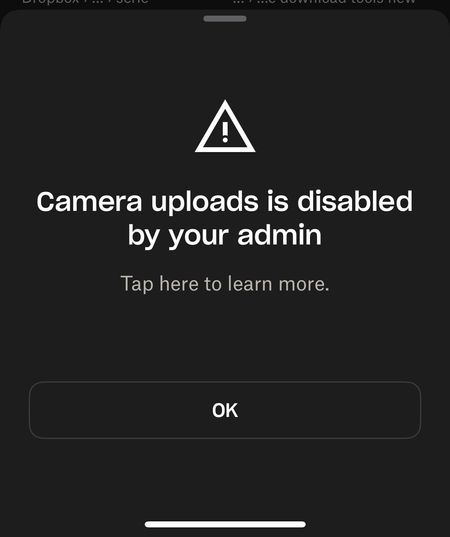
"Camera Uploads is disabled by your admin" error on iOS
So... i think there is something wrong with my dropbox ios app. It worked fine until about 2 hours ago. I have alread logged out, install/uninstall, power cycle the phone, everything level 1 helpdesk has been done. Yes, i have space, the account is working fine from the notebook. For example the screenshot upload from windows is fine. Both dropbox app and ios are the latest version. I'm not part of a team, never have been.Solved887Views4likes16Comments
Why does DropBox rename photos based on modification date rather than creation date?
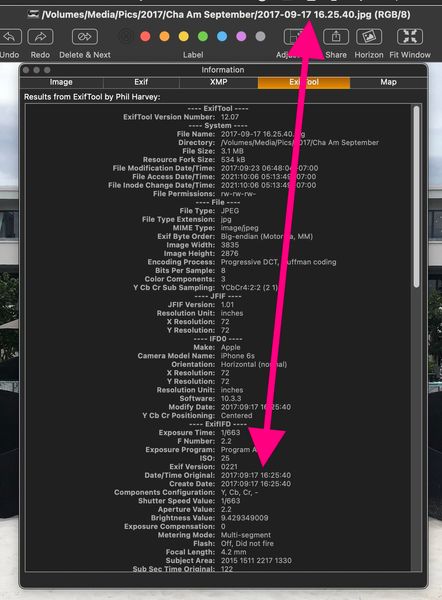
Previously, DropBox renamed camera uploads based on the photos creation date (EXIF: Date/Time Original). This makes sense because you want the photos to be name-sorted based on when they were taken. Now DropBox renames camera uploads based on the modification date (EXIT: File/Modification Date/Time). This makes no sense because the files are now out of chronological order when sorted by name.6.5KViews4likes26Comments
Issues with Camera Upload
I’ve been having issues with my Camera Upload feature in my IOS Dropbox App. Usually when I open the app on my iPhone X, Dropbox will start locating the photos that it hasn’t uploaded yet and start uploading them. Now, it just reads “Starting camera uploads….Looking for photos” but nothing ever happens. I’ve tried closing/re-opening the app, deleting the app/re-installing, updating my IOS, deleting other photo cloud apps (Google Photos), and even upgrading to Dropbox Plus. None of these attempts have help solve my problem. Does anyone have any advice?8KViews4likes45Comments
Two-Way Sync Option for "Camera Uploads" Folder
Please release a "Two-Way Sync" toggle option for the "Camera Uploads" folder. This "Camera Uploads" folder would actually be a valuable feature if this option were enabled. Currently, the folder is a one-way sync, which simply creates more work for us users - if we use the feature as is, we have to clean out photos twice - once on our phone and once in the "Camera Uploads" folder. For that reason, I simply have the feature turned off as I am sure many others do as well. Ideally, with this folder having 2-way sync capability, it could be used as a "holding place" for phone photos until the user is able to organize the pictures/videos into proper folders elsewhere on Dropbox. This way, if the phone is lost or stolen, those pictures are securely saved to Dropbox AND it is a perfect mirror of what was actually on the phone. PLEASE FIX THIS. 🙂2KViews3likes6Comments
Can we upload live photos through Camera Uploads?
I can see lots of posts asking for support for Live Photos. I feel quite cheated that I have lost the ability to see these photos. As someone else has also posted, I have little snippets of my mother’s voice and movement that I have lost forever and she has passed away. Dropbox offer a photo sync service which means they need to solve for Live Photos, they have been around since 2015 so it’s not a new function. Please prioritise a solution to upload and then restore Live Photos.Solved1.4KViews2likes6CommentsCamera uploads has a stuck photo
For weeks now, Camera uploads has a message at the top: Camera uploads (1 left) Couldn't upload photo. Tap for more info. Tapping just gives me the generic help page, which is oriented toward complete failures to upload. That's NOT my problem, because all my other photos have been and continue to upload just fine. How can I figure out what the problem file is so I can delete it or rename it or tell Dropbox not to bother with that folder, or whatever the fix turns out to be? Telling me there's a problem isn't much help without a hint of what the problem is. Android 9 (Pixel 2 XL) and fully updated as of 10 minutes ago.Solved8.7KViews2likes14Comments