Our Community is in read-only mode until April 8th, learn more here. You can still search existing threads or get help via Dropbox Support, the Dropbox Help Center, or Learn.
Linux
39 Topics
How can I make files online-only on Ubuntu?
Dear all Recently, I moved from Windows 11 to Ubuntu 24.04 in my laptop. During my journey in Windows, I was always very pleased with the integration between Dropbox and my operating system, as I could browse all the folders in my Dropbox account locally on my laptop without having to go to the web browser, even those that were not synced to my computer (i.e. I could access the folders not downloaded to my computer, see the file names... and when I double-clicked on a file, it would be downloaded to my computer and I could access it quickly and easily). When I downloaded and synced Dropbox with Ubuntu on my laptop, all the files and folders in my Dropbox account started to store a copy locally on my computer. For those folders that took up a lot of space and that I wasn't going to use at the moment, I right-clicked on them and checked the option to not sync with dropbox.com. However, this did not have the effect of clearing the space that these folders were taking up, with the desired functionality of being able to browse my laptop locally and see their names and be able to access them even if they weren't synced. I was wondering if there was a way to mimic this functionality that I enjoyed on Windows.1.6KViews13likes9Comments
Future Support for Linux?
Hi.. That other thread is getting really, really long, so I thought I'd pose a question here, for someone from Dropbox to answer, rather than the complaints and rants in the other thread. :-) Right at this moment I'm considering going through the pain of shifting my DB folder to ext4 despite the security/stability issues of using an old filesystem for one app. I want to know if I'm just wasting my time and money continuing to be a paid DB customer who uses a cross-platform mix of machines. So.. Questions for Dropbox to answer here: - Does dropbox intend to continue supporting Linux? - Is there a roadmap or intention to support modern filesystems rather than the nearing legacy ext4? - How much of a minority are paid Linux accounts? 1%? Less? Not really expecting an answer, and if you're not a dropbox rep, please keep your comments in the other thread.. :-)Solved7.2KViews9likes7Comments
[Solved, Ubuntu 22.04] Dropbox is always "Connecting..."
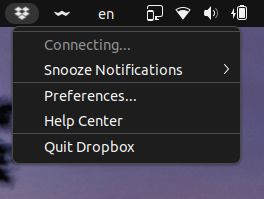
Hi, Dropbox tray icon says it is "Connecting..." forever. I cannot see the list of the latest modified files as it used to show or use the tray, actually. I am using Linux Ubuntu 22.04 (but it like that since the 19.10, I suppose) The currently installed version of Dropbox is 149.4.4568 I also don't have the "Early releases" enabled as you can see in the following screenshot. I also tried to remove `.dropbox` and `.dropbox-dist` manually to reinstall them cleanly. You can check the date and time it was reinstalled here.Solved20KViews3likes74Comments
Linux Dropbox: fatal python exception
Hi everybody, I am new to linux, taking over responsibilty due to a colleague leaving and im very lost. Yesterday, I checked the drobox status on the terminal and it was stuck on dropbox upgrading. I restarted it and now I'm getting the following error with a load of other text: ImportError: libatomic.so.1: cannot open shared object file: No such file or directory !! dropbox: fatal python exception: Can anybody advise how I am able to fix this? And please bear in mind I am new to all of this :) Thank you so much for your time. RossSolved19KViews3likes36CommentsAccessing online-only files from Linux terminal
I have a large Dropbox folder (Dropbox for Business) that on some of my computers is set to "online-only", but I want to make specific files available offline. I know I can do this via right clicks in the File Explorer window for individual files or folders. Also, when accessing files using the File Explorer (double clicking with the mouse), Dropbox notices and downloads files on the fly. However sometimes I work with files from a terminal (Windows Subsystem for Linux, WSL). In this case, accessing the files using terminal commands (cat, grep, editors like vim, etc.) do not result in files being downloaded. It is as if Dropbox does not know that files are being accessed. Seems like there is no connection with the WSL. However this other post shows users have the same problems in MacOS terminals. So this is not restricted to WSL or Windows. I am not requesting support or help in understanding this issue. I know it doesn't work. I am requesting this feature. It should be nice to be able to have either 1) a dropbox CLI command that would let us specify which file(s) or folder(s) we want to make available offline from a shell; 2) or have the WSL provide information to dropbox on files being accessed through the terminal. Thanks! I'm using Windows 10 or 11 in different computers, WSL running Ubuntu 20.04. Dropbox v192.4.46051.2KViews2likes1CommentI created 2.4M files over the limit on the desktop app and now it's stuck syncing.
Application Affected Dropbox Device Dell OptiPlex 980 Operating System/Browser (if using the web) Ubuntu Linux Dropbox App Version (if using the app) v237.4.5655 Question or Issue I created 2.4M CSV files for a client, and the Dropbox app starting to upload these files. After almost 48 hours of this, I discovered that this was way too many files. My remediation was to exclude the top-levl directory from syncing. I made that change ten hours ago, but the app is still grinding away, doing something. I tried exporting the logs to find out what it might be doing, but the logs just show up as binary data -- I don't know how to read them. How can I sort this out?Solved521Views1like13Comments
How to read Dropbox Linux application log
I see some weird behavior from the official Dropbox client on my Kubuntu Linux. I prefer to first inspect application log to get a clue of what's going on. I found some folders including binary files in "~/.dropbox/logs". How may I read them?2.9KViews1like5CommentsThe desktop app on my Linux Mint isn't syncing
Hi. I'm using Dropbox on Linux Mint. It aways worked fine, but recently it stopped syncing. The icon in the notification bar shows "Syncing..." status, but I waited for days and it doesn't sync files and doesn't change its status. I tryed reinstall Dropbox, deleting all configuration hidden files in the home directory and in the root Dropbox folder. It synced the files once and when I restarted the computer the problem started again. I think the problem started when my subscription expired. But I have renewed it last month.Solved6.3KViews1like7Comments