Our Community is in read-only mode until April 8th, learn more here. You can still search existing threads or get help via Dropbox Support, the Dropbox Help Center, or Learn.
Linux
39 Topics
Files on third computer are not syncing with the files on my other two computers
I have a windows and a linux computer that are successfully syncing the files in their dropbox folder to the files I see when I log into dropbox online. The problem occurred when I created an account (using the same email address) on a third (windows) computer - it does not sync at all. The files when logged in to dropbox online on this computer are the same as the other two, but the files in its dropbox folder are completely different and do not sync. The weird thing is that the files in this computer's dropbox computer have the little dropbox icons on them (the ones that show whether they are synced, or just in the cloud, and so forth) - it's as if they are syncing to a completely different mystery repository from what I see when logged in online! I have checked that I do have the desktop dropbox program installed (it's also clearly true, as the little dropbox icons show in the file browser), so this is not the problem.132Views0likes5Comments
Moving the Dropbox Folder on Ubuntu
I have been looking but not finding anything... can anyone point me in the right direction for moving the Dropbox folder? I have Ubuntu Server (no Gui) installed and the Dropbox folder (and the two symlinks Dropbox Business created) is located in the home directory. My data is in another directory (seperate hard drive) called Shares. With the receint Dropbox update The symlink I created no longer work and I am dead in the water... Everything I do must be via Command Line...7.8KViews0likes26Comments
I created 2.4M files over the limit on the desktop app and now it's stuck syncing.
Application Affected Dropbox Device Dell OptiPlex 980 Operating System/Browser (if using the web) Ubuntu Linux Dropbox App Version (if using the app) v237.4.5655 Question or Issue I created 2.4M CSV files for a client, and the Dropbox app starting to upload these files. After almost 48 hours of this, I discovered that this was way too many files. My remediation was to exclude the top-levl directory from syncing. I made that change ten hours ago, but the app is still grinding away, doing something. I tried exporting the logs to find out what it might be doing, but the logs just show up as binary data -- I don't know how to read them. How can I sort this out?Solved521Views1like13Comments
Can I use the desktop app on my Mac, Windows and Linux devices to sync my files?
Question or Issue I'm a personal user. My home office has macOS, Windows, and Ubuntu/Gnome systems. Can each of these have a Dropbox folder/directory that automatically syncs to the cloud, so changing the contents of the directory on one system will (soon) be reflected in the contents of the other two as well as in the cloud contents? I assume each system would require installation of Dropbox Desktop.Solved133Views0likes2Comments
Problems syncing on Bazzite with Linux.
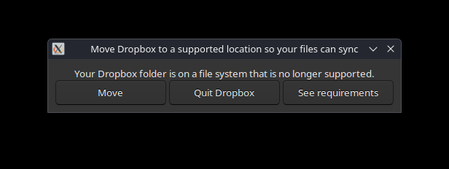
Integration Affected Bazzite Linux, KDE and Gnome Desktops Device Custom PC Operating System/Browser (if using the web) Bazzite Linux, Kernel 6.15.9-116.bazzite Dropbox App Version (if using the app) 231.4.5570 Question or Issue -- I downloaded Dropbox as usual but it says the following when attempting to Sync: -- I've seen this happening only in Bazzite, I don't know if there are considerations given that is an inmutable distro and comes with btrfs filesystem by default. Which is weird because you supposedly support that filesystem. -- Also, other users in the Bazzite forums have tried the following: Interesting. Thank you for the detail, I am a staff software engineer familiar with linux (I run programming.dev actually), so the description helps, I’m just not familiar with a lot of the intricacies of linux, nor desktop linux. I’ve switched to cachyos and am trying to set up bazzite for my wife. So I get the same output on Bazzite for those commands, so UB is at least consistent here. I do not understand what you mean by using flatseal to configure the Dropbox flatpak to use /var/home. There’s no reference to /home anywhere in flatseal, and it looks like the only thing I can change are permissions. When I click the Move button (which I would assume would let me actually point it at /var/home, nothing happens. I actually posted about this in the Universal Blue discord, with some of the other stuff I’ve tried: ** Things I’ve tried:** adding permission in flatseal for app to access everything adding folder to /var/mnt/synco/lnsync/account to Other Files in flatseal (even though synco doesn’t exist) created a 100gb partition /run/media/sabrina/Dropbox , mounting it, adding it to flatseal’s Other Files and clicking Move in the dropbox dialog again. reinstalling running Dropbox with GSK_RENDERER=ngl flatpak run com.dropbox.Client. I’ll attach the logs I got for that, but it was a big nothingburger, even after clicking Move nothing shows up. running Dropbox with GSK_RENDERER=gl flatpak run com.dropbox.Client. Same deal (gl vs ngl) I even have this bit in there: the one thing that is always recommended is moving the dropbox folder from /home/user/Dropbox to /var/home, but I have the same error as the last link I provided. When I click Move nothing ever happens. It just closes the dialog with no further messaging. If I run Dropbox from the cli, to get logs (dropbox’s debug logs are in binary for their ‘support tool’) then I get this, where nothing shows after clicking Move. GSK_RENDERER=ngl flatpak run com.dropbox.Client dropbox: load fq extension '/app/extra/.dropbox-dist/dropbox-lnx.x86_64-230.4.8797/cryptography.hazmat.bindings._openssl.abi3.so' dropbox: load fq extension '/app/extra/.dropbox-dist/dropbox-lnx.x86_64-230.4.8797/cryptography.hazmat.bindings._padding.abi3.so' dropbox: load fq extension '/app/extra/.dropbox-dist/dropbox-lnx.x86_64-230.4.8797/apex._apex.abi3.so' dropbox: load fq extension '/app/extra/.dropbox-dist/dropbox-lnx.x86_64-230.4.8797/google._upb._message.cpython-38-x86_64-linux-gnu.so' dropbox: load fq extension '/app/extra/.dropbox-dist/dropbox-lnx.x86_64-230.4.8797/psutil._psutil_linux.cpython-38-x86_64-linux-gnu.so' dropbox: load fq extension '/app/extra/.dropbox-dist/dropbox-lnx.x86_64-230.4.8797/psutil._psutil_posix.cpython-38-x86_64-linux-gnu.so' <frozen zipimport>:259: UserWarning: google.protobuf.service module is deprecated. RPC implementations should provide code generator plugins which generate code specific to the RPC implementation. service.py will be removed in Jan 2025 dropbox: load fq extension '/app/extra/.dropbox-dist/dropbox-lnx.x86_64-230.4.8797/tornado.speedups.cpython-38-x86_64-linux-gnu.so' dropbox: load fq extension '/app/extra/.dropbox-dist/dropbox-lnx.x86_64-230.4.8797/wrapt._wrappers.cpython-38-x86_64-linux-gnu.so' Gtk-Message: 09:28:00.323: Failed to load module "colorreload-gtk-module" dropbox: load fq extension '/app/extra/.dropbox-dist/dropbox-lnx.x86_64-230.4.8797/cryptography.hazmat.bindings._openssl.abi3.so' dropbox: load fq extension '/app/extra/.dropbox-dist/dropbox-lnx.x86_64-230.4.8797/cryptography.hazmat.bindings._padding.abi3.so' dropbox: load fq extension '/app/extra/.dropbox-dist/dropbox-lnx.x86_64-230.4.8797/apex._apex.abi3.so' dropbox: load fq extension '/app/extra/.dropbox-dist/dropbox-lnx.x86_64-230.4.8797/psutil._psutil_linux.cpython-38-x86_64-linux-gnu.so' dropbox: load fq extension '/app/extra/.dropbox-dist/dropbox-lnx.x86_64-230.4.8797/psutil._psutil_posix.cpython-38-x86_64-linux-gnu.so' dropbox: load fq extension '/app/extra/.dropbox-dist/dropbox-lnx.x86_64-230.4.8797/google._upb._message.cpython-38-x86_64-linux-gnu.so' <frozen zipimport>:259: UserWarning: google.protobuf.service module is deprecated. RPC implementations should provide code generator plugins which generate code specific to the RPC implementation. service.py will be removed in Jan 2025 dropbox: load fq extension '/app/extra/.dropbox-dist/dropbox-lnx.x86_64-230.4.8797/tornado.speedups.cpython-38-x86_64-linux-gnu.so' dropbox: load fq extension '/app/extra/.dropbox-dist/dropbox-lnx.x86_64-230.4.8797/cryptography.hazmat.bindings._openssl.abi3.so' dropbox: load fq extension '/app/extra/.dropbox-dist/dropbox-lnx.x86_64-230.4.8797/cryptography.hazmat.bindings._padding.abi3.so' dropbox: load fq extension '/app/extra/.dropbox-dist/dropbox-lnx.x86_64-230.4.8797/apex._apex.abi3.so' dropbox: load fq extension '/app/extra/.dropbox-dist/dropbox-lnx.x86_64-230.4.8797/google._upb._message.cpython-38-x86_64-linux-gnu.so' dropbox: load fq extension '/app/extra/.dropbox-dist/dropbox-lnx.x86_64-230.4.8797/psutil._psutil_linux.cpython-38-x86_64-linux-gnu.so' dropbox: load fq extension '/app/extra/.dropbox-dist/dropbox-lnx.x86_64-230.4.8797/psutil._psutil_posix.cpython-38-x86_64-linux-gnu.so' <frozen zipimport>:259: UserWarning: google.protobuf.service module is deprecated. RPC implementations should provide code generator plugins which generate code specific to the RPC implementation. service.py will be removed in Jan 2025 dropbox: load fq extension '/app/extra/.dropbox-dist/dropbox-lnx.x86_64-230.4.8797/tornado.speedups.cpython-38-x86_64-linux-gnu.so' dropbox: load fq extension '/app/extra/.dropbox-dist/dropbox-lnx.x86_64-230.4.8797/wrapt._wrappers.cpython-38-x86_64-linux-gnu.so' Gtk-Message: 09:28:06.961: Failed to load module "colorreload-gtk-module" At this point this seems like maybe I should be contacting Dropbox though, but I’ve seen so many other posts where people got this working that I just assumed it must be on my side. -- Other user adds: That is another view of the symptom. The reality is that there is nothing to move! But the code inside of the flatpak: doesn’t understand the metadata it is getting from the composefs fs type is not expecting /home to be a symlink and so is not doing the equiv of performing a stat command the follows the symlink. For example, look at the difference of this output: $ stat /home File: /home -> var/home Size: 8 Blocks: 8 IO Block: 4096 symbolic link Device: 0,39 Inode: 563 Links: 1 Access: (0777/lrwxrwxrwx) Uid: ( 0/ root) Gid: ( 0/ root) Context: system_u:object_r:home_root_t:s0 Access: 1970-01-01 00:00:00.000000000 +0000 Modify: 1970-01-01 00:00:00.000000000 +0000 Change: 1970-01-01 00:00:00.000000000 +0000 Birth: - vs dereferencing the symlink like this: $ stat -L /home File: /home Size: 28 Blocks: 0 IO Block: 4096 directory Device: 0,50 Inode: 256 Links: 1 Access: (0755/drwxr-xr-x) Uid: ( 0/ root) Gid: ( 0/ root) Context: system_u:object_r:home_root_t:s0 Access: 2025-08-25 20:30:54.504715317 +0000 Modify: 2024-12-28 13:11:12.910724872 +0000 Change: 2025-08-24 18:42:06.380999950 +0000 Birth: 2024-12-28 12:57:19.448791400 +0000 I suspect they are not recognizing that `/home` is a symlink so they are querying the wrong filesystem and failing. Thanks for the kind words. -- Another user has a theory but no action Plan: Earlier this year, upstream (Fedora) changed the root (/) filesystem type to composefs for reasons. This is not a widely recognized filesystem type across the Linux landscape. And it has limitations. One of those limitations is what is being experienced in this case - namely, the DropBox flatpak does not recognize the FS type and does not know what to do with it. The workaround I suggested was to bypass the configuration of the flatpak by modifying the config (using flatseal) to point to /var/home/userid instead of /home/userid. The reason that workaround is effective is because: TL;DR - flatpaks not based on one of the Fedora Atomic Desktop offerings do not understand the composefs file system type. The workaround is effective because on Universal Blue systems /var/home is of type btrfs instead, which is widely recognized. / is of filesystem type composefs and that fs type is not widely known outside of the Fed-a-verse /home is just a symlink to /var/home /var/home is of type btrfs instead - which is widely recognized So using /home vs /var/home provide different results because they are of different fs types and the type of the / filesystem is not widely known (yet). $ mount | grep 'on / ' | head -1 composefs on / type overlay (ro,relatime,seclabel,lowerdir+=/run/ostree/.private/cfsroot-lower,datadir+=/sysroot/ostree/repo/objects,redirect_dir=on,metacopy=on) $ mount | grep 'on /var/home ' | head -1 /dev/nvme0n1p3 on /var/home type btrfs (rw,relatime,seclabel,ssd,discard=async,space_cache=v2,subvolid=257,subvol=/home) $ ls -ld /home lrwxrwxrwx. 1 root root 8 Jan 1 1970 /home -> var/home That is the theory behind my suggestion above. I was hesitant to go into the detail here because I have been blasted for doing so in the past. What is needed: - Your help to find out why Dropbox is not working on Fedora-based distro, Bazzite.Solved1.1KViews0likes5Comments
How can I make files online-only on Ubuntu?
Dear all Recently, I moved from Windows 11 to Ubuntu 24.04 in my laptop. During my journey in Windows, I was always very pleased with the integration between Dropbox and my operating system, as I could browse all the folders in my Dropbox account locally on my laptop without having to go to the web browser, even those that were not synced to my computer (i.e. I could access the folders not downloaded to my computer, see the file names... and when I double-clicked on a file, it would be downloaded to my computer and I could access it quickly and easily). When I downloaded and synced Dropbox with Ubuntu on my laptop, all the files and folders in my Dropbox account started to store a copy locally on my computer. For those folders that took up a lot of space and that I wasn't going to use at the moment, I right-clicked on them and checked the option to not sync with dropbox.com. However, this did not have the effect of clearing the space that these folders were taking up, with the desired functionality of being able to browse my laptop locally and see their names and be able to access them even if they weren't synced. I was wondering if there was a way to mimic this functionality that I enjoyed on Windows.1.6KViews13likes9Comments
[Solved, Ubuntu 22.04] Dropbox is always "Connecting..."
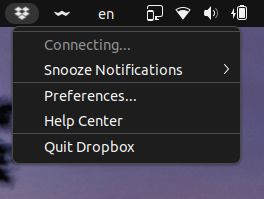
Hi, Dropbox tray icon says it is "Connecting..." forever. I cannot see the list of the latest modified files as it used to show or use the tray, actually. I am using Linux Ubuntu 22.04 (but it like that since the 19.10, I suppose) The currently installed version of Dropbox is 149.4.4568 I also don't have the "Early releases" enabled as you can see in the following screenshot. I also tried to remove `.dropbox` and `.dropbox-dist` manually to reinstall them cleanly. You can check the date and time it was reinstalled here.Solved20KViews3likes74CommentsSync-Problem: Linux Mint 21.3 and Dropbox v194.3.6224
Hi, I have a silly problem. If I change a small file on my Linux machine, the dropbox-icon will get blue and will show "Syncing" for multiple days. After a really long time it is going grey again. What makes me wondering is, that if I go into nemo and look for the sync-status-icons, really everything is green. And, also the changes can be seen on other devices. (so the file was synced) I already checked, that I am not syncing any hard/soft-links and that I do not have any strange characters in the filenames. I rebooted several time and already unlinked/linked the whole Notebook. CPU < 5% Memory 90 % free No other applications running Internet is perfect Nothing helps. I also started a script to check the status of all files (dropbox filestatus xxx) recursively and also there I could not see any not-synced files. Does someone have an idea, what is going wrong here? Makes it sense to try a Beta version? Greetings Juergen System: Kernel: 6.5.0-21-generic x86_64 bits: 64 compiler: N/A Desktop: Cinnamon 6.0.4 tk: GTK 3.24.33 wm: muffin vt: 7 dm: LightDM 1.30.0 Distro: Linux Mint 21.3 Virginia base: Ubuntu 22.04 jammy Machine: Type: Desktop System: ASUS product: N/A v: N/A serial: <superuser required> Mobo: ASUSTeK model: ROG STRIX Z790-E GAMING WIFI v: Rev 1.xx serial: <superuser required> UEFI: American Megatrends v: 0703 date: 11/01/2022 CPU: Info: 16-core (8-mt/8-st) model: 13th Gen Intel Core i7-13700K bits: 64 type: MST AMCP smt: enabled arch: N/A rev: 1 cache: L1: 1.4 MiB L2: 24 MiB L3: 30 MiBSolved3.9KViews0likes13Comments