Our Community is in read-only mode until April 8th, learn more here. You can still search existing threads or get help via Dropbox Support, the Dropbox Help Center, or Learn.
Restore
575 Topics
My Dropbox folder silently disappeared and I haven't accessed it recently.
I am a paid Dropbox user. I use it very often but not very folder is used all the time. Today I tried to retrieve some data from a folder I visited about a year ago. I found it disappeared. No trace, no way to find it anyway. Can't find it in deleted folder either. Does anybody has similar issue? Can I get some advice on this? Thanks.109Views0likes4Comments
I don't have any files in my Dropbox account
OK. so the firewall i am stuck behind for work (DOD) rejects dropbox emails. So i get a look at my spam and it's 2gb of crap and several notifications from dropbox. so i go into my account and there is nothing there. one empty file. so i tried to get a phone # . nope. too lazy to answer the phone70Views0likes3Comments
Files have disappeared but I know they're there
Question or Issue I logged into my Dropbox account after a lengthy hiatus only to find that all my files are missing. However, I have provided other people with links to the files, and when I click on those links, the files and folders are all there. I am just not able to access them. Dropbox gives me a blank area when I go to "All files" with an invitation to "Drop anything here to upload." My account apparently has 2 GBs of storage. I am afraid to hit "rewind this folder" under "Folder settings" to try to revert to a previous state since the files are now accessible if someone with my link tries to access something.176Views0likes11CommentsI need assistance, my files are missing
I NEED TO COMMUNICATE WITH SOMEONE OTHER THAN ROBOTIC RESPONSES. ABSOLUTELY FRUSTRATED WITH DROPBOX SO-CALLED SUPPORT. I CANNOT SEE MY FILES THAT HAVE BEEN IN DROPBOX FOR MANY YEARS YET MY ACCOUNT AND SUBSCRIPTION IS UP TO DATE. WHO CAN HELP ME?79Views0likes2Comments
Un-syncing DELETED/MOVED folders instead of "un-syncing"!?!
I initiated a sync change on one our computers, un-syncing about 50% of various top level folders (and their contents) to that device. Then I noticed on our OTHER computers/devices those folders and MANY others were now missing!? Maybe Dropbox accidently "un-synced them everywhere" ... which it shouldn't have! I next logged into our Dropbox directly via browser and sure enough our entire directory structure was riddled with missing/incomplete/relocated folders I have opened a support case for this, #26124591. But to date, only partial restorations have been made. I have since requested that our ENTIRE directory structure be correctly restored prior to March 5th, as that's the only way to resolve this huge mess Dropbox made of our files and ensure we get ALL our data back. Does not instill confidence in Dropbox ... a caution to those of you un-syncing files/folders. Hope you have a recent backup of your own making at hand. If Dropbox can't restore your account folders/files accurately (or at all) your data be gone :-(156Views0likes9CommentsI have thousands of files deleted - how did this happen?
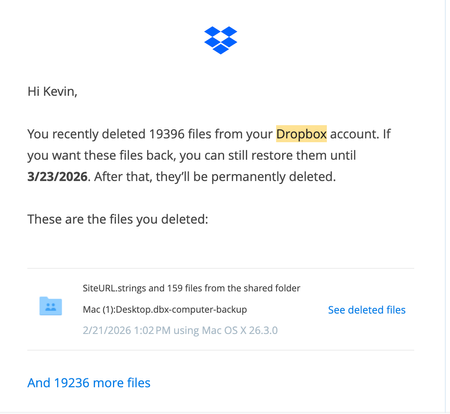
Device -Mac Studio (Operating System/Browser (if using the web) Tahoe 26.3.1. Dropbox App Version (if using the app) 243.4.6956 Syncing Status Up to date. Question or Issue A few thousand files were deleted. No idea how this happened. Dropbox can't tell me either. Said it could be an app that has access. Pretty sure I don't have any that would do that. Any ideas? KMW125Views0likes2Comments
My recently edited Microsoft Excel files are suddenly missing.
Device Mac mini, Macbook air Operating System/Browser (if using the web) OSX tahoe Dropbox App Version (if using the app) not sure Question or Issue two commonly-edited (except not the past 30d) excel files are suddenly missing. They were not deleted and were present on multiple machines/devices as recently as early January. The only thing I changed was how I log in to Office 365 (changed from corporate license to university license). I haven't got it backed up in one place so am at a loss re how to recover them.165Views0likes8Comments
My main file doesn't show recent updates (last one was 7 months ago) and there's no history.
Device samsung galaxy s8 and s21 and antique win 7 laptop Operating System/Browser (if using the web) one old android one current, one old windows Question or Issue my main file suddenly is like 7 months old, 7 months lost and no history for thirty days. this is horrible that this can happen, what's the point of backup like this?244Views0likes15Comments
Recovering files after a Mac-ScanSnap-Dropbox fumble
Device MacBook Pro i9 Operating System/Browser (if using the web) macOS Tahoe 26.3 Chrome v145.0.7632.77 Dropbox App Version v243.3.6895 Scanner Snap ix500 ScanSnap Home v2.23.1(2) Question or Issue Deep plumbing alert! I use a Fujitsu ScanSnap ix500 scanner with my MacBook Pro. It appears I may have made the mistake of changing a folder name via Finder when that folder happened to be the ScanSnap Home (SSH) folder, which is the destination folder for scanned documents. That folder is also within Dropbox. For example, the original SSH folder was [Users/me/Dropbox/My Inbox] and the [My Inbox] folder name was changed in Finder to [My Scans]. The name change was done recently, and with plenty of my recovery period remaining. There is no longer any record of files in the now-renamed [My Scans] folder in Dropbox (online or on my device) before the date of the folder name change. There is nothing in the deleted files folder (online or on my device), including a reference to the folder name change, so I am not able to view/restore as I normally would with deleted files. However, the files (or at least thumbnails of) can still be seen in the ScanSnap app but they cannot be accessed, as an error message comes up showing the doc with the old [My Inbox] path is not accessible. Maybe the question is, how can files (20k+ files) get removed from Dropbox without any trace or record of those files ever being there? Any help or insight would be appreciated.82Views0likes2Comments