Need to see if your shared folder is taking up space on your dropbox 👨💻? Find out how to check here.
Shared Links
9 Topics
list_shared_links API inconsistency with team folders: Only showing edit OR view link, not both
I'm encountering an unexpected behavior with the list_shared_links API (https://api.dropboxapi.com/2/sharing/list_shared_links) when working with team folders. I hope someone can provide clarification. Issue: When listing shared links for a team folder that has both edit and view links: 1. If both edit and view links exist, only the edit link is returned in the API response. 2. If I remove the edit link manually, then only the view link is returned. But, if I pass the specific path it return both links Details: - I'm using a team access token. - I'm passing the 'Dropbox-API-Path-Root' header to list all team space shared links. Expected behavior: Based on the API documentation, I expected to see all shared links returned. The docs state: "If no path is given, returns a list of all shared links for the current user. For members of business teams using team space and member folders, returns all shared links in the team member's home folder unless the team space ID is specified in the request header." Steps to reproduce: 1. Create both an edit and a view link for a team folder in Dropbox. 2. Use the list_shared_links API with a team access token and the 'Dropbox-API-Path-Root' header, without specifying a path in the body. 3. Observe that only the edit link is returned. 4. Manually remove the edit link for the folder via the Dropbox dashboard. 5. Use the list_shared_links API again with the same parameters. 6. Observe that now only the view link is returned. Questions: 1. Is this the intended behavior of the API for team folders? 2. If so, is there a way to retrieve both edit and view links for team folders in a single API call without specifying the path? 3. If not, is this a known issue specific to team folders, and is there a workaround or fix planned? 4. Does this behavior differ between team folders and personal folders? Any clarification on this would be greatly appreciated, especially regarding how the API is supposed to handle multiple link types for team folders. Thank you!463Views0likes5Comments
Get file metadata (video resolution and duration) from shared folder
Hi everybody, I need to access a file metadata using endpoint "files/get_metadata". I need to get video resolution and duration. My code works fine is the file is in my home folder, but it doesn't work if the file is in a shared folder. I can get the files list in the shared folder with endpoint "files/list_folder" and using the shared_link parameter. So, how can I get metadata for a file in a shared folder?Solved271Views0likes2Comments
API Error "path/not_found" when creating shared_link
When interacting with the API, I get a path/not_found error. This happens when I upload a file to dropbox using the path /2/files/upload. After that, I create a link to the file using the path /2/sharing/create_shared_link and specify the path_display received after uploading the file. The error occurs very rarely, but it does not allow you to get a link. What could be the problem?221Views0likes3Comments
filesGetTemporaryUploadLink - 404
Hi! I'm user of dropbox basic and I'm generating upload link but the link following to 404 page. I have one folder /home/products and one app /Apps/xxx with folder /products I did try every combination to get proper link but its impossible for me. here is list of paths witch I did provide - /products - /products/somefilename.txt - /Apps/xxx/ - /Apps/xxx/products - /Apps/xxx/products/somefiname.txt what is proper path in my case ? please help const dbx = new Dropbox({ accessToken: token }); return dbx.filesGetTemporaryUploadLink({duration: 14000, commit_info: {path: '/Apps/xxx/products/text.txt', "autorename": true, "mode": "add", "mute": false, "strict_conflict": false }})365Views0likes2Comments
Clicking files in embedded Dropbox leads to registration screen instead of direct download
We have embedded Dropbox onto our website in an iframe: [Removed as per Community Guidelines] We produce a Dropbox read only share link to include in the embed code. For some folders we get a share link containing /scl/fo/ which leads to a registration splash screen whenever a website visitor clicks a file in the embedder. However we want to start a download instead of a registration... The strange thing is that other folders for which we produce a read only share link contain /sh/ . When you click on a file in the embedder with this link in the code, the download starts without a registration splash screen. Now, I've read that a link containing /scl/fo/ is an edit link. Why do some folders produce a link containing /scl/fo/ and others /sh/ while we explicitly ask for a read only share link? We run a Dropbox Advanced plan.2.7KViews0likes24CommentsOrganize and share Christmas photos with Dropbox
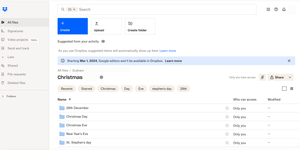
Christmas is definitely a time of year that I find myself taking more pictures than normal. Meeting up with family and friends and wanting to capture special moments means that I have my camera on more than I don’t. If you’re anything like me, you’ll want to be able to share all of these photos with those closest to you. Social media can be a good way to share photos, but there are definitely times when we might want to keep these photos within a private group of people, especially when family are involved, Dropbox makes it easy to share with exactly who you want. To start with, I’ll always make sure that my camera uploads are turned on. You’ve probably heard me talking about this a few times here in the Photographers group before, but I’ll stand by my words again because I love this feature, it saves me time, space on my phone and makes sure I never lose any photos, so it’s a no brainer for me. If you don’t know how to turn on Camera uploads you can find all the information you need right here. Now that all my photos will be automatically added to my Dropbox account, I’ll figure out a way to organize all of the photos I take at Christmas into folders. Generally speaking, I’ll be meeting up with a lot of different groups of people on different days, so I’ll only want to share photos with the people that are in them, so I’ll start by making a Christmas folder, then inside that I’ll make folders for Christas Eve, Christmas Day, Stephen’s Day, New Years Eve and any other days I might be out and about. Then, dependent on what I’m doing, I might make different folders within these daily folders, for example I might do Christmas morning swim and Christmas Dinner, or Stephen’s Day lunch and Stephen’s Day drinks. Once I’ve got my folders created and all my photos put in the right place, it makes it really easy to share with all of the other people who I was with. To do this, all I need to do is create a view-only shared link to the folder I want to share, and share it with everyone who I was with when I took those photos, or anyone else I want to see them. This link will allow anyone with access to it to view and download the photos inside that folder. If you’re not sure how to create shared links, you can find out everything you need to know here. Now, if your friends and family are anything like mine, you’ll know there are 2 types of people, those who take photos and those don’t. When I want to add photos that friends or family took to my collection, I use file request. This allows them to simply add their photos, which then go directly to my Dropbox account, allowing me to easily add them to the folder they belong in. You can find out more about using file request here. When it comes to using Dropbox for organizing photographs, there are literally hundreds of things you can do, and everyone uses it a little different to everyone else. Check out how our very own Sheena used Dropbox to help create a Christmas Family Calendar for another awesome example. We’d really love to hear how you plan on using Dropbox to organize your photos this Christmas, let us know in a comment below.3.6KViews1like0CommentsDownloading Dropbox files using curl or wget
I prefer working on a Linux instance through an SSH session. How could I download the Dropbox files directly from the link through a terminal command? I tried the following but it does not work: curl https://www.dropbox.com/t/jdejjd83827HDHH?dl=1 -o test.zip -J -L -k The link in the example above is a made-up link. But the format of the links I receive from a provider is similar. Could someone help?Solved49KViews0likes9CommentsThe raw=1 parameter for shared links is not working again for my mp3 player. Can you help?
using raw=1 is no longer working with my dropbox mp3 links. it used to work but not anymore with my mp3 player. im frustrated because this seems to happen to me often. please tell me how i can get my mp3 dropbox link to work again with a mp3 player. i hate when this happens. thank you kindly, Hahmed442.9KViews0likes12Comments
links for multiple files in a shared folder
Is there a way to link to specfic files within a shared folder without creating links for each individual file? I have an images folder which I created a shared link that contains multiple (1000+) files. If I want to build a url link to an individual file within the shared folder it seems like I should be able to add the name of the file to the shared folder link somehow but I can't figure out how and haven't found any documentation. Please don't tell me the answer is to create 1000+ unique links for each of the 1000+ individual files!7.6KViews2likes4Comments