Our Community is in read-only mode until April 8th, learn more here. You can still search existing threads or get help via Dropbox Support, the Dropbox Help Center, or Learn.
Third Party Integrations
113 TopicsExtremely slow "Move of Dropbox folder to new location"
So if you're having this problem (like I did) I just wanted to let you know what solved it for me. I started the move and followed instructions here. I had about 77000 files and they copied at a rate of 140 files per hour. I pulled my hair :scream: What caused the problem was Intego Virus Barier, Real time scanning ON. Turning Intego Virus Barier, Real time scanning OFF solved the problem. Hope this helps someone.3.8KViews6likes2Comments
Why can't we shorten shared link URLs on Dropbox?
The email in question... I'm sending a link to a client and the link is longer than the email itself. It looks so unprofessional to the extent that it looks like spam. Yes I could hide the link in html but some clients like to copy and paste the link directly from the email, for example when needing to pass on the link through another platfrom. Why is there no way to shorten this within Dropbox? Is it really that hard to implement? I'm aware there are third party options to do this but I pay for dropbox, I don't feel like I should be having to look for workarounds with questionable security. Box com does custom shared urls. Onedrive and Sharepoint do shorter links. Backblaze does Friendly URLS. Youtube does a short link and even google forms offered me a short link option. Feels like I'm stuck in 2010. Is this an issue for anyone else or is it just me?4.2KViews5likes4Comments
I need to disable syncing in order to save changes in Photoshop.
There seems to be a change in the behavour in file sync. Now Dropbox interupt the saving process of an application (Planimate from InterDynamics). When the software saves it's file, I understand it does this to a temp file with ending .$$$. When the save process is done, and the file is verified, it replaces the orginal file with the new one and change the file ending the the appropriate. This has worked fine with Dropbox for many years. But lately Dropbox interrupt this and "lock" the temp file, making the software fail to save its files. Not very nice. I have to turn off Dropbox every time I do development nowadays. Please revert to a sync method less intrusive.Solved11KViews5likes56CommentsBlock-level sync for VeraCrypt not working post 83.4.152 update
Greetings all, After DB auto-updated to 83.4.152, I noticed that the block-level syncing doesn't seem to be detecting changes anymore for my VeraCrypt container. Before the update, everytime I dismount my VC encrypted container, DB will index the file and compare the deltas at the block-level -- syncing the block-level changes. However, after the 152 update, I've noticed that even with lots of changes in the VC container, after I dismount, DB detects no changes to the encrypted file. I end up having a bunch of conflicts when trying to sync between machines via the "rename the file and rename it back" approach. Could someone share resolution or your similar experiences if you're also using encrypted containers with DB? Thanks, BPHSolved23KViews5likes143Comments
How to shortcut a dropbox FILE on android phone
I was trying to find a way to create a shortcut icon on my androidphone when suddenly dropbox (or Word) asked spontanously that would you like to create a shortcut to this file??? but the question hasn't appeared again and I haven't found a way to do it to other files. Please help me out, it would be so handy to have instant access to a specific file.5.8KViews3likes3CommentsHow to move files from Google Drive to Dropbox
I'm trying to move the files from my company's Google Drive into Dropbox. However I everything a Google Doc file is encountered (.gsheet or .gdoc) the process of copying files is suddenly aborted with not feedback to which file or even folder caused the problem. Since we have thousands of folders to transfer I'm trying to avoid wasting a weekend weeding out Google Doc files manually. Has anyone encountered this problem too? Is there any trick, tip I can use? Thank you! EdoSolved120KViews3likes11Comments
What is the best way to migrate my OneDrive files to Dropbox?
Hello, I plan on moving around 250GBs worth of files from my OneDrive to my Dropbox. Is there a tool or anything that I can use to help with this migration? Is there a recommended procedure to run through? Would tools like Robocopy suffice? ThanksSolved16KViews2likes2CommentsPhotoshop won't save for web unless Dropbox Desktop & Documents backup disabled
This issue affects Adobe Photoshop and the Dropbox backup features on Mac Big Sur. When the Desktop and Documents are selected as Personal backup folders, it seems to mess up the Adobe permissions, so that the Save for Web option in Photoshop doesn't work. Only when you deselect the Desktop and Documents backup options do the permissions reset. Not sure if this is a Dropbox problem or Adobe problem. I found the solution in the Adobe forums here: https://community.adobe.com/t5/photoshop-ecosystem-discussions/p-save-for-web-error-a-write-permissions-error-has-occurred-photoshop-22-1-1/m-p/11747734 Would be good if we could fix this so I can continue to back up my Desktop and Documents folders.6.6KViews2likes9CommentsThe Requested Operation Couldn’t Be Completed error - Dragging & Dropping into Files app on iPad
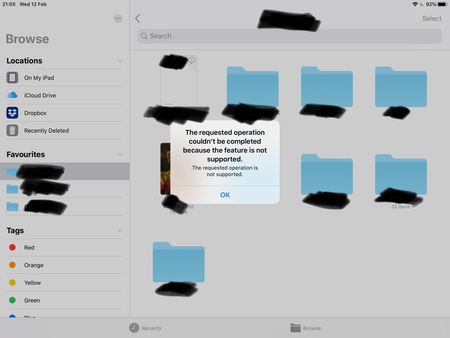
Dragging and dropping error using the stock files app on iPad OS (13 latest) with the latest version of Dropbox installed. Each time I try to drag and drop a file using the files app I'm greeted with an error message: The requested operation couldn't be completed because the feature is not supported. Any ideas to fix it? Or is it just another Dropbox issue that won't ever get addressed like the missing favourites bug? Note, dragging and dropping works flawlessly using Google Drive, One Drive, iCloud etc. I've tried removing and redownloaded Dropbox etc.9.1KViews2likes26Comments