Our Community is in read-only mode until April 8th, learn more here. You can still search existing threads or get help via Dropbox Support, the Dropbox Help Center, or Learn.
Third Party Integrations
9 Topics
Do I need to request production status?
Hey guys, I've built a workflow in N8N that stores files and creates shareable links. If I'm going to share the links with 300-500 people per month, do I need to request production status? Note that most of the people who will receive the link don't have a Dropbox account(If not all of them)Solved
The underlying connection was closed error
Have an integration in C# and has been working fine for a long time till now as nd we get the following error {"The underlying connection was closed: Could not establish trust relationship for the SSL/TLS secure channel."} When doing the following call var full = await client.Users.GetCurrentAccountAsync(); Any help would be appreciated thanks
Team Folder API access in a Standard plan
Forgive me if this information is already available, but I haven't immediately been able to find it. I'm in a scenario where I would like to sync data from a third-party application to team folders in dropbox. My organization is currently operating under a Standard license. I know team folders are a concept in a Standard plan, because I can create them. However, my understanding is that to use the API to send files to them specifically, I need to make use of team folder namespace Ids in my headers. And from what I can tell, there are several API endpoints to retrieve the namespace ID of a given folder, such as team/team_folder/get_info and files/get_metadata. However, while I can hit these endpoints, they do not retrieve any information about folder namepace Ids, and I think what I am now reading is that that information simply isn't available unless you are operating under a Business or Enterprise license. Is this conclusion accurate? Is there a way to retrieve / use team folder namespace Ids under a Standard license, to sync files to specific team folders? If so, how? Thanks in advance for your help, and sorry again if this information is already available and I'm just missing it.
Dropbox download via API unstable under Pyodide (xlwings lite)
I am using the Python dropbox module to download files in pyodide (actually xlwings lite). I see that quite often a file is not downloaded completely, without even raising an error. Is there a workaround or patch or ... ? Uploading files seems to work as expected.Mobile App Integration Just For Displaying Files
Hello, I have files (image, video, pdf, msoffice files etc.) that I need to submit to the approval of more than one customer. Then I want to show the files in the folder in my dropbox account according to the customer who has logged in to a mobile application developed by myself. My customer will only view the files and give approval to some of them. I want to get the name of the files he approves and delete the rest from my account in the folder belonging to the customer. Is there any alternative to connect to my account with oauth2 - refresh token to do all this? If I can only do it with oauth2 and refresh token, can you help me by giving details about it. Thank you.
List all files recursively inside a shared folder using the dropbox node sdk
Hi, trying to list all files recursively inside a folder shared with my account by another account through the Node SDK. The folder is inside Shared -> Folders. Tried the following methods but none of them give me a list of files: sharingListFolders (just returns the folder object) sharingListSharedLinks sharingGetSharedLinkMetadata sharingListReceivedFiles sharingListMountableFolders Is there a method that does what I want?How to configure the domain to the chooser's frame-ancestor
Hi~I used the chooser's iframe embedding (as shown in the code). However, it's not displaying correctly due to frame-ancestor restrictions. How can I add my domain to frame-ancestor? Is this in the app's setting page? It doesn't seem to work. Thanks in advance~ const comp = new Dropbox.Chooser({ appKey: "", onSuccess: () => { }, onCancel: () => { }, linkType: "preview", }) Dropbox.mount(comp, document.getElementById("container"));543Views0likes2Comments
How do I get the share url of a local dropbox file using vb.net
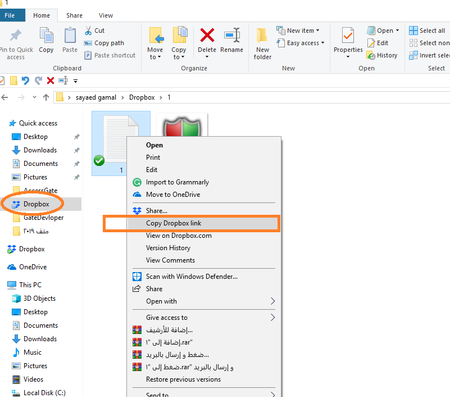
Hello my dear friends I use Dropbox folder by setup Dropbox program in my computer When I have to get a direct link to any file in Dropbox folder just I go to Dropbox folder in my computer and choose that file and right click by mouse and select copy direct link of that file How I do that by vb.net I want to browse for file and select it and get that direct link by vb.net And I am sorry for my bad English2.4KViews0likes6Comments