Our Community is in read-only mode until April 8th, learn more here. You can still search existing threads or get help via Dropbox Support, the Dropbox Help Center, or Learn.
Try something new
25 TopicsThe Dropbox Community is currently being updated
UPDATE: We are aware of the issue with the badge emails resending to everyone, we apologise for the inconvenience - learn more here. Hi everyone, The Dropbox Community team have been busy working on some major updates to the Community itself! So, here is some info on what’s changing, what’s staying the same and what you can expect from the Dropbox Community overall. We are excited to share our side of things, but we want to hear from you, so tell us what you think in the comments below. What’s Changing on the Dropbox Community: These are most of the changes that you may notice in the next few weeks, and there’s more to come, so keep an eye out! What’s under the hood: Essentially, the biggest change here is the platform that the Dropbox Community is built on is getting an upgrade, so a lot of the functionality that you know and love is now part of the site overall. In the past, a lot of those features were customizations, things like the placement of threads, leaderboards, the ideas section and more were essentially hand built by the team. With this upgrade, these features will now be seamlessly integrated, making the platform's code a LOT cleaner and more efficient. The look and feel: As the title implies, we are getting a visual upgrade as well. You can see some samples of that below but overall, the new Community will be cleaner, smoother and easier to navigate. That’s the goal, but of course, let us know if what you’re seeing matches up once we make the changes. Cool New Features to Make the Dropbox Community Even Better: There are some fun new features as part of this update, and while a lot are technical, here are a few you will see pretty easily! Searching by tags: You will be able to search by tags. Pretty self explanatory but a really handy one, you can search by tags so posts that might not have your keyword in the title will still show up when you search. Previously, we’ve had tags and labels but now we are just working with tags so no more doubling up on categories. It’s easier than ever to post: Previously, there were a lot of steps to posting a thread but now it a lot sleeker and simpler. Nested replies are finally here: You can now reply directly to a specific comment - before, comments automatically popped down to the end of the thread, which is not how real conversations happen, but now you can reply directly to a specific comment and the replies are nested under that comment instead of the overall thread. I’ll add an image because it’s so much clearer when you see it, but overall this is a more natural way to chat. Voting from the ideas page: You can now vote for ideas from the menu, without having to click in, so if the title hits hard enough you can vote, and be on your way in no time. Simple! Single page threads: You might have seen that currently our comments on a thread push on to a new page after 10 comments, but now we will have all the comments on one page - so the conversation just keeps going and you don’t get lost. What Hasn’t Changed on the Dropbox Community: The Team Are Still Here to Help: The Dropbox Community team are all still here to help, and while we might be working on a snazzier look and feel, the team are still here and committed to helping you get the answers you need. All of your threads are still here! None of your threads will be lost in the changes here, so there are still a mountain of helpful posts to review, answers to check and conversations to join too. Your Voice Matters: As always, your feedback is invaluable to us. This is your community, and we want it to work for you! So keep sharing your ideas and suggestions—we’re all ears. Why is the Dropbox Community Changing? It was time for a refresh, and the new update means that the upkeep of the website is a LOT less intense - so the load time is quicker, and there should be no code bloat, just a smoother experience for you, and for us. And, to be frank, the old version of the Community website was close to end of life. This new version of the Community also means we can implement new and fun features as they become available. Basically, if the tools work well, we can connect Dropbox Staff and you, our Community members more smoothly, and that means we can be more useful to you. When is This Change Coming? You’ll start seeing the updates within a few weeks. We’re still ironing out a few things, so if you come across any bugs or issues, please let us know right away. Your feedback is key as we fine-tune the new platform. That’s all for now! Stay tuned for more updates, and don’t hesitate to reach out if you have any questions or thoughts. We’re excited about this new chapter and look forward to hearing what you think!27KViews29likes31CommentsHave your say on the Community!
Hello everyone, Here at the Dropbox Community, we are always trying to listen to what you, our Community members, are saying, and we share your feedback with the appropriate teams every week. One area that the Community team would love to hear your feedback on is, well, the Community! We’re always striving to improve the user experience on the Community, and we are looking for new ways to hear from our users. As a result, we’re creating a customer panel of Community users to give their feedback on the Community, and help us develop the Community into the future. Give us your feedback, get a free gift card* If you would be interested in having your say on the Community, please sign up to be a part of our customer panel here. If you’re not interested in signing up for this customer panel, but still want to have your say about the Community, please leave us a comment below. Be as detailed as possible, as we will take every comment on board! Gift cards are available to users who sign up and complete surveys after we contact them. Our mission is to make the work day work better for everyone. And we need your help to get it right! Join our user research panel and help us build a better Dropbox for hundreds of millions of users worldwide. Regards, Emmet *Depending on the study type and length, you may receive a virtual gift card of your choice. If you’d like to be considered for future research studies, please sign up here. You would change the Join our user research panel with something related to just your project people would only get incentives if they have an official session with you.25KViews14likes0Comments
Cut the Clutter: Ignore Files Feature is now live
Update: This feature is now live and available to all individual plan customers! Thank you to all our testers, and share your feedback with the team, we're still eager to hear from you! For years you’ve asked for a simple way to exclude files and folders from sync without using selective sync feature. We’re testing a new way to give you more control over what Dropbox syncs and what it doesn’t. If you’ve ever wanted to keep certain files or folders on your device without syncing them to dropbox.com, this feature is for you. 🤔 What is it? Ignore Files lets you list exclusion rules in a special text file called rules.dropboxignore placed in your Dropbox root folder. Any file or folder that matches a rule will stay on your computer but will not sync to dropbox.com or count against your storage 👀 Who we’re looking for Desktop Dropbox users on Windows, macOS, or Linux People who regularly deal with temporary or bulky content, e.g. Software Engineers Video / audio / 3D creators Anyone who hates seeing clutter in their cloud storage Someone who is comfortable trying a closed beta feature and sharing honest feedback 🗓️ How the closed beta works Here’s what to expect if you join the beta for Ignore Files: Register - Fill out the form here → [Sign-up link] Confirm: Eligible participants will receive an email to confirm their participation, along with the timeline details. Get Set Up - Make sure you have Dropbox app installed on your computer We’ll Enable It - We’ll activate Ignore Files feature for you. Try It Out - Use Dropbox as usual for 1 week, ignoring files and folders as needed. Share Your Thoughts - At the end of the week, we’ll send a quick survey. You can also opt into a 30-minute feedback chat (optional, limited spots available!) ✍️ Want in? Fill out the quick screener here by date → [Sign-up link] Keep an eye on your inbox - we’ll be in touch if you’re selected Thanks so much for helping us improve Dropbox. We’re excited to hear what you think! Got questions? Just drop them in the thread below. 💬5KViews13likes53CommentsLive conference - new products and updates
We love to bring you updates about Dropbox — new products, new ways to use features, and all that. Today, you’ll be hearing directly from the product team, and our own Drew Houston, live. Check out the live video below, and, of course, it will be available to watch after the live event, so let us know what you think! Click below to watch! Whether you’re watching live or later, we want to hear from you - what do you think of these new updates? Let us know in the comments! 7.7KViews11likes6Comments
Introducing Dropbox Dash: The AI-powered universal search tool
Back in the early 2000’s when we still had computer classes and CD-ROMs, it was really easy to find your files, because you maybe had tens, or maybe even hundreds of files and they were pretty small (size wise, not in terms of impact). Now, however, it seems we can’t exist without creating hundreds of files a week, which is great for recording our most important creations, it does make navigating our files a bit of a nightmare, especially when it comes to work. Now we have windows upon windows, tabs upon tabs, saved files, untitled files. With scattered files and folders, search can be a scattered affair too. So, we set out to build a tool that can help you spend less time searching and organizing all your content, and more time efficiently doing your best work. And we think you’re going to like it, because we do. From folders to files, docs to decks, notes to names, Dash knows what you’re looking for better than you do. Because it’s not just AI-powered search, it’s a way to spend less time sorting through tasks and more time on what matters to you. You can keep reading for more details, some customer testimonials and more, but you can also check out this video with none other than our CEO, Drew. Introducing Dropbox Dash: The AI-powered universal search tool for work Dropbox Dash is AI-powered universal search that connects all of your tools, content, and apps in a single search bar. Working with the tools you actually already work with, like Google Workspace, Microsoft Outlook, Salesforce, and more, you can find everything in one place, fast. Overall, you can make search a one step process again. And if universal search isn’t enough, Dash can do more than that too. And it will continue to grow but for now you can look forward to: Start Page: A single dashboard that lets you access Dash universal search, view Stacks, get shortcuts to recent work, and start meetings, making it easier to navigate your day and get back to your most important work. Stacks: Smart collections for your links that offer a quick way to save, organize, and retrieve URLs. In the same way files have folders and songs have playlists, Stacks provide an easily shareable, organizational layer for your cloud content. You don’t have to take my word for it, Craig Smith from the University of New Hampshire put it well when he said: “I can see stacks being very useful especially if I don't have to curate stacks. I want something to just learn my flows and present ways of executing those flows faster.” - And of course, we want to make sure that these things actually work for you, the people who use Dropbox. Why not sign up for the Dropbox Dash beta and get stuck in and tell us all about what you think! 17KViews11likes2Comments
What’s new: Facebook data transfer
Now is the perfect time to back up all your photos and videos, and if you’re anything like me, half of them are on Facebook and nowhere else. Good news, you can now download all of them from Facebook, directly to your Dropbox account. Overview: The Facebook Data Transfer process creates copies of your files and saves them in your Dropbox account. All your photos and videos will still be available on Facebook, and Facebook will only receive permission to add files to the single Dropbox folder that contains the export, so don’t worry about accidentally sharing all your files with your Facebook friends. New photos and videos won’t be automatically added to Dropbox, so each time you back up your Facebook photos and videos, a new folder will be created in your Dropbox account in the Facebook Data Transfer folder. The folder will be named “Photo Transfer” or “Video Transfer”, followed by a number. It’s worth noting that all the photos or videos in your Facebook account will be copied every time you initiate a transfer - so you can probably delete old transfers and save space. Learn more: You can learn all about how to download your Facebook photos and videos here. Audience: This is available on Dropbox Basic, Plus, Family and Professional accounts now. More ideas: We would love to hear what you think of this new feature, so why not comment below. If this has sparked your imagination, why not submit an idea for the next Dropbox feature you’d love to see released? Will you back up your important photos and videos?151KViews11likes1CommentHi! I’m Theresa!
Hello Dropbox Community! I hope you’re all doing great! I’m Theresa and I am super excited to join this awesome Dropbox community. My mission here is to help enhance this warm, welcoming space to a place where everyone feels comfortable to share, ask questions, and connect with each other. Whether you’re new to Dropbox or have been around for a while, your voice matters, and I am here to make sure it gets heard! A little bit about me, I am a huge music lover (always down for new recommendations. Recently, I have been dipping my toes into home recording - just a beginner, and it’s really a work in progress, but I’m having a great time with my little DIY Studio! And let me tell you, Dropbox has been a lifesaver for keeping my projects backed up safely. I’m kinda storing everything in my Dropbox like a digital treasure chest, but I’d love to know how other musicians keep everything neat and tidy whilst in the creative flow! Here’s what you can expect from me: 😀A friendly face: I’ll be here to answer questions, listen to your ideas and engage in conversation, so don’t hesitate to say hello! 🙌 Supportive Vibes: Have a question? Need advice? Want to share something cool about how you use Dropbox? Let’s talk! Remember, no question is too small! 💫 Fun and interactive posts: I’ll be sharing posts about fun ways to use your Dropbox account, to get the most out of your experience, and to hear your thoughts, ideas and experiences. But enough about me, I’d love to get to know YOU! Let’s kick things off - what brought you here to the Dropbox community? Or if you have any burning questions about anything Dropbox, feel free to drop them here ✌️ Looking forward to hearing from you all and sharing all things Dropbox.14KViews8likes6CommentsSeamless end-to-end encryption, Microsoft Co-Authoring, new Dropbox Replay features and more
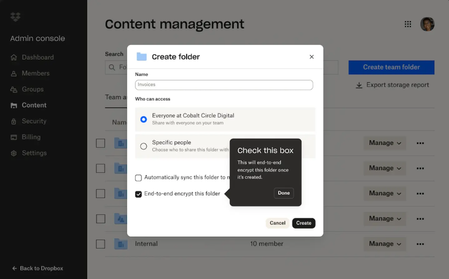
You might have already spoken to some of the team at Dropbox who build Dropbox here on the Community forums, and we are so happy to be able to update you when they have some updates to share! The team have been busy and here are some updates on end-to-end encryption (which we know you’ve been looking forward to), Replay, integrations, Dash and more. Keep reading and don’t forget to let us know what you think! Advanced data protection features add extra layers of security to confidential content with seamless end-to-end encryption and advanced key management If you’ve been using the Dropbox Community for any length of time, you might have seen requests for end-to-end encryption and we have excellent news! It is here! New advanced data protection features from Dropbox provide businesses with sole control over how their data is secured. End-to-end encryption and advanced key management make it easy to protect sensitive and confidential files in Dropbox team folders. This means that no one—including Dropbox—can gain access to their files. Activating end-to-end encryption is as simple as creating a shared team folder and selecting the new encrypted folder option, requiring no technical expertise from the admin or account owner. Files are encrypted when added to the folder and decrypted when a team member is added to the encrypted folder. Only users who have been invited to an encrypted folder can access the files stored within it. Team members quickly get access by invitation to the shared team folder, similar to sharing a regular Dropbox folder. Files are end-to-end encrypted on the team member’s device before they are securely synced with Dropbox servers. No one—including Dropbox—can decrypt the file or access your private key. With advanced key management, teams can set up a unique encryption key as an added layer of security to ensure only members of their organization can access Dropbox files and protect against threats. Keys are automatically rotated every 12 months, and admins can rotate or revoke the key as needed. Dropbox Trust Center also launched today to streamline and accelerate risk assessments of Dropbox products with self-serve, anytime access to our security, reliability, privacy, and compliance information. Prospective and existing customers can streamline internal reviews, audits and risk assessment processes to get value from Dropbox products faster. We know you’ve been asking, so if you want to dive deeper into the security benefits of Dropbox, you can check out https://www.dropbox.com/security. Fast-track video, image, and audio reviews with new features in Dropbox Replay You already know we are Replay’s biggest fans, so if you want to learn more about Replay, we’ve got you too - Replay enables teams to easily share and collaborate on projects from anywhere, including with real-time live reviews and transcriptions—all in one place. With today’s announcement, new functionality helps teams accelerate the feedback process and finish projects faster: Dynamic watermarking: Keep proprietary content protected and prevent unauthorized use by placing watermarks on work shared with collaborators. Watermarks include recipient email, IP address, date, and time of when the file is opened. Added rich media support: Use Replay to review and approve more types of rich media including PDF and PSD files. Custom branding: Configure custom images, banners, logos, and colors within Replay project workspaces. Avid integration: Integration with Avid Pro Tools enables teams to review and approve audio files directly within the Avid platform. For more tips and advice, check out how Calvin uses Dropbox to get feedback here. Find and get to work on content with quick view, quick access, suggested actions, and more on the Dropbox web experience We know, the surface you see when you use Dropbox is very important to you, and now you will see an update to the Dropbox web experience, some small but mighty changes that will improve your day-to-day processes, to help you quickly find what they need and get work done faster. Expect to see changes that include: Dynamic filters that automatically organizes content, for example by project name or theme Quick view to preview files in list layout and smart suggestions related to files being reviewed Favorite files and folders added to an updated left navigation bar for easy access Suggested quick actions for files—such as editing a PDF—that change based on how you work. We know you’ll see these changes, and we want to hear from you about this too, so share your feedback in the comments. Stay organized with new Dropbox integrations with Microsoft 365 and say goodbye to conflicting copies Customers want tools that meet them where they’re working—and it should be seamless to bring the tools they use most into our products. That’s why we recently launched an improved integration with Microsoft Teams that lets you search, preview, upload, and share content stored in Dropbox without leaving Microsoft 365. With this update, you can also use our plugin extension for Copilot for Microsoft 365 to answer questions and generate summaries. Today, we're building on this with even more Microsoft integrations designed to simplify work for teams. Real-Time Co-Authoring (beta): One of Dropbox’s most-requested features ever, Co-Authoring allows multiple team members to collaboratively edit Word, Excel, and PowerPoint files from desktop, web, and mobile, natively within Dropbox. You can also see who’s in the document and where they’re editing in real-time, so everyone is working off the latest version. Now teams can finally put an end to conflicting copies. Dropbox Replay for OneDrive: Bring media files from OneDrive directly into Replay for reviews and approvals. Manage sensitive documents securely and get real-time deal insights with DocSend Advanced Data Rooms DocSend Advanced Data Rooms streamline the entire deal process, from pitching to diligence to signing. Offering the perfect blend of ease, control, and security for deal professionals of all types. DocSend Advanced Data Rooms reduce time spent on administrative tasks and the complexity of your deals, allowing you to focus on closing deals faster. Conduct due diligence with confidence and control: Features like group permissions, visitor verification, and built-in NDAs give you precise control over your most sensitive information. Empower your team with real-time deal insights: Comprehensive data room analytics and page-by-page insights let your team make data-driven decisions. Create and organize your Virtual Data Rooms in minutes: Quickly put your best foot forward with features like data room templates, auto-indexing, and custom branding. With transparent pricing and unlimited data rooms, DocSend is the preferred choice for those seeking a trusted and secure software solution for their deal-making needs. Find what you need instantly across your digital workspace with Dropbox Dash, AI-powered universal search You’ve definitely heard us talking about Dropbox Dash already, but in case you’re new here, Dropbox is building for an AI-first future—not only with Dropbox files, but with everything that makes up the digital workspace. Dropbox Dash (beta) is your AI-powered universal search tool, designed to simplify your workday and give you more time for the work that matters most. Dash instantly searches your connected apps, files and more to find anything across your entire digital workspace in seconds. Ask a question, and Dash can analyze your content to find the answer, summarize key findings from your docs, and much more. Now, Dropbox is improving search and adding new capabilities based on customer feedback: Increased access to Dash: Dash is just a click away on desktop and web. And with an improved Desktop app, it’s easier for customers to find, organize, and share content. Redesigned Start Page: The Start Page, a single dashboard that lets you access universal search, view Stacks—smart, shareable collections of content, and get shortcuts to recent work, offers a new experience that makes it simple to find content, fast. Dash now automatically groups different types of content into Stacks and displays them in a central hub. New connectors: Dash now connects to more than 20 tools and apps customers use for work, including popular new additions like Microsoft OneNote and Zendesk. Dropbox Dash is currently in beta and only available in the U.S. in English. Features will be available on a rolling basis. To learn more, visit https://dash.dropbox.com That was a lot of information in one update, so expect some more updates and tips from us, but if you have anything in particular you’d like to hear from us, tell us!10KViews8likes0Comments
Publish to social media from Dropbox!
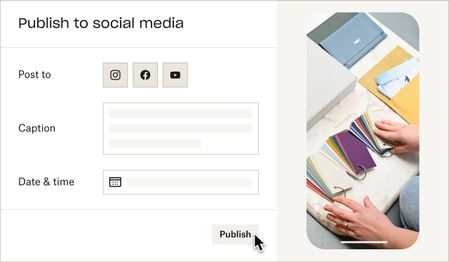
Hello! My name is Amanda. My team is building a feature to help users publish videos to their final destination — whether that’s social media, YouTube, your website, or elsewhere. We hear this task is repetitive and tiresome, and you shouldn’t have to waste time downloading and uploading videos to multiple places. Starting today, you can publish videos and photos directly from Dropbox to Instagram and Facebook**. Simply open a video or photo on www.dropbox.com, and click "Publish". Soon, we’ll let you schedule posts in advance, and post to YouTube. Note: This feature isn’t widely available to all users yet — if you don’t see the Publish button, reply to this thread with “opt-in” and we'll give your account access. 😉 If you’d like to collaborate and help shape the future of this feature, reply with “I’m ok for Dropbox to contact me by email” and we will reach out. **You must have an Instagram Business account and a Facebook Page to publish from Dropbox. See this article for support. ***Update - this feature has been temporarily postponed and there is no longer an "opt-in" option for it. Thank you for your continued patience.***Solved26KViews8likes32Comments
New Scan Improvements for Android
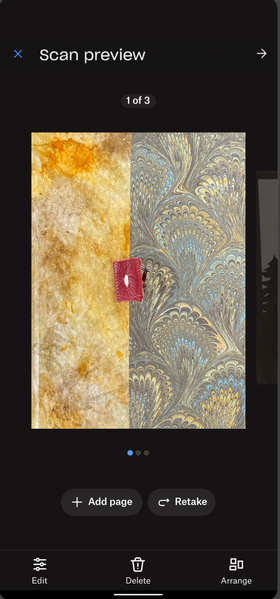
Hi, my name is Amanda and I work on the Mobile app at Dropbox! My team and I just rolled out new improvements to the Scan experience for Android users! With these changes you'll be able to more easily: Scan multiple files Edit scanned files and add color filters Retake scans Check out the new experience and let us know what you think! Any and all feedback is greatly appreciated 🙂5.9KViews6likes2Comments