We're making some changes to the Dropbox Community 👩💻 - Find out more here.
Web
11 Topics
Enable Emoji in file names.
I use emoji’s to help me find things quicker. I would like to add an emoji from the apple keyboard to the file folder name but when I click on rename and add the emoji it says “invalid folder name...the folder name contains invalid characters”. Here is an example I wish to change “Vehicles and DOT” folder to say “🚗Vehicle and DOT”36KViews96likes31Comments
Disable "Suggested from your activity" permanently
Hi there, I absolutely hate the feature "Suggested from your activity". I would like to see a checkbox in settings that allows a user to disable that permanently and have the cleanest possible view of file(lists) and folders. The "Suggested from your activity" feature always shows my family photos or, like today, a preview of my tax form. Whenever I open dropbox in the office to browse my files, all my work colleges can see these previews too. The icon that hides it, is only remembering the setting as long as one does not delete cookies from the browser. At our company, it is policy to delete cookies every day at the end of the day. So this "hiding" setting is pretty useless for me. More over, please make it possible to have a clean, minimalistic UI without all the fluff, super big blue buttons and "easy access" helpers. Some people don't need it. It is distracting and disturbing.28KViews82likes52Comments
Setting a keyboard shortcut for "View on dropbox.com" in the Dropbox Desktop App on PC or Mac
I want to be able to open the currently selected file or folder directly in the web browser on dropbox.com with a single keyboard shortcut — without having to repeatedly open the Dropbox app or right-click and select "View on dropbox.com" every time. If this feature were provided, I think the Dropbox web interface could be used much more easily and conveniently as a file viewer.163Views2likes1Comment
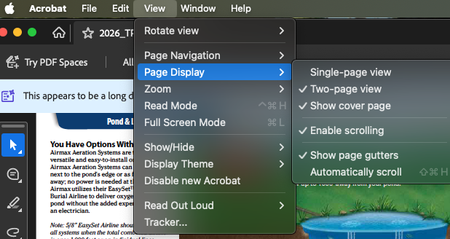
2-page / Book view for PDF's
It would really be great to be able to view PDF's in "Two page view" like on Acrobat. It makes it much easier for clients to review documents intended to be read/viewed in spread format WHILE KEEPING THE ACCURATE PAGE NUMBERS. Yes, as a designer, I can export a document in spread view, but then the page numbers will be off (i.e. the spread of pages 4 and 5 are combined and appear as a single page 3) and can make communicating about the document complicated. To see what functionality I am talking about, please open a multi page document in Acrobat and go to the View --> Page Display options as shown in my included screen shot.155Views3likes1Comment
Please add a "search" functionality in move
Currently, if I want to move a file from "folder1/" to "folder2/very/deep/one/folderWithUniqueName", the fastest way is to go to "folder1/" to download the file, go to dropbox and search "folderWithUniqueName", then upload my file there and delete my file from "folder1/". Using the move action of the file takes much more clicking and choosing, which is especially painful when some of my folders have more than 30 items. It would be much easier if there is a search feature in the move action of a file/folder. You know, "suggested folder" doesn't work very well :)70Views0likes1Comment