We’re Still Here to Help (Even Over the Holidays!) - find out more here.
apple
38 Topics
Is there a way to change the default PDF viewer in the Dropbox App for the iPad?
Is there a way to change the default PDF viewer in the Dropbox App for the iPad? When I click on "Open in" in a PDF, it only shows the option of Adobe, but I use PDF Expert. (In contrast, on my Mac, when I double click on a PDF in my Dropbox folder, it automatically opens in PDF Expert). If I can't change the default PDF viewer to PDF Expert on the iPad, what is the easiest way to open a PDF from Dropbox in PDF Expert? (Of course I already know that I can start IN PDF Expert and open Dropbox files there from Dropbox, which I have linked to it; but this is for when I happen to have begun from the Dropbox iPad app instead.)Solved1.8KViews2likes5Comments
I downloaded my iCloud photos as a .zip file, and need to save the content to Dropbox.
Hi everyone, i want to get my photos and videos off icloud and into dropbox for safe keeping, I downloaded all of my photos etc (in a zip file) but I can not do anything with the file! i tried to cut and paste into my picture file on the computer - no luck windows cant open it. I've no idea how to get the file into dropbox, if anyone can give me a step by step guide so I can turn off Icloud I will be very thankful. Cheers, TinaSolved5.8KViews0likes4Comments
.rtf files now have become .rtfd files and won't open
here is the problem which has just begun recently. I have an iMac and iPad and iPod and now .rtf files now have suddenly changed into .rtfd files and won't open. I think it is only .rtf files which have images embedded. Can't find any help although i discovered if i go through one at a time and RENAME them back to .rtf , it becomesTWO files. Is doing this the only way to get back the textEdit files which used to open without trouble?14KViews1like19CommentsCan I use Mac OS Time Machine alongside Dropbox?
Having levelled up from the free version of Dropbox and using Time Machine alongside for years, and now on a professional plan and being told to ditch Time Machine. This is a potential deal-breaker. Why exactly is it a bad idea to use both together? I find myself stuck here because Dropbox is not a full backup solution, as we are constantly told. So I need to use a full backup solution like TM to back up my system drive - is there another Time Machine like app that I can use that will work alongside Dropbox and is recommended?3KViews1like4Comments
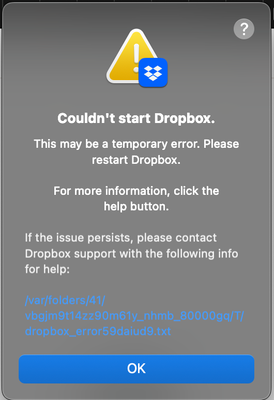
Dropbox won't open on macBook. See error below.
Application Affected - Dropbox app on MacBook Device - MacBook Dropbox App Version (if using the app) - can't open the app to see, but have tried to reinstall Question or Issue Hello! I'm hoping someone can help me. A couple of days ago I started getting an error message that the Dropbox app on my MacBook couldn't open. I hadn't touched it or updated anything, it just appeared. I've tried uninstalling and reinstalling, including following the steps I found on here for an advanced reinstall, but it's giving the same message. Attached are a screenshot of the error message and the code. Any help would be gratefully appreciated! bn.BUILD_KEY: Dropbox bn.VERSION: 238.4.6075 bn.constants.WINDOWS_SHELL_EXT_VERSION: 88 bn.is_frozen: True machine_id: b3e1c381-0678-5d02-8dc8-71d24baa5173 pid: 1386 ppid: 1 uid: 503 user_info: pwd.struct_passwd(pw_name='Kath', pw_passwd='********', pw_uid=503, pw_gid=20, pw_gecos='Katherine Holder', pw_dir='/Users/Kath', pw_shell='/bin/bash') effective_user_info: pwd.struct_passwd(pw_name='Kath', pw_passwd='********', pw_uid=503, pw_gid=20, pw_gecos='Katherine Holder', pw_dir='/Users/Kath', pw_shell='/bin/bash') euid: 503 gid: 20 egid: 20 group_info: grp.struct_group(gr_name='staff', gr_passwd='*', gr_gid=20, gr_mem=['root']) effective_group_info: grp.struct_group(gr_name='staff', gr_passwd='*', gr_gid=20, gr_mem=['root']) DYLD_LIBRARY_PATH: None cwd: '/' real_path='/' mode=0o40755 uid=0 gid=0 parent mode=0o40755 uid=0 gid=0 HOME: '/Users/Kath' appdata: '/Users/Kath/.dropbox/instance1' real_path='/Users/Kath/.dropbox/instance1' mode=0o40700 uid=503 gid=20 parent mode=0o40755 uid=503 gid=20 dropbox_path: None not found parent not found sys_executable: '/Applications/Dropbox.app/Contents/MacOS/Dropbox' real_path='/Applications/Dropbox.app/Contents/MacOS/Dropbox' mode=0o100755 uid=503 gid=20 parent mode=0o40755 uid=503 gid=20 trace.__file__: '/Applications/Dropbox.app/Contents/Resources/python-packages.zip/dropbox/client/ui/common/boot_error.pyc' real_path='/Applications/Dropbox.app/Contents/Resources/python-packages.zip/dropbox/client/ui/common/boot_error.pyc' not found parent not found tempdir: '/var/folders/41/vbgjm9t14zz90m61y_nhmb_80000gq/T' real_path='/private/var/folders/41/vbgjm9t14zz90m61y_nhmb_80000gq/T' mode=0o40700 uid=503 gid=20 parent mode=0o40755 uid=503 gid=20 Traceback (most recent call last): File "desktop/dropbox/client/main.py", line 6835, in _setup_root_for_account File "desktop/dropbox/sync_root/helpers.py", line 199, in create_root_for_account File "desktop/dropbox/foundation/futures/basic.py", line 933, in result dropbox.foundation.futures.basic.IncompleteFutureException: Future not yet completeSolved36Views0likes2CommentsApps create conflicted recursive copies of their contents filling my drive
Application Affected Dropbox Device Various Macs Operating System/Browser (if using the web) macOS Tahoe 26.2 and various Macs on lower versions Dropbox App Version (if using the app) 238.4.6075 Question or Issue For the second time now, I've found a file in a Dropbox folder that recursively keeps adding conflicted copies of itself in the app package. See a sample below of a partial transcript of my deletion attempt in macOS terminal: Amazon Kindle.app/Contents/PlugIns/SendToKindle (David Kaplan's conflicted copy 2025-12-09) (David Kaplan's conflicted copy 2025-12-10) (David Kaplan's conflicted copy 2025-12-15) (David Kaplan's conflicted copy 2025-12-16) (David Kaplan' ( (David Kaplan's conflicted copy 2025-12-19).appex Amazon Kindle.app/Contents/PlugIns/SendToKindle (David Kaplan's conflicted copy 2025-12-07) (David Kaplan's conflicted copy 2025-12-11) (David Kaplan's conflicted copy 2025-12-12 1) (David Kaplan's conflicted copy 2025-12-16 1) (David Ka (David Kaplan's conflicted copy 2025-12-19 15).appex Amazon Kindle.app/Contents/PlugIns/SendToKindle (David Kaplan's conflicted copy 2025-12-07 2) (David Kaplan's conflicted copy 2025-12-08) (David Kaplan's conflicted copy 2025-12-09 1) (David Kaplan's conflicted copy 2025-12-11) (David Kaplan (David Kaplan's conflicted copy 2025-12-13).appex There were hundreds or thousands of these (I have no idea, but I'm getting disk warnings that my drive is getting full). These were consecutive in the terminal session I use to recursively delete the sub programs... Even more interesting the two times this has happened, the files were in a data folder, not in a folder I would use for executing them. Being that this is on Dropbox, I've had to stop syncing on my 6 Macs, delete the files before I can turn syncing on again. At the moment a deletion attempt is still running after deleting over 165,000 items in that file. When this file creation happens it really slows down my computer. Also stranger, is that I don't have a "Amazon Kindle.app" in my Applications folder. I use a "Kindle.app" The first time this happened it was with a completely different program, not Kindle. What more info can I provide?24Views0likes1Comment
I switched to an annual Plus plan, but I'm still back on Basic. How is this possible?
Recently switched to Plus Annual, but something messed up, and now I am back on Basic, but with Annual fee gone. I was on Plus, paying monthly. Switched to Annual, but now get the Unable to upgrade message. I never logged into the Dropbox with another account. Paid via apple store. Billing Management page is empty now. I have Order ID, Receipt and screenshots from apple device, ready to share privately. Would like to keep the Plus subscription. Please assist.51Views0likes3CommentsThe Files app in my iPad won't sync/update my files
Integration Affected Files Device iPad Pro 2nd gen. Operating System/Browser (if using the web) iPadOS 18.7.3 Dropbox App Version (if using the app) 454.2 Question or Issue The files app doesn't show new folders/files added to Dropbox in the last few months. After reinstalling the Dropbox app, all content is up to date in the dropbox app, but the files app shows syncing paused for folders with newer content and doesn't show the newer content.39Views0likes2Comments
The Dropbox desktop app version 194.4.6267 does not run anymore on Mac OS Mojave
I've been using Dropbox on different MacOS machine for many years (iMac and MacBook Air). One iMac (Sequoia OS) and one MacBook Air(Mojave OS) both run fine with dropbox version 237.4.5655 perfectly (desktop application launch, syncing...). Another iMac (Mojave OS) has also been running fine for years with dropbox version 194.4.6267 but suddenly will not launch the application since a few days now. What can be done so version runs again ? Thank you in advance for your timeSolved114Views0likes3Comments