We’re Still Here to Help (Even Over the Holidays!) - find out more here.
share
2608 Topics
How to allow others to view and download from a folder in my Dropbox folder?
Hi, I am having trouble reading the Dropbox Help Center with its low-contrast theme, so I am asking here. I am running Linux Mint 17.3 64-bit and using MATE Desktop. I am running the very latest Firefox browser, 60.0.1, 64-bit. My Dropbox installation is designed for the Gnome desktop. Therefore I don't see all the integration I am used to back when I ran Windoze. I can edit on dropbox.com and see changes in my Dropbox. I can drop something in my Dropbox and see it on the website. Using the website tools, I can send someone an invitation from the website to share a file to be viewed and downloaded. (Or edited too if I want.) I saw today where I could copy links to my clipboard and paste them to my own email instead of using the canned invitation. Not sure where I saw that. I write a column for a club newsletter and it includes big photo files not suitable to be attached and emailed. My question is, is it possible to link a folder and if so, how do I go about it?Solved10KViews0likes7Comments
"View only" link says "Join Folder", "Copy to Dropbox", "Download". I don't want "Join Folder"
I create printables I share on Etsy, and because the files are so large, I send a dropbox folder link. It USED to be that the page the link went to would have the choices at top Copy to Dropbox and Download ONLY. Now every link has Join Folder, Copy to Dropbox, and Download. I keep getting email requests to join the folder, which is really annoying. I just want someone to be able to download the files, and that's it. I cannot figure out for the life of me how to make the Join Folder go away! I've tried everything I can think of and nothing changes. I'm going crazy.Solved19KViews8likes78CommentsHow do I find a folder shared with me by a link on Dropbox?
Someone shared a folder with me and sent me a link. Some time later I went back to my dropbox account but I don't see the folder they shared with me. Do I have to memorize the link so I can get to folders that were shared with me? I assume I would see it right on my dropbox page, and if I'm not mistaked there used to be a "folders shared with you" section. It's not too useful if I have to keep track of links for shared folders. I'm sure this has been answered a million times already, but I couldn't find it.Solved36KViews0likes3Comments
Creating shortcuts within a Dropbox folder without .ink files
Dear Community, I am working with several other people in a share Dropbox folder, which contains several subfolders. Now I wanted to create a shortcut from one subfolder to another subfolder within this Dropbox (everybody has access to every folder) to save space - is this possible without .ink-files appearing in the shortcut? Best, SusannaSolved26KViews3likes11Comments
I sent a shared link to someone, but they can't download the file to their device.
I was able to email a link to one of my Dropbox folders to someone who is not on Dropbox. They can view the files in the folder (in their web browser). However, there doesn't appear to be any option to download a file to their computer (for example, PDF or MP4 file). How do they do this? Thanks, JordanSolved15KViews0likes5Comments
Dropbox right click menu missing (Mac OS). App says it's up-to-date.
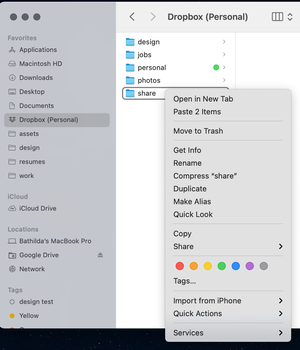
Hello, Thought I would reach out to you directly with a problem that I don't see the specific solution to. My right click menu suddenly disappeared today while working on files in a Dropbox folder. The Dropbox folder is a personal account. The files are syncing correctly (I see it on web version as well). Notifications indicate they are synced. However, there are no icons to indicate they are synced or the right click menu option. I've shared three screenshots--(1) one from within a Dropbox folder with right click selected (and available options), (2) my Dropbox app menu showing that all items are synced and they are confirmed via Dropbox web and (3) showing that all folders are set to sync (which they are). I have restarted my computer already. Still an issue.13KViews1like38CommentsCan't share files as I'm getting an error that my sharing activity was interrupted
"Couldn’t complete share We’ve interrupted your sharing activity. For details or to contact support, read our help center article." There is no other explanation given. Can you help me with this?13Views0likes1Comment
When does a shared link expire?
Hello, I would like to share particular files by putting a link on a website. The files need to be available for public download for a particular length of time (in this case about 15 days). When links are posted for a shared file or folder, can anyone advise how long that link is available for? I am currently using the free version of dropbox but can consider upgrading as it is for a business purpose if that enables the link to be available for a time period that suits my requirements. Thank you.Solved13KViews0likes9Comments