We're making some changes to the Dropbox Community 👩💻 - Find out more here.
Forum Discussion

rahulj1
2 years agoExplorer | Level 4
Access Shared Folder with API
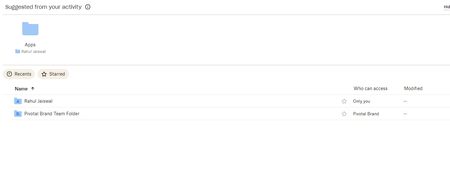
Hi Team, can any one please help me to get access in shared folder to extract the meta data like subfolder size and file count. I was unable to locate the shared folder through api always it say...

rahulj1
2 years agoExplorer | Level 4
While I am trying with Root path, I am getting below error
BadInputError('8b261218809945cb828cd56a177f8df2', 'Error in call to API function "users/get_current_account": This API function operates on a single Dropbox account, but the OAuth 2 access token you provided is for an entire Dropbox Business team. Since your API app key has team member file access permissions, you can operate on a team member\'s Dropbox by providing the "Dropbox-API-Select-User" HTTP header or "select_user" URL parameter to specify the exact user <https://www.dropbox.com/developers/documentation/http/teams>.')

DB-Des Dropbox Community Moderator
2 years agoDropbox Community ModeratorHi rahulj1
You are still trying to call a user endpoint using a team token, that's why you are receiving errors.
The following code snippet should help you get the information you are looking for:
import dropbox

dbx = dropbox.DropboxTeam("ACCESS_TOKEN").as_user("TEAM_MEMBER_ID")

root_namespace_id = dbx.users_get_current_account().root_info.root_namespace_id

path = ""
print(dbx.with_path_root(dropbox.common.PathRoot.root(root_namespace_id)).files_list_folder(path))
In the above code, you can use the team token you have used previously, and call the .as_user() method with the team_member_id, to retrieve the data.
- rahulj12 years agoExplorer | Level 4
Hi Deb,
Thanks for some how it works with user ID of team member, but I don't know how I can utilize the output to get folder size and file count
ListFolderResult(cursor='AAEy9LSRRFtili8gf8rcZ29hN4PQliBGohGDpBAbKUyJeRJ65mH93FzWh0YFgxfN214N0YM2V7m3lxP_hIQLEepf-Fyqao9Cncw5Hzi-0zCnVhS1-HyQnFVtim3RFt1eWuc9T9DniZ0idfexWLym-8G77lbzL0dVLD0AYg_zkW_cNcFOJ4gEun-DRkNbAcFHBtmjq1IrflOpNKDkrEoGTZXP3eQLgY2AqU1kep_okDhwS1cmNQdMPdT1wG51Et08dqIUtJSt_aXEXC8Ydc77mMdR', entries=[FolderMetadata(id='id:WKNO8Vu_-TsAAAAAAAAAEw', name='Pivotal Brand Team Folder', parent_shared_folder_id='3494645729', path_display='/Pivotal Brand Team Folder', path_lower='/pivotal brand team folder', preview_url=NOT_SET, property_groups=NOT_SET, shared_folder_id='1143758326', sharing_info=FolderSharingInfo(no_access=False, parent_shared_folder_id='3494645729', read_only=False, shared_folder_id='1143758326', traverse_only=False)), FolderMetadata(id='id:WKNO8Vu_-TsAAAAAAAAAJg', name='Rahul Jaiswal', parent_shared_folder_id='3494645729', path_display='/Rahul Jaiswal', path_lower='/rahul jaiswal', preview_url=NOT_SET, property_groups=NOT_SET, shared_folder_id=NOT_SET, sharing_info=FolderSharingInfo(no_access=False, parent_shared_folder_id='3494645729', read_only=False, shared_folder_id=NOT_SET, traverse_only=False))], has_more=False)
- DB-Des2 years ago
files_list_folderandfiles_list_folder_continuereturn the size of files only, not the size of the folder. You could list all of the contents of a folder usingfiles_list_folderandfiles_list_folder_continueand then add up the files and file sizes, for all of the files in the folder, to get a file count and size, respectively.- rahulj12 years agoExplorer | Level 4
Hi,
Thanks for your response.
Could you please provide sample code snippet to extract size and count from a team folder?
About Dropbox API Support and Feedback

Get help with the Dropbox API from fellow developers and experts.
The Dropbox Community team is active from Monday to Friday. We try to respond to you as soon as we can, usually within 2 hours.
If you need more help you can view your support options (expected response time for an email or ticket is 24 hours), or contact us on X, Facebook or Instagram.
For more info on available support options for your Dropbox plan, see this article.
If you found the answer to your question in this Community thread, please 'like' the post to say thanks and to let us know it was useful!


